
YouTube Hide Control On Pause
Hides YouTube controls and gradient overlay when paused; shows them only on hover — same as during playback.
As of June 2026, YouTube Hide Control On Pause has 80 users and a 5.00/5 rating from 7 reviews in the Functionality & UI category.
Usersup 5.3 percent+5.3%
80
80
Ratingno change0%
5.00
7 reviews
Reviewsno change0%
7
Version
1.1.0
Manifest V3
History
5 snapshotsTracking since Apr 19, 2026.
View as table
| Date | Users | Rating | Reviews | Version |
|---|---|---|---|---|
| Apr 19, 2026 | 76 | 5.00 | 7 | 1.1.0 |
| May 4, 2026 | 79 | 5.00 | 7 | 1.1.0 |
| May 13, 2026 | 80 | 5.00 | 7 | 1.1.0 |
| May 25, 2026 | 118 | 5.00 | 7 | 1.1.0 |
| Jun 6, 2026 | 79 | 5.00 | 7 | 1.1.0 |
| Now | 80 | 5.00 | 7 | 1.1.0 |
Permissions & access
- Permissions
- None declared
- Host access
- None declared
Screenshots

About
WHAT IT DOES
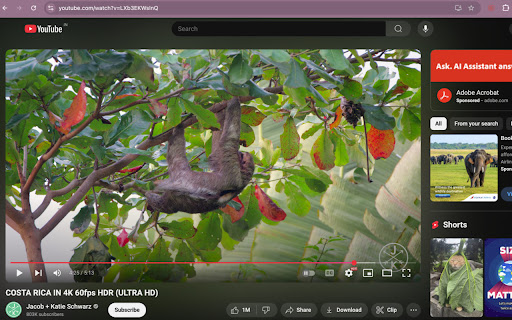
This plugin hides the YouTube player's control and the dark gradient overlay when the video is paused and makes them appear only on mouse hover — just as they do during playback.

No settings to waste time around and no hotkey to remember. Simply install and forget about it.

WHY IT EXISTS
When you are watching a tutorial on YouTube, sometimes you want to pause the video, take a quick screenshot, and keep it in your note-taking app. But the control and the dark gradient overlay are not letting you take a clean screenshot. 😤 😢

When you are watching something beautiful on Youtube, sometimes you want to pause the video and admire what you are seeing. But the control and the dark gradient overlay are obscuring the beauty you want to admire. 😞 😢

Say goodbye to that frustration! This plugin will hide that obtrusive control and the dark gradient overlay during pause - just like it is during playback. 😊 ✨

NOTE
- Works only on YouTube video pages.
- No options or permissions required.

HANDY TIP
For pause in fullscreen video playback, move the cursor to the extreme bottom-left corner to immediately hide the video player's control.
Technical
- Version
- 1.1.0
- Manifest
- V3
- Size
- 23.36KiB
- Min Chrome
- 88
- Languages
- 1
- Featured
- No
Metadata
- ID
- nejdjhopiicjapojmbmdecmebcaaocnb
- Developer ID
- u7084d1696d799eec3ca6c225ab3616fd
- Developer Email
- [email protected]
- Created
- May 25, 2025
- Last Updated (Store)
- Oct 21, 2025
- Last Scraped
- Jun 6, 2026
- Website
- —
- Privacy Policy
- —
Similar extensions
Alternatives to YouTube Hide Control On Pause, ranked by description similarity.

hyde — hide the YouTube video player controls
Press Ctrl+M to hide or show the YouTube video player controls.
90.0K
★ 4.2

HideTube
Clean up your YouTube experience by toggling player UI elements on demand.
11
★ 5.0

YouTube Previews On Long Click
Play YouTube video previews on long click instead of hover.
792
★ 3.9

Just the player
Automatically hides everything except the video. Just mouse over to reveal again.
—

EnhanceTube: Sound, Themes & Bookmarks
Enhance YouTube: Picture-in-Picture, Smart Mini Player, Shorts Blocker, Volume Booster, Bookmarks, and Customization.
10

Hide YouTube Player Controls for Videos & Shorts
Hide overlaying elements on YouTube and Shorts players (scrollbar, buttons, gradients, titles, etc.) with a single shortcut.
218
★ 5.0

YouTube Audiophile
A Chrome extension to hide video and thumbnails while playing only the audio on YouTube
5

YouTube Enhancer
Enhance your YouTube experience with bookmarks, transcripts, and speed control.
4
Data sourced from the Chrome Web Store · last verified Jun 6, 2026.