
Prime Video SubStyler: customize subtitles
Extension to customize captions and subtitles on Prime Video. Change text size, font, color and add background.
As of June 2026, Prime Video SubStyler: customize subtitles has 595 users and a 4.50/5 rating from 2 reviews in the fun category.
Usersup 15.3 percent+15.3%
595
595
Ratingno change0%
4.50
2 reviews
Reviewsno change0%
2
Version
1.0.10
Manifest V3
History
10 snapshotsTracking since Apr 1, 2026.
View as table
| Date | Users | Rating | Reviews | Version |
|---|---|---|---|---|
| Apr 1, 2026 | 516 | 4.50 | 2 | 1.0.10 |
| Apr 10, 2026 | 528 | 4.50 | 2 | 1.0.10 |
| Apr 20, 2026 | 517 | 4.50 | 2 | 1.0.10 |
| Apr 25, 2026 | 533 | 4.50 | 2 | 1.0.10 |
| Apr 30, 2026 | 540 | 4.50 | 2 | 1.0.10 |
| May 5, 2026 | 552 | 4.50 | 2 | 1.0.10 |
| May 10, 2026 | 544 | 4.50 | 2 | 1.0.10 |
| May 18, 2026 | 541 | 4.50 | 2 | 1.0.10 |
| May 27, 2026 | 553 | 4.50 | 2 | 1.0.10 |
| Jun 5, 2026 | 576 | 4.50 | 2 | 1.0.10 |
| Now | 595 | 4.50 | 2 | 1.0.10 |
Permissions & access
- Permissions
- storage
- Host access
- *://*.primevideo.com/*, *://*.amazon.com/*, *://*.amazon.co.uk/*, *://*.amazon.de/*, *://*.amazon.co.jp/*
Screenshots
About
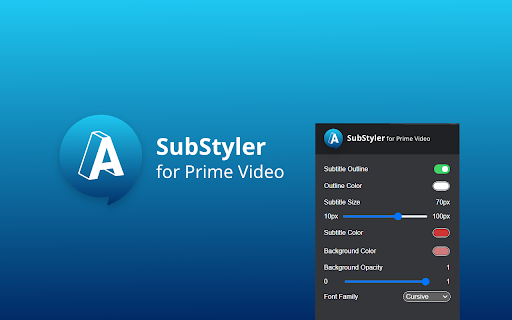
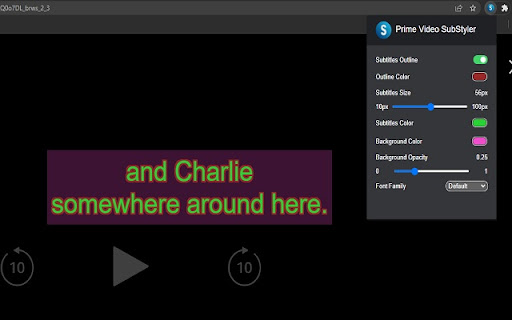
Wake up your inner artist and express your creativity by customizing PrimeVideo subtitle style.
Even though you usually don’t use movie captions, you may consider starting after checking out all the settings this extension has to offer.

Now you’re able to:

- Choose custom text color,
- Adjust text size,
- Add text outline and choose its color,
- Add text background, choose its color and adjust the opacity
- Choose font family

Feeling artistic? Here’s another bonus: all the colors can be chosen either from a built-in color picker or by entering RGB value, creating almost endless style possibilities. Take the subtitle customization to the next level with Prime Video SubStyler and let your imagination run wild!!

Too many options? Worry not! Check out some basic settings, such as text size and background.

All you need to do is add Prime Video SubStyler extension to your browser, manage available options in the control panel and adjust subtitles to your own preferences. It’s as simple as that!

Disclaimer : Prime Video is a trademark of Amazon.com, Inc.. This website & extension hold no association or affiliation with Amazon Prime Video or any third-party companies.
Technical
- Version
- 1.0.10
- Manifest
- V3
- Size
- 55.22KiB
- Min Chrome
- 88
- Languages
- 55
- Featured
- Yes
Metadata
- ID
- nefaieamogpbokobidmgceonnjbakgof
- Developer ID
- u39636fb7379d9b5dae4d4bedfec462d1
- Developer Email
- [email protected]
- Created
- Feb 19, 2022
- Last Updated (Store)
- Feb 5, 2026
- Last Scraped
- Jun 5, 2026
- Website
- —
- Privacy Policy
- https://bestchromextensions.com/privacy_policy/
Similar extensions
Alternatives to Prime Video SubStyler: customize subtitles, ranked by description similarity.

PeacockTV SubStyler: customize subtitles
Extension to customize captions and subtitles on Peacock TV. Change text size, font, color and add background.
110
★ 3.0
Rakuten TV SubStyler: customize subtitles
Extension to customize captions and subtitles on Rakuten TV. Change text size, font, color, and add background.
62

Viaplay SubStyler: Customize subtitles
Extension to customize captions and subtitles on Viaplay. Change text size, font, color and add background.
26
Netflix SubStyler: Customize subtitles
Extension to customize captions and subtitles on Netflix. Change text size, font, color, and add background.
1.0K
★ 3.6
Hulu SubStyler: Customize subtitles
Extension to customize captions and subtitles on Hulu. Change text size, font, color, and add background.
261
★ 5.0

Apple TV SubStyler: Customize subtitles [QVI]
Extension to customize captions and subtitles on Apple TV. Change text size, font, color, and add background.
1.0K
★ 4.1

HBO Max SubStyler: Customize subtitles [QVI]
Extension to customize captions and subtitles on HBO Max. Change text size, font, color, and add background.
824
★ 5.0

Customized subtitles, works with Disney Plus
Independent software - not affiliated with Disney. Change Disney+ subtitle fonts, colors, sizes, outlines and backgrounds.
1.0K
★ 4.0
Data sourced from the Chrome Web Store · last verified Jun 5, 2026.