
SnapAura
Create stunning viral screenshots with gradient backgrounds and animations.
As of June 2026, SnapAura has 11 users and a 5.00/5 rating from 1 reviews in the Productivity category.
Usersup 22.2 percent+22.2%
11
11
Ratingno change0%
5.00
1 reviews
Reviewsno change0%
1
Version
2.2.0
Manifest V3
History
4 snapshotsTracking since Apr 19, 2026.
View as table
| Date | Users | Rating | Reviews | Version |
|---|---|---|---|---|
| Apr 19, 2026 | 9 | 5.00 | 1 | 2.2.0 |
| May 4, 2026 | 9 | 5.00 | 1 | 2.2.0 |
| May 13, 2026 | 8 | 5.00 | 1 | 2.2.0 |
| May 26, 2026 | 9 | 5.00 | 1 | 2.2.0 |
| Now | 11 | 5.00 | 1 | 2.2.0 |
Permissions & access
- Permissions
- activeTabscriptingtabsstorage
- Host access
- None declared
Screenshots


About
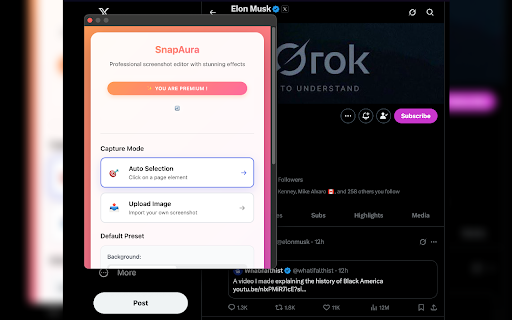
🌟 Make Your Screenshots Stand Out ! Turn plain screenshots into stunning, viral visuals. You can capture web page elements or upload images, then enhance them.

✨ Why SnapAura? Because the main features are FREE forever, and you'll never have an ugly watermark !

Free Features :
  ✅ Upload screenshot or auto selected element
  ✅ 9 gradient backgrounds
  ✅ Background Padding
  ✅ Borders & shadows
  ✅ PNG export
  ✅ PNG with transparent background export (perfect for presentations)

⚡ Fast & Easy
   1. Click the SnapAura icon in Chrome
   2. Capture the page or element you want
   3. Customize with background styles, animation, overlays & effects
   4. Export instantly —> ready to share!

💎 Premium (One-time $3.99) : unlock the full power of SnapAura:
  ⇢ 6x pastel background
  ⇢ 6x glassy background
  ⇢ 6x animated background
  ⇢ Artistic patterns (dots, waves, hexagons, etc.)
  ⇢ Advanced animations (shake, pulse, confetti, fade in) & GIF EXPORT
  ⇢ Premium effects for truly standout visuals

🫡 Last Update :
  ✦ 9 gradient backgrounds now FREE (was premium-only)
  ✦ Transparent PNG export - keep edits but remove backgrounds
  ✦ Added pulse animation - smooth, centered scaling
  ✦ Improved UI - cleaner button design & better contrast

👉 Whether for presentations, social media, tutorials, or portfolios, SnapAura is the
   easiest way to transform plain screenshots into beautiful, professional content.

Download SnapAura today and give your screenshots the glow they deserve !
Technical
- Version
- 2.2.0
- Manifest
- V3
- Size
- 1.1MiB
- Min Chrome
- 88
- Languages
- 1
- Featured
- No
Metadata
- ID
- neebbdkppmndfeipcnbhhijlclloekdd
- Developer ID
- u65e64b56a481e0a7d1390df0c3587808
- Developer Email
- [email protected]
- Created
- Aug 20, 2025
- Last Updated (Store)
- Aug 29, 2025
- Last Scraped
- Jun 7, 2026
- Website
- —
- Support URL
- —
- Privacy Policy
- https://snapaura-index.vercel.app/privacy-policy.html
Similar extensions
Alternatives to SnapAura, ranked by description similarity.

Zenshotz - Capture & Beautify
Capture any webpage screenshot and beautify it with Zenshotz. 1-click to professional mockups.
45
★ 5.0

UI Capture - Screenshot & UI Video Recorder
Capture beautiful screenshots and short UI videos from any website. Turn any UI into polished PNGs and MP4s in seconds.
33
★ 5.0

ScreenClean — Beautiful Screenshot Enhancer
Transform screenshots into beautiful, presentation-ready images. Add backgrounds, shadows, and device frames in one click.
—

Snapmark - Screenshot & Annotate
Capture screenshots and annotate with arrows, text, shapes, and highlights. Perfect for tutorials, bug reports, and documentation.
1

PrettyScreen
Capture screenshots with beautiful backgrounds
16

Captio
Capture page elements and compose stunning visuals with backgrounds, text, 3D transforms, templates, and high-quality export.
20

Snapshot - Screenshot & Annotate
Capture, annotate and beautify screenshots with area selection, full page capture, annotations, browser frames and more.
54
★ 5.0

SnapPulse
Transform your images instantly with SnapPulse - the sleek, powerful, and user-friendly photo editor right in your browser!
8
★ 5.0
Data sourced from the Chrome Web Store · last verified Jun 7, 2026.