
No-Tabs-Auto-Discard
Disable auto-discard of all tabs or for tabs with specific domains
As of May 2026, No-Tabs-Auto-Discard has 7,000 users and a 3.67/5 rating from 6 reviews in the Developer Tools category.
Usersno change0%
7.0K
7,000
Ratingno change0%
3.67
6 reviews
Reviewsno change0%
6
Version
1.0.4
Manifest V3
Permissions & access
- Permissions
- tabsstorageidlealarms
- Host access
- None declared
Screenshots



About
Not all domains or web applications benefit from Chrome's tabs auto-discarding feature, in an enterprise context many of those are state-rich, always connected mission critical applications (e.g. CTI applications, monitoring applications, etc.) which can be negatively impacted by such Chrome feature.

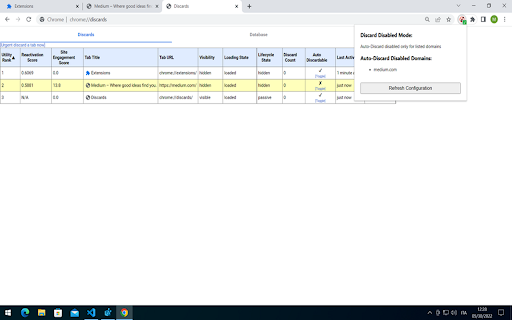
This extension has been developed to deal with Chrome tabs auto-discarding feature by providing a way to configure its behaviour over the tabs of a Chrome instance.

The extension monitors your tabs and can be configured to:

	- turn off the extension (Chrome default behaviour)
	- disable auto-discarding on all tabs (already opened and new tabs)
	- disable auto-discard for specific domains (already opened and new tabs)

The extension's configuration can be provided in two ways (in order of precedence):

	- by Chrome Policies (for enterprise Administrator/Users distributed via Windows Group Policy)
	- by local configuration file

Configuration Parameters
------------------------------------

This extension can be configured with this two parameters :

- DiscardDisabledMode

	This mandatory parameter controls the extension behaviour:

	  - EXTENSION_DISABLED
		Disable the extension

	  - DISABLE_FOR_ALL_TABS (default extension mode)
		Disable auto-discard for all tabs

	  - DISABLE_ONLY_FOR_DOMAINS
		Disable auto-discard for specific domains (FQDN, e.g. medium.com, www.google.com)

- DiscardDisabledDomains

	This optional parameter is specific for DiscardDisabledMode=DISABLE_ONLY_FOR_DOMAINS and contains the list of domains for which to disable auto-discarding:

	- e.g. [ "medium.com", "www.google.com"]

	If DiscardDisabledMode=DISABLE_ONLY_FOR_DOMAINS but the list is empty, the extension will behave like DiscardDisabledMode=DISABLE_FOR_ALL_TABS

Configuration Providers
------------------------------------

- Chrome Policies (for enterprise Administrator/Users distributed via Windows Group Policy)

	The extension configuration can be provided machine-wide or for specific users by applying enterprise policies or GPO to the device registry under the following keys:

	- Machine-Wide
      HKEY_LOCAL_MACHINE\SOFTWARE\Policies\Google\Chrome\3rdparty\extensions\ndpjhokgnpdcldkklhhklkgabnjehfap\policy

	- Specific User
      HKEY_CURRENT_USER\SOFTWARE\Policies\Google\Chrome\3rdparty\extensions\ndpjhokgnpdcldkklhhklkgabnjehfap\policy

  Depending on your choice, under the key create the two configuration parameters:

    - DiscardDisabledMode (string/REG_SZ)
    - DiscardDisabledDomains (string/REG_SZ)

  IMPORTANT!!! Chrome Policies have precedence over the local configuration file.

- Local configuration file

	The extension can be also configured by its local configuration file (config.json), located under the extension's installation folder (e.g. on Windows) :

  - C:\Users\<current user>\AppData\Local\Google\Chrome\User Data\Default\Extensions\ndpjhokgnpdcldkklhhklkgabnjehfap\<extension version>\config.json

  The configuration file has this structure (the json below shows the default configuration) :

    {
      "DiscardDisabledMode":"DISABLE_FOR_ALL_TABS",
      "DiscardDisabledDomains":[]
    }

- Configuration Refresh
----------------------------------

The extension's configuration is refreshed:

	- manually
		- by clicking the "Refresh Configuration" button on the extension popup

	- automatically by the extension:
		- when Chrome starts up
		- every 60 minutes
		- when the device is locked or screensaver is active for more than 2 minutes
Technical
- Version
- 1.0.4
- Manifest
- V3
- Size
- 35.28KiB
- Min Chrome
- 88
- Languages
- 2
- Featured
- No
Metadata
- ID
- ndpjhokgnpdcldkklhhklkgabnjehfap
- Developer ID
- u04ffba0e48c25c9b06531e908cfca943
- Developer Email
- [email protected]
- Created
- May 23, 2022
- Last Updated (Store)
- Jun 1, 2022
- Last Scraped
- May 26, 2026
- Website
- —
- Support URL
- —
- Privacy Policy
- —
Similar extensions
Alternatives to No-Tabs-Auto-Discard, ranked by description similarity.

Tab Discarder
Manually discard any inactive tab by title
5
★ 5.0

Sticky Fullscreen
Maintains fullscreen mode for specific domains across redirects.
12

EXT Shed (Auto Turn OFF/ON Extensions Manager)
Turn OFF/ON Extensions on specified sites to improve performance. Extensions Management Schedule with day-specific timings.
13
★ 5.0

Self-Destructing Cookies
Delete cookies when browser is closed or once the tab is closed to prevent tracking
4.0K
★ 3.7

Feature Flags Devtools
Manage and toggle feature flags from Chrome DevTools in real time.
50
★ 5.0

Disable Cookies
Disable cookies on current site
20.0K
★ 3.9

Tab Switcher with Azure Workbook Refresher
A Chrome extension to automatically switch tabs and refresh Azure portal workbooks.
3

The Duplicator
Duplicate tabs with custom URL parameters, shortcuts, and export/import for a streamlined workflow.
125
★ 3.8
Data sourced from the Chrome Web Store · last verified May 26, 2026.