
WebClip: Pages & AI chats to your notes
Clip any web page or AI chat to clean Markdown. Edit it, then sync to Notion, Obsidian, Typora or local files. 100% local.
As of June 2026, WebClip: Pages & AI chats to your notes has 11 users in the Productivity category.
Usersno change0%
11
11
Ratingno change0%
—
— reviews
Reviewsno change0%
—
Version
2.1.6
Manifest V3
90-day change · In the last 90 days this extension 2 version updates.
History
8 snapshotsTracking since Apr 4, 2026.
View as table
| Date | Users | Rating | Reviews | Version |
|---|---|---|---|---|
| Apr 4, 2026 | — | — | — | 2.1.3 |
| Apr 18, 2026 | — | — | — | 2.1.3 |
| May 9, 2026 | 7 | — | — | 2.1.5 |
| May 13, 2026 | 6 | — | — | 2.1.5 |
| May 19, 2026 | 8 | — | — | 2.1.5 |
| May 26, 2026 | 11 | — | — | 2.1.5 |
| Jun 2, 2026 | 9 | — | — | 2.1.5 |
| Jun 8, 2026 | 10 | — | — | 2.1.6 |
| Now | 11 | — | — | 2.1.6 |
Changelog
- Jun 2, 2026short_description
Clip any webpage to Markdown. Articles, docs & AI chats. Themes, TOC nav, search & highlight. Sync to cloud notes.
Clip any web page or AI chat to clean Markdown. Edit it, then sync to Notion, Obsidian, Typora or local files. 100% local.
- Jun 2, 2026name
WebClip: Smart Markdown Clipper & Cloud Sync
WebClip: Pages & AI chats to your notes
Permissions & access
- Permissions
- activeTabstoragesidePanelscripting
- Host access
- <all_urls>
Screenshots


About
WebClip is an intelligent web content clipper designed for knowledge builders, developers, and learners. Unlike traditional tools that require page redirects, WebClip features an innovative sidebar workflow that lets you complete the entire process from extraction to editing to saving without leaving the current webpage.

✨ Five Core Differentiators

🧠 Smart Text Extraction — Say Goodbye to Manual Copying
• AI-powered algorithm precisely identifies main content, auto-filters ads, recommendations, comments, tags
• Deeply optimized code block extraction, perfectly preserving syntax highlighting and language types
• Supports 30+ mainstream tech communities and developer platforms
• Supports major AI conversation platforms

🎨 Highly Customizable — Build Your Personal Reader
• 4 beautiful themes: Light, GitHub, Sepia, Dark—adapt to different scenarios
• 3 font families + adjustable size/line height, eye-friendly comfortable reading
• Custom Front Matter templates for automated metadata management

🖥️ Sidebar Workflow — Uninterrupted Reading Experience
• No new tab needed—complete all operations in the current page's sidebar
• Real-time editing, instant preview, one-click export—seamless workflow
• Maintain original context for easy reference and comparison

⚡ Quick Navigation — Long Article Reading Made Easy
• Auto-generated table of contents with chapter quick-jump support
• Full-text search with highlighted positioning, find key content in seconds
• Collapsible/expandable TOC, focus on your current reading section

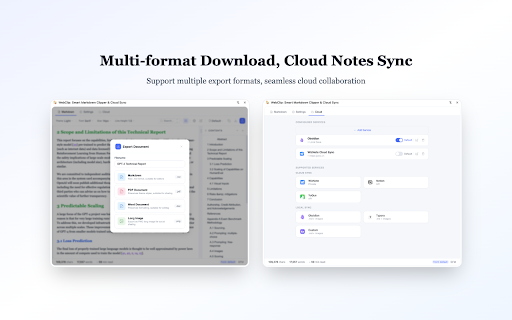
📤 Multiple Export Options — Flexible Workflow Adaptation
• Clipboard: One-click copy, quick paste to any editor
• Local File: Download as .md file for offline storage
• Multi-format Export: Support PDF, Word, long image and more
• Cloud Notes: Seamless transfer to WizNote, Notion, Yuque, Obsidian, Typora, multi-device sync

🛠️ Technical Features
• Based on Mozilla Readability intelligent extraction engine
• Full support for GFM (GitHub Flavored Markdown)
• Code block syntax highlighting, tables, images fully preserved
• Local processing, privacy-safe, no data uploaded

🌐 Perfectly Supported Sites

Supports 30+ mainstream tech communities, developer platforms, and AI conversation platforms including both domestic and international services.

🔒 Privacy Protection

• All web content processing is done locally, no upload to any server
• No browsing history or personal identity information collected
• Cloud sync only after user active authorization
• Strictly follow Chrome Web Store privacy policy

💡 Use Cases

• 📚 Technical documentation collection & organization
• 🗂️ Personal knowledge base building
• 📝 Study notes management
• ✍️ Content creation material gathering
• 🔖 Article bookmarking & archiving

🚀 Quick Start

1. Click WebClip icon in toolbar → Auto-extract current page
2. Edit, preview, adjust format in sidebar
3. Copy/download/save to cloud notes—your choice

Make WebClip your knowledge management assistant, build your personal knowledge base with ease!

---

GitHub: https://github.com/damoncui668/webclip
Feedback: https://github.com/damoncui668/webclip/issues
Technical
- Version
- 2.1.6
- Manifest
- V3
- Size
- 419KiB
- Min Chrome
- 88
- Languages
- 2
- Featured
- No
Metadata
- ID
- nckpgijbjllidpodngpfhnfapalhhhnj
- Developer ID
- ube450732cdacd413c77c3c0631c4b2dd
- Developer Email
- [email protected]
- Created
- Apr 4, 2026
- Last Updated (Store)
- Jun 1, 2026
- Last Scraped
- Jun 8, 2026
- Website
- —
- Support URL
- —
Data sourced from the Chrome Web Store · last verified Jun 8, 2026.