
ScreeNo Studio: 4k Screen Recorder (No Watermark)
Record your screen with tab audio, microphone, and camera overlay. Export as MP4, WebM, or MKV.
As of June 2026, ScreeNo Studio: 4k Screen Recorder (No Watermark) has 38 users and a 5.00/5 rating from 1 reviews in the Workflow & Planning category.
Usersno change0%
38
38
Ratingno change0%
5.00
1 reviews
Reviewsno change0%
1
Version
6.2.2
Manifest V3
90-day change · In the last 90 days this extension 4 version updates, changed permissions.
History
9 snapshotsTracking since Apr 14, 2026.
View as table
| Date | Users | Rating | Reviews | Version |
|---|---|---|---|---|
| Apr 14, 2026 | — | — | — | 6.1.1 |
| Apr 21, 2026 | — | — | — | 6.1.1 |
| Apr 28, 2026 | 3 | 5.00 | 1 | 6.1.1 |
| May 6, 2026 | — | 5.00 | 1 | 6.1.2 |
| May 11, 2026 | 9 | 5.00 | 1 | 6.1.2 |
| May 23, 2026 | 10 | 5.00 | 1 | 6.1.3 |
| May 30, 2026 | 22 | 5.00 | 1 | 6.2.0 |
| Jun 5, 2026 | 30 | 5.00 | 1 | 6.2.2 |
| Jun 12, 2026 | 26 | 5.00 | 1 | 6.2.2 |
| Now | 38 | 5.00 | 1 | 6.2.2 |
Changelog
- May 30, 2026host_permissions
(empty)
(empty)
- May 30, 2026permissions
storage, downloads, offscreen
storage, downloads, offscreen, windows
- May 23, 2026description
ScreeNo Studio is a fast, privacy-first screen recorder built right into Chrome. No sign-up, no cloud, no subscriptions — just hit record and go.

Whether you're recording a product demo, a bug report, a tutorial, or a quick update for your team, ScreeNo Studio makes it effortless to capture exactly what's on your screen.

KEY FEATURES
🎬 Record your screen, microphone, system audio, and camera overlay
🎙 Flexible audio — capture system audio, mic only, or both mixed together
📹 Camera overlay — picture-in-picture webcam in any corner of your recording
🎞️ Export in MP4, WebM, or MKV — your format, your choice
💾 Recordings saved directly to your Downloads folder — no cloud required
⏱️ Live recording timer so you always know how long you've been recording
📋 Built-in recordings list with file size, duration, and format badge
🔒 100% private — nothing ever leaves your device
🎬 Screen Recording 🎬

Record any tab, window, or your entire screen
➤One-click start — no setup, no waiting
➤Capture in full HD quality
➤Live timer during recording

🎙 Audio Recording 🎙

➤ System audio captures everything playing in your browser. Tick "Share tab audio" in the screen picker to enable
➤ Microphone records your voice for narration and commentary
➤ Both mixes system audio and mic together for tutorials and walkthroughs

📹 Camera Overlay 📹

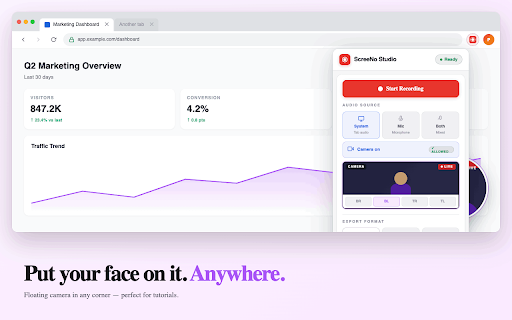
➤ Enable your webcam as a picture-in-picture overlay
➤ Reposition to any corner — bottom-left, bottom-right, top-left, top-right
➤ Stays visible during the full recording

🎞️ Export Formats 🎞️

➤ MP4 — universal compatibility, plays on any device
➤ WebM — fastest export, perfect for web sharing
➤ MKV — lossless quality for archiving and editing

🔒 Privacy First 🔒

ScreeNo Studio never uploads your recordings anywhere. No accounts, no cloud storage, no tracking. Everything is recorded, processed, and saved locally on your device.

To enable microphone and camera recording,
➤ Goto the ScreeNo Studio extension settings→ View Web Permissions → allow Microphone and Camera.

EVERYTHING YOU NEED, NOTHING YOU DON'T
Most screen recorders require an account, upload your videos to the cloud, or lock features behind a paywall. ScreeNo Studio does none of that. It's a clean, lightweight tool that does one thing well — records your screen and gets out of your way.
# ScreeNo Studio: Privacy-First 4k Screen Recorder (No Watermark)

Stop compromising your privacy for a simple screen capture. ScreeNo Studio is a fast, 100% private HD screen recorder built directly into Chrome. No sign-ups, no cloud uploads, and no subscriptions—just professional-grade recording at your fingertips.

Whether you need to record a product demo, document a bug report, create a YouTube tutorial, or send a quick video message to your team, ScreeNo Studio makes it effortless.

## 🚀 Why Choose ScreeNo Studio?
* 100% Private & Offline: Your videos never leave your device.
* No Accounts Required: Skip the "Sign up to download" hassle.
* Unlimited Recording: No paywalls, no time limits, and no watermarks.
* High Performance: Lightweight design that won't lag your browser.

## 🎬 Key Recording Features
* Flexible Capture: Record a specific Chrome tab, a window, or your entire desktop.
* Webcam Overlay: Add a Picture-in-Picture (PiP) camera bubble.
* Crystal Clear Audio: Capture System Audio, Microphone, or both mixed together.
* HD Quality: Record in full resolution with a live timer.

## 🎞️ Export in Your Favorite Formats
Save your files locally to your Downloads folder:
* MP4: Universal compatibility for Slack, Teams, and Social Media.
* WebM: Optimized for fast web sharing.
* MKV: High-quality, lossless recording for professional editing.

## 🔒 Privacy by Design
ScreeNo Studio never uploads your recordings. No tracking, no local data collection, and zero cloud storage. Everything happens locally on your machine.

## 🛠️ How to Get Started
1. Click Add to Chrome.
2. Pin the ScreeNo icon to your toolbar.
3. Click the icon, choose your settings, and hit Record.
4. Note: To use the camera/mic, go to Extension Settings -> View Web Permissions and allow access.

Everything you need for screen recording. Nothing you don't.
- May 23, 2026name
ScreeNo Studio - Screen Recorder
ScreeNo Studio: 4k Screen Recorder (No Watermark)
- May 23, 2026host_permissions
(empty)
(empty)
- May 23, 2026permissions
storage, downloads, offscreen, windows
storage, downloads, offscreen
- May 11, 2026short_description
Record your screen, tab audio, microphone, and camera overlay. Export as MP4, WebM, or MKV.
Record your screen with tab audio, microphone, and camera overlay. Export as MP4, WebM, or MKV.
- May 11, 2026name
Screenly- Screen Recorder
ScreeNo Studio - Screen Recorder
- May 11, 2026description
Screenly is a fast, privacy-first screen recorder built right into Chrome. No sign-up, no cloud, no subscriptions — just hit record and go.

Whether you're recording a product demo, a bug report, a tutorial, or a quick update for your team, Screenly makes it effortless to capture exactly what's on your screen.

KEY FEATURES
🎬 Record your screen, microphone, system audio, and camera overlay
🎙 Flexible audio — capture system audio, mic only, or both mixed together
📹 Camera overlay — picture-in-picture webcam in any corner of your recording
🎞️ Export in MP4, WebM, or MKV — your format, your choice
💾 Recordings saved directly to your Downloads folder — no cloud required
⏱️ Live recording timer so you always know how long you've been recording
📋 Built-in recordings list with file size, duration, and format badge
🔒 100% private — nothing ever leaves your device
🎬 Screen Recording 🎬

Record any tab, window, or your entire screen
➤One-click start — no setup, no waiting
➤Capture in full HD quality
➤Live timer during recording

🎙 Audio Recording 🎙

➤ System audio captures everything playing in your browser. Tick "Share tab audio" in the screen picker to enable
➤ Microphone records your voice for narration and commentary
➤ Both mixes system audio and mic together for tutorials and walkthroughs

📹 Camera Overlay 📹

➤ Enable your webcam as a picture-in-picture overlay
➤ Reposition to any corner — bottom-left, bottom-right, top-left, top-right
➤ Stays visible during the full recording

🎞️ Export Formats 🎞️

➤ MP4 — universal compatibility, plays on any device
➤ WebM — fastest export, perfect for web sharing
➤ MKV — lossless quality for archiving and editing

🔒 Privacy First 🔒

Screenly never uploads your recordings anywhere. No accounts, no cloud storage, no tracking. Everything is recorded, processed, and saved locally on your device.

To enable microphone and camera recording,
➤ Goto the Screenly extension settings→ View Web Permissions → allow Microphone and Camera.

EVERYTHING YOU NEED, NOTHING YOU DON'T
Most screen recorders require an account, upload your videos to the cloud, or lock features behind a paywall. Screenly does none of that. It's a clean, lightweight tool that does one thing well — records your screen and gets out of your way.
ScreeNo Studio is a fast, privacy-first screen recorder built right into Chrome. No sign-up, no cloud, no subscriptions — just hit record and go.

Whether you're recording a product demo, a bug report, a tutorial, or a quick update for your team, ScreeNo Studio makes it effortless to capture exactly what's on your screen.

KEY FEATURES
🎬 Record your screen, microphone, system audio, and camera overlay
🎙 Flexible audio — capture system audio, mic only, or both mixed together
📹 Camera overlay — picture-in-picture webcam in any corner of your recording
🎞️ Export in MP4, WebM, or MKV — your format, your choice
💾 Recordings saved directly to your Downloads folder — no cloud required
⏱️ Live recording timer so you always know how long you've been recording
📋 Built-in recordings list with file size, duration, and format badge
🔒 100% private — nothing ever leaves your device
🎬 Screen Recording 🎬

Record any tab, window, or your entire screen
➤One-click start — no setup, no waiting
➤Capture in full HD quality
➤Live timer during recording

🎙 Audio Recording 🎙

➤ System audio captures everything playing in your browser. Tick "Share tab audio" in the screen picker to enable
➤ Microphone records your voice for narration and commentary
➤ Both mixes system audio and mic together for tutorials and walkthroughs

📹 Camera Overlay 📹

➤ Enable your webcam as a picture-in-picture overlay
➤ Reposition to any corner — bottom-left, bottom-right, top-left, top-right
➤ Stays visible during the full recording

🎞️ Export Formats 🎞️

➤ MP4 — universal compatibility, plays on any device
➤ WebM — fastest export, perfect for web sharing
➤ MKV — lossless quality for archiving and editing

🔒 Privacy First 🔒

ScreeNo Studio never uploads your recordings anywhere. No accounts, no cloud storage, no tracking. Everything is recorded, processed, and saved locally on your device.

To enable microphone and camera recording,
➤ Goto the ScreeNo Studio extension settings→ View Web Permissions → allow Microphone and Camera.

EVERYTHING YOU NEED, NOTHING YOU DON'T
Most screen recorders require an account, upload your videos to the cloud, or lock features behind a paywall. ScreeNo Studio does none of that. It's a clean, lightweight tool that does one thing well — records your screen and gets out of your way.
- Apr 28, 2026description
ScreenSnap Recorder — Simple, private, and powerful screen recorder for Chrome.

Record your screen, microphone, and camera overlay with just one click. Perfect for creating tutorials, product demos, bug reports, presentations, or quick video messages.

### Key Features:
• Record full screen, application window, or Chrome tab
• Optional microphone audio (system + voice mixed clearly)
• Optional camera overlay (picture-in-picture) with 4 position choices: bottom-right, bottom-left, top-right, top-left
• Live camera preview in the popup while recording
• High-quality output in WebM (fastest), MP4, or MKV (lossless) format
• Automatic save to your Downloads folder — nothing is uploaded to any server
• Floating draggable camera preview window
• Clean and lightweight — built properly for Manifest V3

### How it works:
1. Click the ScreenSnap icon in your toolbar
2. Toggle Mic and/or Camera as needed
3. Click "Start Recording"
4. Choose what to share using Chrome’s native screen picker
5. Click "Stop Recording" when done — the video saves automatically

All recordings stay on your device. No account required, no cloud storage, and no data collection.

### Technical Notes:
- Records in VP9/Opus (WebM) or H.264 (MP4) for excellent quality and compatibility
- Works with Chrome’s "Stop sharing" button
- Camera overlay uses advanced Insertable Streams for smooth compositing
- Supports recordings with both system audio and microphone

Privacy-first design: ScreenSnap records only when you explicitly start it and saves files locally.
Screenly is a fast, privacy-first screen recorder built right into Chrome. No sign-up, no cloud, no subscriptions — just hit record and go.

Whether you're recording a product demo, a bug report, a tutorial, or a quick update for your team, Screenly makes it effortless to capture exactly what's on your screen.

KEY FEATURES
🎬 Record your screen, microphone, system audio, and camera overlay
🎙 Flexible audio — capture system audio, mic only, or both mixed together
📹 Camera overlay — picture-in-picture webcam in any corner of your recording
🎞️ Export in MP4, WebM, or MKV — your format, your choice
💾 Recordings saved directly to your Downloads folder — no cloud required
⏱️ Live recording timer so you always know how long you've been recording
📋 Built-in recordings list with file size, duration, and format badge
🔒 100% private — nothing ever leaves your device
🎬 Screen Recording 🎬

Record any tab, window, or your entire screen
➤One-click start — no setup, no waiting
➤Capture in full HD quality
➤Live timer during recording

🎙 Audio Recording 🎙

➤ System audio captures everything playing in your browser. Tick "Share tab audio" in the screen picker to enable
➤ Microphone records your voice for narration and commentary
➤ Both mixes system audio and mic together for tutorials and walkthroughs

📹 Camera Overlay 📹

➤ Enable your webcam as a picture-in-picture overlay
➤ Reposition to any corner — bottom-left, bottom-right, top-left, top-right
➤ Stays visible during the full recording

🎞️ Export Formats 🎞️

➤ MP4 — universal compatibility, plays on any device
➤ WebM — fastest export, perfect for web sharing
➤ MKV — lossless quality for archiving and editing

🔒 Privacy First 🔒

Screenly never uploads your recordings anywhere. No accounts, no cloud storage, no tracking. Everything is recorded, processed, and saved locally on your device.

To enable microphone and camera recording,
➤ Goto the Screenly extension settings→ View Web Permissions → allow Microphone and Camera.

EVERYTHING YOU NEED, NOTHING YOU DON'T
Most screen recorders require an account, upload your videos to the cloud, or lock features behind a paywall. Screenly does none of that. It's a clean, lightweight tool that does one thing well — records your screen and gets out of your way.
- Apr 28, 2026permissions
storage, downloads, offscreen
storage, downloads, offscreen, windows
- Apr 28, 2026short_description
Record your screen with optional mic and camera overlay. Saves directly to Downloads as WebM/MP4/MKV.
Record your screen, tab audio, microphone, and camera overlay. Export as MP4, WebM, or MKV.
- Apr 28, 2026name
ScreenSnap Recorder
Screenly- Screen Recorder
Permissions & access
- Permissions
- storagedownloadsoffscreenwindows
- Host access
- None declared
Screenshots




About
# ScreeNo Studio: Privacy-First 4k Screen Recorder (No Watermark)

Stop compromising your privacy for a simple screen capture. ScreeNo Studio is a fast, 100% private HD screen recorder built directly into Chrome. No sign-ups, no cloud uploads, and no subscriptions—just professional-grade recording at your fingertips.

Whether you need to record a product demo, document a bug report, create a YouTube tutorial, or send a quick video message to your team, ScreeNo Studio makes it effortless.

## 🚀 Why Choose ScreeNo Studio?
* 100% Private & Offline: Your videos never leave your device.
* No Accounts Required: Skip the "Sign up to download" hassle.
* Unlimited Recording: No paywalls, no time limits, and no watermarks.
* High Performance: Lightweight design that won't lag your browser.

## 🎬 Key Recording Features
* Flexible Capture: Record a specific Chrome tab, a window, or your entire desktop.
* Webcam Overlay: Add a Picture-in-Picture (PiP) camera bubble.
* Crystal Clear Audio: Capture System Audio, Microphone, or both mixed together.
* HD Quality: Record in full resolution with a live timer.

## 🎞️ Export in Your Favorite Formats
Save your files locally to your Downloads folder:
* MP4: Universal compatibility for Slack, Teams, and Social Media.
* WebM: Optimized for fast web sharing.
* MKV: High-quality, lossless recording for professional editing.

## 🔒 Privacy by Design
ScreeNo Studio never uploads your recordings. No tracking, no local data collection, and zero cloud storage. Everything happens locally on your machine.

## 🛠️ How to Get Started
1. Click Add to Chrome.
2. Pin the ScreeNo icon to your toolbar.
3. Click the icon, choose your settings, and hit Record.
4. Note: To use the camera/mic, go to Extension Settings -> View Web Permissions and allow access.

Everything you need for screen recording. Nothing you don't.
Technical
- Version
- 6.2.2
- Manifest
- V3
- Size
- 44.51KiB
- Min Chrome
- 116
- Languages
- 1
- Featured
- No
Metadata
- ID
- ncggpdehgajpiikpakedhibcnflmbfdn
- Developer ID
- uaac08f697f884d2e15373081f6c5a995
- Developer Email
- [email protected]
- Created
- Apr 13, 2026
- Last Updated (Store)
- May 29, 2026
- Last Scraped
- Jun 12, 2026
- Website
- —
- Support URL
- —
- Privacy Policy
- —
Data sourced from the Chrome Web Store · last verified Jun 12, 2026.