
TrackBee - Job Tracker for Google Sheets
Save job listings to your Google Sheets in one click. No dashboards, just data in your own Sheet.
As of June 2026, TrackBee - Job Tracker for Google Sheets has 4 users and a 5.00/5 rating from 1 reviews in the Workflow & Planning category.
Usersno change0%
4
4
Ratingno change0%
5.00
1 reviews
Reviewsno change0%
1
Version
1.0
Manifest V3
History
4 snapshotsTracking since May 14, 2026.
View as table
| Date | Users | Rating | Reviews | Version |
|---|---|---|---|---|
| May 14, 2026 | — | — | — | 1.0 |
| May 20, 2026 | — | — | — | 1.0 |
| May 26, 2026 | 2 | 5.00 | 1 | 1.0 |
| Jun 8, 2026 | 3 | 5.00 | 1 | 1.0 |
| Now | 4 | 5.00 | 1 | 1.0 |
Permissions & access
- Permissions
- activeTabstorageidentity
- Host access
- None declared
Screenshots


About
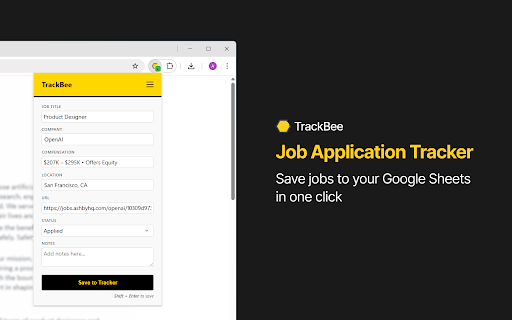
TrackBee captures job details from any job page and saves them directly to your Google Sheets in one click — no more copy-pasting, no third-party dashboards, no cost.

YOUR DATA, YOUR SHEET
Most job trackers are built as hooks for AI subscription ecosystems. They don't care about your workflow, they want to replace it. TrackBee is different.
TrackBee is a lightweight productivity tool built for Sheets-first job seekers who want the flexibility, portability, and power of owning their data. Our one-click extension saves everything to a Google Sheet you own.

WHAT GETS CAPTURED
- Job Title
- Company
- Location
- Compensation
- Job Description
- Application Status
- Date Applied
- Job URL

WORKS ON MAJOR JOB BOARDS AND ATS PLATFORMS
TrackBee works on the most popular job boards and applicant tracking systems, with smart page detection that adapts to virtually any job listing page.

HOW IT WORKS
1. Authorize your Google Account on first use* — one-time setup
2. Stick to your normal job search workflow. TrackBee automatically detects job listings and is available whenever you need it
3. Click the TrackBee extension icon and hit "Save to Tracker" — done

*TrackBee requests Google Drive access scoped only to files it creates. It cannot access any existing files in your Drive.

PRIVACY FIRST
TrackBee only reads the current tab. It writes only to your own Google Sheet. No browsing history. No data collection. No third-party servers.

FREE FOREVER
No subscriptions, no paywalls, no catch. TrackBee is free to install, free to use, and free forever. No strings attached.

SUPPORT
Questions or feedback? Reach us at [email protected] or visit http://usetrackbee.com/support.
Technical
- Version
- 1.0
- Manifest
- V3
- Size
- 46.31KiB
- Min Chrome
- 88
- Languages
- 1
- Featured
- No
Metadata
- ID
- ncgglpjphaeeijgcmfojhafficeecapo
- Developer ID
- uaaf3edbbebf708c23d0ae5b4a85b380b
- Developer Email
- [email protected]
- Created
- May 13, 2026
- Last Updated (Store)
- May 13, 2026
- Last Scraped
- Jun 8, 2026
- Website
- https://usetrackbee.com/
- Support URL
- https://usetrackbee.com/support
- Privacy Policy
- https://usetrackbee.com/privacy
Data sourced from the Chrome Web Store · last verified Jun 8, 2026.