
KANTAN Chord
This extension will converts various chord sites' song chords to its "degrees", also known as Nashville Numbers.
As of May 2026, KANTAN Chord has 4,000 users and a 4.70/5 rating from 10 reviews in the Entertainment category.
Usersno change0%
4.0K
4,000
Ratingno change0%
4.70
10 reviews
Reviewsno change0%
10
Version
2025.3.6.0
Manifest V3
History
1 snapshotsTracking since Apr 29, 2026.
View as table
| Date | Users | Rating | Reviews | Version |
|---|---|---|---|---|
| Apr 29, 2026 | 4.0K | 4.70 | 10 | 2025.3.6.0 |
| Now | 4.0K | 4.70 | 10 | 2025.3.6.0 |
Permissions & access
- Permissions
- tabsstorage
- Host access
- None declared
Screenshots


About
• Overview
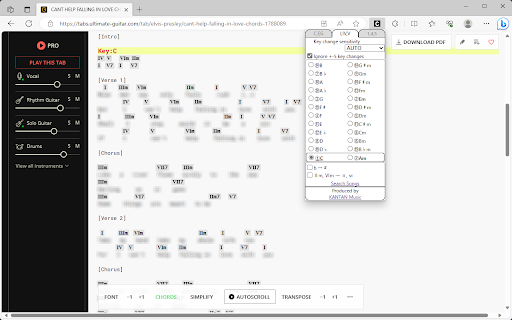
KANTAN Chord is a browser extension that converts various chord sites' song chords to its "degrees", also known as Nashville Numbers.
(Former name: InstaChordizer)

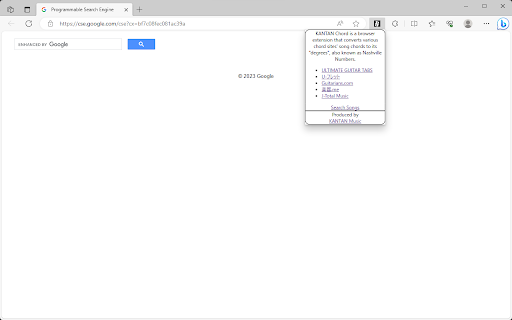
• Compatible sites
 - ULTIMATE GUITAR TABS(https://www.ultimate-guitar.com/)
 - U-フレット(https://www.ufret.jp/)
 - 楽器.me(https://gakufu.gakki.me/)
 - J-Total Music(https://music.j-total.net/)
 - Guitarians.com(https://guitarians.com/)
 - 91譜(https://www.91pu.com.tw/)

• How to use
Open the chord web page.
From the browser extensions, choose KANTAN Chord icon and it opens a pop-up window.
Choose from tabs "C,F,G" (original) , "I,IV,V" (roman numerals), or "1,4,5" (degrees).

 - "C,F,G" (original)
Displays the chords in its original form.
Select radio buttons change keys.

 - "I,IV,V" (roman numerals)
Displays the chords' degrees, in standard roman numerals format.

 - "1,4,5" (degrees)
Displays the chords' degrees, in numbers.
Different symbols follow the "KANTAN Chord" system, based on the Nashville Number System.
For more details, please visit this page: https://instachord.com/instruction/icn/

• Key analyzation
KANTAN Chord automatically analyzes the song's key and displays it in red text with a yellow background banner.
When the key changes during a song, it will be displayed with additional banners.
E.g. "Key:E(-3)" or "Key:Ab(+1)"
Numbers such as (-3) and (+1) represent half steps. If your instrument can transpose, try adjusting to these numbers.
If the key analyzation is wrong or is difficult to play, try adjusting the analyzation sensitivity.

 - Ignore +-5 key changes
When changing to a dominant (+5 half steps) or subdominant key (-5 half steps) , chords used will be very similar to its original key. When this option is turned on, KANTAN Chord will ignore +-5 key changes and stay in its original key.

• Displayed keys
You can choose keys outside of the auto-analyzed key.

 - Song's analyzed key
The song's auto-analyzed most likely key is outlined in a box.

 - Difficulty rank
The numbers in front of the key (Eg. ①, ②, ③...) are difficulty ranks when playing on the InstaChord, from easiest to most difficult. Please use as reference, when the analyzed key if wrong or when the original key is difficult to play.
① and ② are in bold, and ① is underlined.

 - Changing they key (in C,F,G tab)
When in the C,F,G tab, you can pick different keys to transpose to.

 - Changing they key (in I,IV,V or 1,4,5 tab)
In I,IV,V or 1,4,5 tab, you can change the base key. Apply when the analyzed key is wrong, or when the original key is difficult to play. If other keys are greyed-out, turn off analyzation sensitivity.

• Options for C,F,G tab
- Disable automatic loading
KANTAN Chord will not take effect until the icon is pressed.
Use this option if there are compatibility issues with the site's features or other extensions.
This option is only effective in the C,F,G tab.

- Hide key display
KANTAN Chord displays the song's key and displays it in red text with a yellow background banner.
Use this option to hide the key display.
This option is only effective in the C,F,G tab.

• Options for I,IV,V tab
- b → #
All half tones are represented with #

- IIm, VIm → ii, vi
Minor chords are represented with lower case roman numerals.

• Options for 1,4,5 tab
- 3b/7b → 8/9 (5b/2b → 8/9 for minor key)
For the InstaChord, commonly used chords are allocated on the 8 and 9 buttons.
Using this option will make use of these buttons.

- Use minor key
Allows the use of minor key

• Beginner mode
By selecting 🥚LV.0 / 🐤LV.1 / 🐔LV.2 shown on the first line, you can adjust the difficulty of the chords.
In 🥚LV.0 / 🐤LV.1 mode, chords will be simplified.
In 🐔LV.2 mode, all chords will be in their original form.
This mode isl not available when minor key is selected.
Technical
- Version
- 2025.3.6.0
- Manifest
- V3
- Size
- 107KiB
- Min Chrome
- 88
- Languages
- 2
- Featured
- Yes
Metadata
- ID
- ncdpcgdgemdklhocjgecijjjhaboopbp
- Developer ID
- u0b3ed7e54055ebba81faeef634103e80
- Developer Email
- [email protected]
- Created
- Sep 15, 2021
- Last Updated (Store)
- Mar 6, 2025
- Last Scraped
- May 26, 2026
- Website
- —
- Support URL
- —
- Privacy Policy
- —
Similar extensions
Alternatives to KANTAN Chord, ranked by description similarity.

ChordsGate: Quick Find Chords & Tabs
Instantly find guitar tabs and piano sheet music for songs on YouTube and Spotify.
578
★ 5.0

Ultimate Guitar: Add Banjo Chords
Searches for chords in an Ultimate Guitar song chord page, and displays the corresponding banjo chords.
73

YouChords
Get real-time guitar chords on YouTube videos with diagrams, synced captions, capo tools, tuner, and a searchable chord library.
255
★ 1.0

GoCapo
Transpose guitar chords on any webpage
—

Guitar Scale Overlay
Learn guitar scales visually! Interactive neck overlay for YouTube backing tracks. 16 scales, 6/7-string support.
90

HIKU-FRET
Adds a guitar element to U-FRET's page (and Youtube) that can be played with the mouse. Come on, everyone, let's sing and play!
3

Lyrical Chord Diagram Viewer Extension
Chord viewer for website https://lyricalchord.com/
6

CifraClub Better UI
Displays CifraClub song sheets horizontally and provides additional UI enhancements.
100
Data sourced from the Chrome Web Store · last verified May 26, 2026.