
Content Extractor
CSS/XPath Content Extractor is a simple and efficient Chrome extension designed for developers, testers, and anyone working with…
As of May 2026, Content Extractor has 134 users and a 5.00/5 rating from 2 reviews in the Developer Tools category.
Usersup 12.6 percent+12.6%
134
134
Ratingno change0%
5.00
2 reviews
Reviewsno change0%
2
Version
1.0
Manifest V3
History
2 snapshotsTracking since Apr 29, 2026.
View as table
| Date | Users | Rating | Reviews | Version |
|---|---|---|---|---|
| Apr 29, 2026 | 119 | 5.00 | 2 | 1.0 |
| May 26, 2026 | 127 | 5.00 | 2 | 1.0 |
| Now | 134 | 5.00 | 2 | 1.0 |
Permissions & access
- Permissions
- activeTabscripting
- Host access
- None declared
Screenshots
About
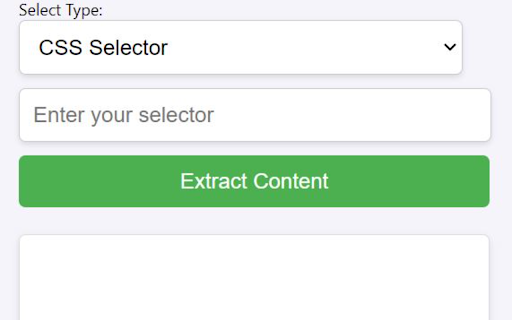
CSS/XPath Content Extractor is a simple and efficient Chrome extension designed for developers, testers, and anyone working with web content. Whether you're a QA engineer validating page elements or a web developer looking to scrape data from specific parts of a webpage, this tool helps you extract content easily using both CSS Selectors and XPath.

Key Features:
Extract web content with CSS Selectors or XPath.
Intuitive interface: Simply input the selector or XPath, and extract the matching content from the webpage.
Get a formatted list of content directly from any webpage, ready to copy to your clipboard.
Supports content extraction from Shadow DOM elements, ensuring compatibility with modern web development techniques.
Quick copy functionality: Once the content is extracted, click a button to copy it instantly to your clipboard.
Responsive and lightweight: No unnecessary bloat, ensuring fast and reliable performance.
How to Use:
Open the web page from which you want to extract content.
Enter the CSS Selector or XPath of the element you wish to extract in the input field.
Choose the type (CSS or XPath) from the dropdown.
Click the Extract button, and the matching content will be displayed.
Use the Copy button to copy the content to your clipboard instantly.
This tool is ideal for:

Web developers and designers working with front-end technologies.
QA engineers and testers verifying web page elements.
Data analysts looking to scrape data from specific web page sections.
Anyone working with DOM structures.
Start simplifying your web content extraction today with CSS/XPath Content Extractor!

Permissions:
Requires access to the active tab for content extraction from the currently loaded webpage.
Technical
- Version
- 1.0
- Manifest
- V3
- Size
- 5.5KiB
- Min Chrome
- 88
- Languages
- 1
- Featured
- No
Metadata
- ID
- nbpjbnpiiapmifhbialohlfpgpfllmij
- Developer ID
- u69b0a3ed0b483f53e466764bf83f324c
- Developer Email
- [email protected]
- Created
- Sep 24, 2024
- Last Updated (Store)
- Sep 24, 2024
- Last Scraped
- May 26, 2026
- Website
- —
- Support URL
- —
Similar extensions
Alternatives to Content Extractor, ranked by description similarity.

Content Extractor
Extract content from the current webpage using CSS selectors.
29

XPath Extractor
Extract text and attributes from web elements using XPath. Test, highlight, and export data effortlessly.
29
★ 5.0

DOMExtractor
Extract DOM elements with CSS styles from any website. For developers & designers. Export as HTML, CSS, React or Vue components.
24
★ 5.0

CSS Extractor — Extract CSS from Any Website
Instantly extract clean, ready-to-use CSS for any element on any webpage. Stop digging through stylesheets manually.
183
★ 5.0

Css Extracter
Inspect CSS styles and save snapshots of web components and designs
19

CSS and XPath Extractor
Extract CSS and XPath from selected elements via easy copy-paste for targeting or testing.
57
★ 5.0

Element Extractor
Extracts all elements from the current page.
184

XPath Selector
HTML XPath Selector: instantly test and debug XPath queries in your browser. Validate your XPath expressions easily.
3.0K
★ 5.0
Data sourced from the Chrome Web Store · last verified May 26, 2026.