
Tab URL Copier
Select multiple open tabs and copy all their URLs at once.
As of July 2026, Tab URL Copier has — users in the Productivity category.
Usersno change0%
—
—
Ratingno change0%
—
— reviews
Reviewsno change0%
—
Version
1.1.0
Manifest V3
History
1 snapshotsTracking since Jul 10, 2026.
Not enough history yet for this metric — the chart fills in as we collect more snapshots.
View as table
| Date | Users | Rating | Reviews | Version |
|---|---|---|---|---|
| Jul 10, 2026 | — | — | — | 1.1.0 |
| Now | — | — | — | 1.1.0 |
Permissions & access
- Permissions
- tabsclipboardWrite
- Host access
- None declared
Screenshots
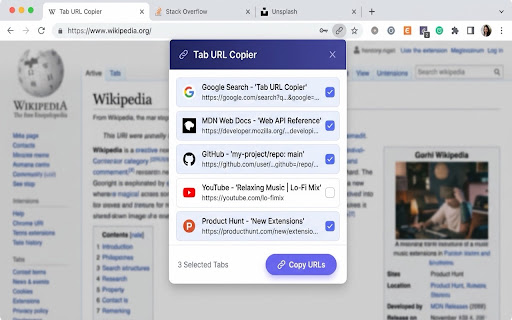

About
Tab URL Copier is a lightweight, privacy-focused tool that lets you copy multiple open tab URLs at once
  with a single click. No more copying tabs one by one.

    Key Features:
    - Lists all open tabs in your current browser window.
    - Quick buttons to Select All tabs or Clear all selections.
    - Smart browser pre-selection: if you highlight multiple tabs in your browser strip (using Shift or
  Ctrl/Cmd selection) before clicking the icon, those tabs are pre-checked automatically.
    - Automatic theme selection following your system dark/light preferences.
    - Sleek manual toggle override in the header to switch between Light, Dark, and Auto sync modes.
    - Lightweight vanilla code with smooth animations and zero external dependencies.

    How to use it:
    1. Click the Tab URL Copier icon in your toolbar.
    2. Check the tabs you wish to copy (or click "Select all").
    3. Click "Copy URLs".
    4. Your selected URLs are copied to your clipboard, newline-separated, ready to paste anywhere!

    Privacy & Permissions:
    All data is processed strictly local to your device. Tab URL Copier does not collect, store, or transmit any personal data, analytics, or browsing history.
Technical
- Version
- 1.1.0
- Manifest
- V3
- Size
- 9.08KiB
- Min Chrome
- 88
- Languages
- 1
- Featured
- No
Metadata
- ID
- nbnehobinolaclgihaobabohgghfdlmg
- Developer ID
- u48346c5bdb075804b5a785fd644cb3bb
- Developer Email
- [email protected]
- Created
- Jul 9, 2026
- Last Updated (Store)
- Jul 9, 2026
- Last Scraped
- Jul 10, 2026
- Website
- —
- Support URL
- —
Data sourced from the Chrome Web Store · last verified Jul 10, 2026.