Gmail Sender Icons by Simbolic
Quickly identify the sender of email messages in Gmail.
As of May 2026, Gmail Sender Icons by Simbolic has 27 users in the Workflow & Planning category.
Usersup 3.8 percent+3.8%
27
27
Ratingno change0%
—
— reviews
Reviewsno change0%
—
Version
1.1
Manifest V3
History
2 snapshotsTracking since Apr 29, 2026.
View as table
| Date | Users | Rating | Reviews | Version |
|---|---|---|---|---|
| Apr 29, 2026 | 26 | — | — | 1.1 |
| May 26, 2026 | 24 | — | — | 1.1 |
| Now | 27 | — | — | 1.1 |
Permissions & access
- Permissions
- scripting
- Host access
- https://mail.google.com/
Screenshots
About
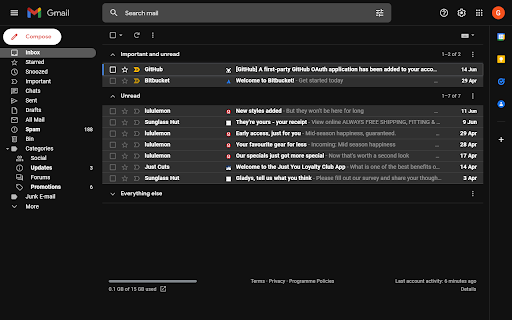
Quickly identify the sender of email messages in Gmail without opening the message.

Gmail Sender Icons is a Google Chrome extension that makes it easy for you to quickly and visually identify email senders in Gmail. It shows the official logo (favicon) of the sender's organization alongside the email message.

For instance, if you receive an email from [email protected], the Gmail extension will add a logo of the Google website next to the message so you can immediately identify the sender in the email list.

The Gmail Chrome extension uses the Google S2 service for generating the website's favicon while the Gmail messages are parsed with the Inbox SDK framework. All processing is done locally in your browser and no Gmail data is ever shared or uploaded anywhere.

The add-on is open source and the code is available on Github. Based on the Gmail Sender Icons extension by Amit Agarwal with additional support for all TLDs. Source code is available at https://github.com/gregbradley/gmail-icons
Technical
- Version
- 1.1
- Manifest
- V3
- Size
- 486KiB
- Min Chrome
- 88
- Languages
- 1
- Featured
- No
Metadata
- ID
- nbgemdmmeiheaopanlgfgdniphldgbol
- Developer ID
- udad97f7989ba3f6afd5ee7e866a626fa
- Developer Email
- [email protected]
- Created
- Jun 14, 2022
- Last Updated (Store)
- Jun 22, 2022
- Last Scraped
- May 26, 2026
- Website
- —
- Support URL
- —
- Privacy Policy
- —
Similar extensions
Alternatives to Gmail Sender Icons by Simbolic, ranked by description similarity.

Gmail Link Sender
This add-on opens a Gmail compose window with the current page URL automatically inserted into the email body.
8

Gmail Address Check & Send Verify Tool
Check From, To, Cc, Bcc, Subject to avoid mistake operation before sending an email message on Gmail.
3.0K
★ 5.0

Send from Gmail - Share Link Via Email
provides a button which allows you to send a webpage URL (link) via email.
6.0K
★ 4.9

Notifier for Gmail 2.0
Multiple label and account notifier for Gmail.
350
★ 5.0

Preview Links for Gmail™
Automatically generate complete web URL link previews, sample content and screenshots while drafting your email.
7
Shortcuts for Google™
Choose from 1000+ Google™ shortcuts to show up as buttons in a space-saving popup
100.0K
★ 4.8

Gmail.com Login
Make gmail.com login easy with our extension tool! Enjoy quick gmail sign in and instant inbox access with just one click.
2.0K
★ 5.0

Send from Gmail (by Google)
Makes Gmail your default email application and provides a button to compose a Gmail message to quickly share a link via email
800.0K
★ 4.0
Data sourced from the Chrome Web Store · last verified May 26, 2026.