
Todays tasks
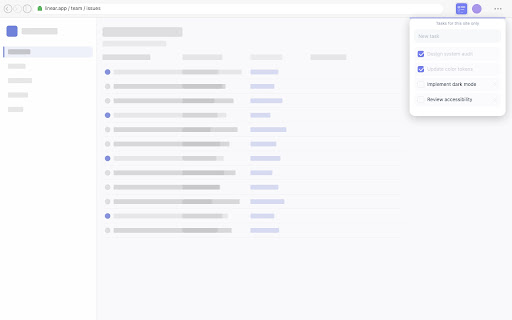
Per-site to-do lists that keep you focused. Tasks on YouTube stay on YouTube, Figma tasks stay on Figma. One click, zero noise.
As of June 2026, Todays tasks has 5 users and a 4.80/5 rating from 5 reviews in the Workflow & Planning category.
Usersup 66.7 percent+66.7%
5
5
Ratingdown 0.6 percent−0.6%
4.80
5 reviews
Reviewsdown 16.7 percent−16.7%
5
Version
1.2.4
Manifest V3
History
4 snapshotsTracking since Apr 19, 2026.
View as table
| Date | Users | Rating | Reviews | Version |
|---|---|---|---|---|
| Apr 19, 2026 | 3 | 4.83 | 6 | 1.2.4 |
| Apr 24, 2026 | 3 | 4.83 | 6 | 1.2.4 |
| May 18, 2026 | 5 | 4.83 | 6 | 1.2.4 |
| May 25, 2026 | 4 | 4.83 | 6 | 1.2.4 |
| Now | 5 | 4.80 | 5 | 1.2.4 |
Permissions & access
- Permissions
- storagetabsidentity
- Host access
- https://www.googleapis.com/*
Screenshots



About
Stay focused on what matters — right where you are. Tasks tied to each site, so your brain never loses the thread.

If you have ADHD, switching between tabs can mean losing your train of thought entirely. Today's Tasks keeps you grounded by showing only the tasks that belong to the site you're on — nothing else, no noise.

Open GitHub? See your GitHub tasks. Switch to Figma? Your Figma tasks are there. Every site gets its own list, automatically.

Why it helps with ADHD
— No global task pile to scroll through and feel overwhelmed by
— Tasks appear in context, right when you need them
— Dead simple — add a task, check it off, move on
— One click away from anywhere in your browser

How it works
Click the extension icon on any website. Type a task and press Enter. That task lives on that site and only that site. Check it off when done, or delete it.

Sign in with Google to sync your tasks silently across all your devices via Google Drive — so switching from your laptop to your desktop never breaks your flow. Sign out anytime with a single click. No data is shared or stored outside your own Google account.

No sign-up required. No ads. No noise. Just the tasks you need, exactly where you need them — and optionally, on every device you use.
Technical
- Version
- 1.2.4
- Manifest
- V3
- Size
- 386KiB
- Min Chrome
- 88
- Languages
- 1
- Featured
- No
Metadata
- ID
- naoadfjjkejkbofeemadehcmbifpcclf
- Developer ID
- u4bc8999f8053b189f090b02555306d7c
- Developer Email
- [email protected]
- Created
- May 27, 2024
- Last Updated (Store)
- Mar 22, 2026
- Last Scraped
- Jun 7, 2026
- Website
- —
- Support URL
- https://www.tipsytypes.com/todays-tasks.html
- Privacy Policy
- —
Similar extensions
Alternatives to Todays tasks, ranked by description similarity.

NagTab
One task. Giant letters. Every new tab. Built for ADHD brains that forget every other app exists.
4

Do One Thing - ADHD Focus Timer & Task Manager
ADHD focus timer and task manager for deep work and distraction-free productivity.
16

TaskSite – Tasks for Sites
Stay organized and focused — right where you browse.
83
★ 5.0

Easy tasks by Morgen
Highlight text, press Option+Shift+T/Alt+Shift+T to capture as a to-do with context and link. No app switching.
338
★ 5.0

UpOrbit — New Tab for Focus
Replace your new tab with your #1 Must-Do, focus timer, smart lists, and wellness nudges. A calm start to every tab.
11
★ 5.0

Focusly — Website Blocker for Focus
Friction-based approach to stop doomscrolling. Not a blocker — a focus companion. Helpful for ADHD and distraction control.
2

Schedule Sidebar Extension
A minimal, persistent sidebar task manager for your browser.
2

Track That Plan
A comprehensive task management extension that allows you to view, create, and synchronise your Track That Plan tasks.
4
★ 5.0
Data sourced from the Chrome Web Store · last verified Jun 7, 2026.