Autentik AI: Explain & Reply
AI-based web-extension - helps autistic individuals explain meanings of phrases and compose replies.
As of May 2026, Autentik AI: Explain & Reply has 350 users and a 4.73/5 rating from 15 reviews in the Accessibility category.
Usersup 7.4 percent+7.4%
350
350
Ratingno change0%
4.73
15 reviews
Reviewsno change0%
15
Version
1.0.8
Manifest V3
History
2 snapshotsTracking since Apr 29, 2026.
View as table
| Date | Users | Rating | Reviews | Version |
|---|---|---|---|---|
| Apr 29, 2026 | 326 | 4.73 | 15 | 1.0.8 |
| May 26, 2026 | 347 | 4.73 | 15 | 1.0.8 |
| Now | 350 | 4.73 | 15 | 1.0.8 |
Permissions & access
- Permissions
- storageactiveTabscripting
- Host access
- *://*/*
Screenshots

About
Finding the perfect answer to ritualistic questions can be tough. Let our tool assist you.

Features:
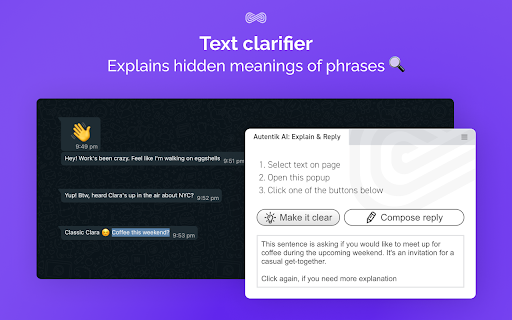
🔍 Text clarifier: Explains hidden meanings of phrases
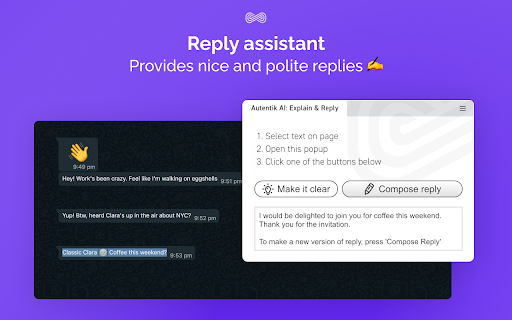
✍️ Reply assistant: Provides nice and polite replies

Text clarifier:
The Text Clarifier is a valuable tool designed to help you decipher hidden meanings and nuances in written communication. It's especially useful when you want to understand the underlying messages, subtext, or implied sentiments within a text.

Reply assistant:
This feature aids in crafting responses for those polite small talk moments and dialogue initiations and conclusions. ∞ Tailored for the autistic community, we aim to help in these often meaningless interactions. Our goal isn't to change your authentic voice or make you imitate others, but to offer a hand during routine exchanges.

Use Autentik AI Text Helper for a gentle nudge during these moments! 💬❤️

How to use the extension:
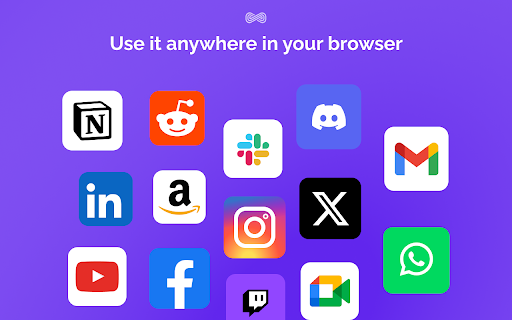
1. Select some text on the web-page: in email,  "Whatsapp for web", "Reddit", or on some other resource.
2. Open the Extention
3. Press "Make it clear" to clarify the text, Press "Compose reply" to get an option for potential reply.

Settings:
To open settings, click on the three lines in the top right corner. Here you can:
- Translate the interface to different languages
- Choose whilte ⬜, blue 🟦 or black ⬛️ color scheme
- Make the Popup bigger or smaller

--
The solution is powered by Anthropic.

Users should not highlight or send any personal data while interacting with this service.
Technical
- Version
- 1.0.8
- Manifest
- V3
- Size
- 1.62MiB
- Min Chrome
- 88
- Languages
- 1
- Featured
- No
Metadata
- ID
- nakhncmolfdoehhapkakieogkggekaea
- Developer ID
- u736e4383b1c22a7c4f7e1c8b43e9863f
- Developer Email
- [email protected]
- Created
- Oct 14, 2023
- Last Updated (Store)
- Sep 19, 2024
- Last Scraped
- May 26, 2026
- Website
- autentik.ai
- Support URL
- —
- Privacy Policy
- https://www.autentik.ai/privacy-policy
Similar extensions
Alternatives to Autentik AI: Explain & Reply, ranked by description similarity.

Clarify
Right-click any text, image, or video and get AI answers using your existing subscriptions.
3
★ 5.0

Text Tailor - by Bliink
Replace, Remove, Blur or Highlight words across the web
13

1-Click Font Changer
Stable V4 Architecture with RTL & LineHeight support.
206
★ 5.0

Textune
Extension that makes online reading easy and highlight important keywords to search
428
★ 5.0
IntentSeek
Highlight the text you want efficiently to summarise or analyse in order to reveal the hidden message or underlying intent.
155
★ 4.8

Moondrop - Text Humanizer
Moondrop-Text Humanizer is a browser extension that makes AI-generated text sound natural, engaging, and more human-like.
—

YouTube SummarAIze
Save time with free AI-powered YouTube summaries using AI like ChatGPT, Gemini, Claude, Deepseek, Grok,...
9

ELIV - Explain Like I'm 5
AI powered assistant to explain. Highlight text; get a simple explanation.
167
★ 3.0
Data sourced from the Chrome Web Store · last verified May 26, 2026.