
uJson - JSON Formatter & Viewer
Auto-format JSON responses with syntax highlighting, collapsible tree view, dark mode & built-in editor
As of June 2026, uJson - JSON Formatter & Viewer has 30 users and a 5.00/5 rating from 2 reviews in the Developer Tools category.
Usersup 150.0 percent+150.0%
30
30
Ratingno change0%
5.00
2 reviews
Reviewsno change0%
2
Version
1.0.2
Manifest V3
History
7 snapshotsTracking since Apr 7, 2026.
View as table
| Date | Users | Rating | Reviews | Version |
|---|---|---|---|---|
| Apr 7, 2026 | 12 | 5.00 | 2 | 1.0.2 |
| Apr 19, 2026 | 14 | 5.00 | 2 | 1.0.2 |
| Apr 26, 2026 | 22 | 5.00 | 2 | 1.0.2 |
| May 3, 2026 | 27 | 5.00 | 2 | 1.0.2 |
| May 9, 2026 | 24 | 5.00 | 2 | 1.0.2 |
| May 14, 2026 | 26 | 5.00 | 2 | 1.0.2 |
| Jun 3, 2026 | 29 | 5.00 | 2 | 1.0.2 |
| Now | 30 | 5.00 | 2 | 1.0.2 |
Permissions & access
- Permissions
- storageactiveTabclipboardWrite
- Host access
- <all_urls>
Screenshots


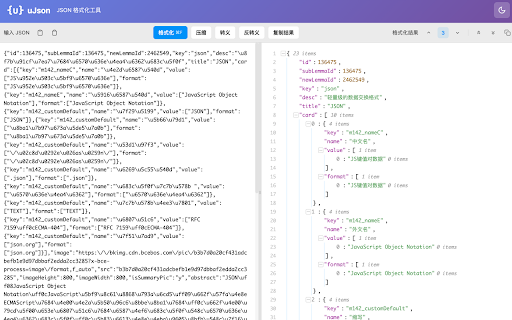
About
uJson is a lightweight and powerful JSON formatter extension that automatically beautifies JSON responses in your browser.

uJson 是一款轻量强大的 JSON 格式化扩展,自动美化浏览器中的 JSON 响应。

---

✨ Key Features / 主要功能:

• Auto-detection & Formatting / 自动检测与格式化
  Automatically detects and formats JSON responses when browsing APIs or JSON files.
  浏览 API 或 JSON 文件时自动检测并格式化。

• Syntax Highlighting / 语法高亮
  Color-coded values for strings, numbers, booleans, and null for easy reading.
  字符串、数字、布尔值、null 用不同颜色区分,一目了然。

• Collapsible Tree View / 可折叠树形视图
  Expand or collapse nested objects and arrays to navigate complex JSON structures.
  展开或折叠嵌套对象和数组,轻松浏览复杂结构。

• Dark Mode / 深色模式
  Easy on the eyes with a beautiful dark theme.
  精美的深色主题,保护眼睛。

• Built-in JSON Editor / 内置 JSON 编辑器
  Edit, format, compress, escape/unescape JSON directly in the browser.
  直接在浏览器中编辑、格式化、压缩、转义/反转义 JSON。

• Python Dict Support / Python 字典支持
  Automatically converts Python dict format (True/False/None, single quotes) to valid JSON.
  自动将 Python 字典格式转换为有效 JSON。

• Copy & Download / 复制与下载
  One-click copy to clipboard or download formatted JSON as a file.
  一键复制到剪贴板或下载为文件。

---

🚀 Perfect for developers, testers, and anyone who works with JSON data regularly.
适合开发者、测试人员以及经常处理 JSON 数据的用户。

Lightweight, fast, and privacy-focused - no data collection, works entirely offline.
轻量、快速、注重隐私 - 无数据收集,完全离线运行。
Technical
- Version
- 1.0.2
- Manifest
- V3
- Size
- 72.99KiB
- Min Chrome
- 88
- Languages
- 2
- Featured
- No
Metadata
- ID
- nahpjpifcdnkjcfoikglibgikhnkachl
- Developer ID
- u35d9f545be7407d213d5a7ef9f70fb4d
- Developer Email
- [email protected]
- Created
- Jan 29, 2026
- Last Updated (Store)
- Feb 26, 2026
- Last Scraped
- Jun 3, 2026
- Website
- —
- Support URL
- https://github.com/uuhc/ujson/issues
- Privacy Policy
- https://github.com/uuhc/ujson/blob/main/PRIVACY.md
Similar extensions
Alternatives to uJson - JSON Formatter & Viewer, ranked by description similarity.

JSON Formatter
Paste JSON and format it with collapsible tree view, syntax highlighting, search, and dark mode.
2

Auto JSON Formatter
Automatically formats JSON API responses
16

JSON Formatter Extension
Format and beautify JSON data similar to jsonformatter.org
51

JSON Formatter Everywhere
Automatically formats JSON responses in any tab, not just raw JSON pages.
3

JSON Insighter
JSON Insighter: A fast, lightweight JSON formatter with syntax highlighting, collapsible tree views, and multi-format export.
17

Nice JSON Formatter
奈斯出品Json格式化工具,数据类型展示格式化,支持复制
1

JSON Formatter - Simple & Clean
Automatically formats JSON responses in the browser with themes, collapsible nodes, and other helpful features.
7
★ 5.0

JSON Formatter & Highlighter
简洁美观的 JSON 格式化工具,支持语法高亮
3
Data sourced from the Chrome Web Store · last verified Jun 3, 2026.