
Afterword
Extension for the afterword website
As of May 2026, Afterword has 83 users and a 5.00/5 rating from 4 reviews in the Workflow & Planning category.
Usersdown 7.8 percent−7.8%
83
83
Ratingno change0%
5.00
4 reviews
Reviewsno change0%
4
Version
1.1
Manifest V3
History
3 snapshotsTracking since Apr 1, 2026.
View as table
| Date | Users | Rating | Reviews | Version |
|---|---|---|---|---|
| Apr 1, 2026 | 90 | 5.00 | 4 | 1.1 |
| May 1, 2026 | 91 | 5.00 | 4 | 1.1 |
| May 29, 2026 | 93 | 5.00 | 4 | 1.1 |
| Now | 83 | 5.00 | 4 | 1.1 |
Permissions & access
- Permissions
- activeTabscriptingstoragetabscontextMenus
- Host access
- https://backend.afterword.tech/*
Screenshots
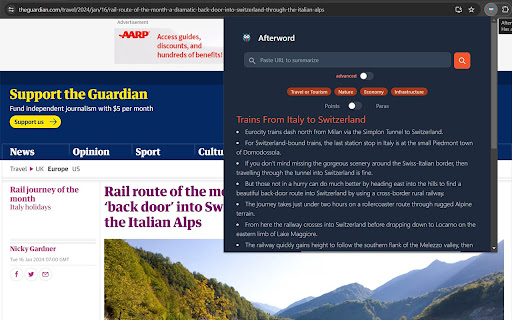
About
Overcome Lengthy Content with Afterword - Your Chrome Research Powerhouse
Afterword empowers you to breeze through walls of text with its innovative multi-level summaries and organizational tools.

Key Features:

•	Multi-Level Summaries: Get an AI-powered overview of any web page, with the ability to zoom in and out for deeper analysis.
•	Subheading Navigation: Effortlessly skim through lengthy articles with automatically generated subheadings that guide you to the information you seek.
•	Save & Annotate: Store summaries and original sources for future reference. Highlight key sections and add annotations just like you would in a physical book.
•	Hyperdocuments: Create digital scrapbooks called "Hyperdocuments" where you can effortlessly collect and organize saved excerpts and annotated sources.
•	Frictionless Hyperdoc Creation: Start a Hyperdoc directly from highlighted text, making information gathering a seamless process.

Benefits:

•	Faster Research: Break down complex articles into easily digestible summaries, saving you valuable time.
•	Improved Comprehension: Gain a deeper understanding of the content with multi-level summaries and annotations.
•	Enhanced Organization: Store research materials and organize your thoughts with Hyperdocuments.
•	Effortless Reference: Never lose track of important information - your summaries and annotated sources are readily available in your profile.

Getting Started:

Afterword integrates seamlessly into your Chrome browser. Install the extension from the Chrome Web Store and start summarizing articles with a simple click!

FAQs:

•	Q: Does Afterword work on all websites? A: Afterword strives to summarize a wide range of web content.
•	Q: How do I access my saved summaries and annotations? A: Your saved summaries and annotations are stored within your Afterword profile.

Afterword - Your research companion for a more productive and insightful browsing experience!
Technical
- Version
- 1.1
- Manifest
- V3
- Size
- 381KiB
- Min Chrome
- 88
- Languages
- 1
- Featured
- No
Metadata
- ID
- nacoojhlhceipnenclnephnhlhkhmeib
- Developer ID
- u8ff1f79aa476a94f44c490ad208daa7c
- Developer Email
- [email protected]
- Created
- Jan 19, 2024
- Last Updated (Store)
- Jul 1, 2024
- Last Scraped
- May 29, 2026
- Website
- —
- Support URL
- —
- Privacy Policy
- https://www.afterword.tech/privacy/
Similar extensions
Alternatives to Afterword, ranked by description similarity.

Summarize: AI-Powered Text Summary Tool
Instantly summarize any webpage with a sleek, modern AI tool. Get concise summaries in seconds and even listen to them!
282
★ 4.0

Summarize with AI
Summarize the current webpage and save it with title and URL.
—

Snippets
Provide a short bite-sized summary of any given text
5
★ 5.0

Glancy
Select, summarize, understand - Chrome's built-in AI brings clarity to any webpage
Glancy brings intelligent text summarization…
—
★ 5.0
ShortMe
ShortMe Chrome Extension
124
★ 4.6

Save To Note
Capture every web wonder, turn them into personal notes.Let your favorite things orbit around you like digital constellations.
2

AI Page & Youtube Summaries using ChatGPT
AI summaries for Youtube videos, webpages and articles. Uses ChatGPT. Supports text-to-speech.
7

SummarAI
Slicing Through Information Overload
66
Data sourced from the Chrome Web Store · last verified May 29, 2026.