
JupyLens - Jupyter Notebook Viewer & Editor
Open, view, and edit Jupyter/IPython Notebook (.ipynb) files directly in your browser.
As of June 2026, JupyLens - Jupyter Notebook Viewer & Editor has 32 users in the Developer Tools category.
Usersno change0%
32
32
Ratingno change0%
—
— reviews
Reviewsno change0%
—
Version
1.2.0
Manifest V3
History
10 snapshotsTracking since Apr 4, 2026.
View as table
| Date | Users | Rating | Reviews | Version |
|---|---|---|---|---|
| Apr 4, 2026 | — | — | — | 1.2.0 |
| Apr 18, 2026 | — | — | — | 1.2.0 |
| Apr 23, 2026 | 6 | — | — | 1.2.0 |
| Apr 28, 2026 | 11 | — | — | 1.2.0 |
| May 6, 2026 | 13 | — | — | 1.2.0 |
| May 11, 2026 | 17 | — | — | 1.2.0 |
| May 16, 2026 | 25 | — | — | 1.2.0 |
| May 23, 2026 | 24 | — | — | 1.2.0 |
| May 29, 2026 | 32 | — | — | 1.2.0 |
| Jun 5, 2026 | 30 | — | — | 1.2.0 |
| Now | 32 | — | — | 1.2.0 |
Permissions & access
- Permissions
- storageunlimitedStorage
- Host access
- None declared
Screenshots



About
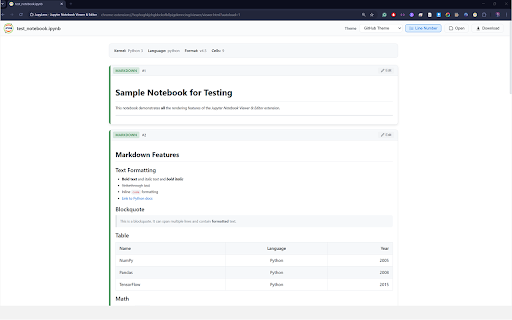
JupyLens opens, renders, and edits Jupyter/IPython Notebook (.ipynb) files directly in your browser. No Jupyter server, no Python installation, no setup — just open your notebook and start reading or editing.

Important: This extension does not execute or run notebook code. It is a viewer and editor only — you can read and edit cell source text, but code cells are never executed.

# Key Features

- Instant Rendering: Open any .ipynb file and see it rendered with formatted markdown, syntax-highlighted Python code, and all cell outputs including images, HTML tables, and error tracebacks.

- Auto-Open: Navigate to any .ipynb file URL (local or remote) and JupyLens automatically intercepts and renders it. Works with file:// URLs when file access is enabled.

- 13 Themes: Choose from GitHub Theme, One Dark Pro, Dracula, Monokai Pro, Tokyo Night, Ayu, One Monokai, Rose Pine, Shades of Purple, Winter Is Coming, Solarized Light, Solarized Dark, and Nord. Your selection is saved across sessions.

- System-Aware Defaults: Automatically selects Ayu for dark system themes and GitHub Theme for light system themes on first launch.

- Inline Editing: Click the Edit button on any cell to modify its source. Tab key inserts 4 spaces. Save commits the change; Cancel discards it. Download the modified notebook as a .ipynb file.

- Line Numbers: Toggle line numbers on code cells with one click. The preference is saved automatically.

- Rich Output Support: Displays stream output, execution results, display_data with base64-encoded PNG/JPEG/GIF images, inline SVG, HTML content, and error tracebacks with full ANSI color rendering (including 256-color codes).

- Drag and Drop: Drop a notebook file onto the viewer to open it instantly.

# How It Works
1. Install JupyLens from the Chrome Web Store.
2. Click the JupyLens icon in your toolbar and select "Open Notebook Viewer."
3. Drag and drop a .ipynb file onto the viewer, or click Open to browse your files.
4. The notebook renders immediately with your selected theme.
5. Edit any cell by clicking the Edit button, then Save or Cancel.
6. Download the modified notebook using the Download button.

For automatic interception of .ipynb files from your local file system:
1. Go to chrome://extensions and find JupyLens.
2. Click Details and enable "Allow access to file URLs."
3. Now any .ipynb file you open in Chrome will render automatically.

# Privacy
JupyLens processes all notebook files entirely within your browser. No data is uploaded, transmitted, or shared with any server. The extension stores only your theme preference and line number setting using chrome.storage.local. No analytics, tracking, or third-party services are used. The extension works completely offline.

# Technical Details
- Manifest V3 compliant
- Zero external dependencies — no npm packages, no CDN scripts, no build step
- Built-in markdown parser, Python syntax highlighter, and ANSI escape code parser
- All JavaScript is bundled locally within the extension package

# Support
Report issues or contribute at: https://github.com/sajjad-ahmed/jupylens

Developed by Sajjad Ahmed Niloy.
Technical
- Version
- 1.2.0
- Manifest
- V3
- Size
- 85.75KiB
- Min Chrome
- 88
- Languages
- 1
- Featured
- No
Metadata
- ID
- naabbnjehfabpfpmiefejpfoblhfjahg
- Developer ID
- ufe3415a945e4443e78bb62f2d561e9ec
- Developer Email
- [email protected]
- Created
- Apr 4, 2026
- Last Updated (Store)
- Apr 4, 2026
- Last Scraped
- Jun 12, 2026
- Website
- niloy.red
- Support URL
- —
- Privacy Policy
- —
Data sourced from the Chrome Web Store · last verified Jun 12, 2026.