
Courier Web: AI Sidebar + Vertical Tabs Manager
All-in-one AI Hub: ChatGPT, Claude, Gemini + local models. Vertical tabs, YouTube transcripts, text and image capture.
As of June 2026, Courier Web: AI Sidebar + Vertical Tabs Manager has 6 users in the Productivity category.
Usersup 50.0 percent+50.0%
6
6
Ratingno change0%
—
— reviews
Reviewsno change0%
—
Version
1.13.4
Manifest V3
90-day change · In the last 90 days this extension 2 version updates, changed permissions.
History
10 snapshotsTracking since Apr 1, 2026.
View as table
| Date | Users | Rating | Reviews | Version |
|---|---|---|---|---|
| Apr 1, 2026 | 4 | — | — | 1.12.1 |
| Apr 10, 2026 | 5 | — | — | 1.12.1 |
| Apr 20, 2026 | 6 | — | — | 1.12.1 |
| Apr 27, 2026 | 4 | — | — | 1.12.1 |
| May 4, 2026 | 4 | — | — | 1.13.3 |
| May 9, 2026 | 5 | — | — | 1.13.4 |
| May 12, 2026 | 3 | — | — | 1.13.4 |
| May 16, 2026 | 4 | — | — | 1.13.4 |
| May 25, 2026 | 5 | — | — | 1.13.4 |
| Jun 14, 2026 | 4 | — | — | 1.13.4 |
| Now | 6 | — | — | 1.13.4 |
Changelog
- May 4, 2026permissions
activeTab, alarms, bookmarks, clipboardRead, clipboardWrite, contextMenus, history, identity, idle, management, notifications, offscreen, pageCapture, sessions, sidePanel, scripting, storage, tabs
activeTab, alarms, bookmarks, clipboardRead, clipboardWrite, contextMenus, history, identity, idle, management, notifications, offscreen, pageCapture, sessions, sidePanel, scripting, storage, tabs, declarativeNetRequest, declarativeNetRequestWithHostAccess
- Apr 27, 2026name
Courier Web | AI Sidebar & Web Capture Assistant
Courier Web: AI Sidebar + Vertical Tabs Manager
- Apr 27, 2026permissions
activeTab, alarms, clipboardRead, clipboardWrite, contextMenus, idle, notifications, offscreen, pageCapture, sidePanel, scripting, storage, tabs
activeTab, alarms, bookmarks, clipboardRead, clipboardWrite, contextMenus, history, identity, idle, management, notifications, offscreen, pageCapture, sessions, sidePanel, scripting, storage, tabs
- Apr 27, 2026description
Courier Web — Connect Your Browser to AI Workflows

Courier Web is a productivity extension that connects everyday browsing with modern AI assistants. It allows you to capture information from any webpage and instantly send it to tools like ChatGPT, Claude, Gemini, DeepSeek, and other platforms without interrupting your workflow.

Instead of manually copying content between tabs, Courier Web lets you work with AI directly from the page you are already on.

Highlight content, capture visuals, collect video transcripts, or use the built-in side panel — and send information to AI in seconds.


BUILT FOR HOW PEOPLE ACTUALLY USE AI

Many users rely on AI throughout the day but still follow a repetitive process:

• copy information
• open an AI website
• paste content
• rewrite prompts

Courier Web removes these extra steps by creating a direct connection between web content and AI tools. The result is a faster, more focused workflow that keeps attention on the task instead of tab switching.


CORE FEATURES

HIGHLIGHT TEXT AND ANALYZE INSTANTLY

Select text from articles, documentation, research papers, emails, or web applications and send it directly to your preferred AI assistant for summarization, explanation, rewriting, or deeper analysis.

This workflow is ideal for research, learning, writing, and professional productivity.


SIDE PANEL FOR PERSISTENT ACCESS

Courier Web includes a built-in side panel that keeps your AI workflow accessible without leaving your current page.

Open it with the toolbar icon or keyboard shortcut (Cmd+Shift+K on Mac / Ctrl+Shift+K on Windows) and access your destinations, templates, and capture tools alongside any webpage — no tab switching required.

The side panel stays out of the way until you need it, making it ideal for ongoing research sessions, long reading tasks, or any workflow where you return to AI repeatedly.


YOUTUBE TRANSCRIPT CAPTURE AND VIDEO LEARNING TOOLS

Courier Web integrates with YouTube to automatically collect video transcripts when available.

Users can quickly turn long videos into structured information by sending transcripts to AI for:

• summaries and key takeaways
• study notes and learning guides
• lesson preparation
• research extraction
• documentation review

This feature helps transform video content into usable knowledge without manual copying.


SCREENSHOT AND VISUAL CONTEXT CAPTURE

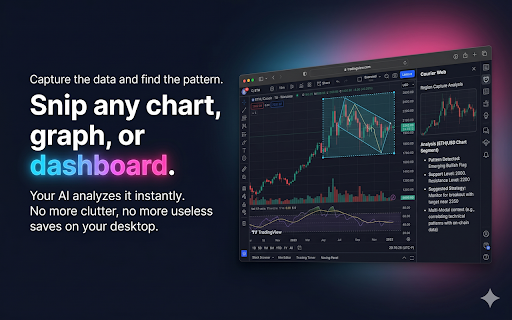
Capture a selected area of any webpage and send it to AI for interpretation.

Use the toolbar button or keyboard shortcut (Cmd+Shift+U on Mac / Ctrl+Shift+U on Windows) to capture a region instantly.

Common uses include reviewing interface designs, explaining code shown on screen, analyzing visual information, or generating feedback from images and layouts.


REUSABLE PROMPTS AND WORKFLOW TEMPLATES

Courier Web supports reusable prompts so common tasks can be completed consistently.

Users can build workflows for summarizing information, rewriting content, extracting action items, brainstorming ideas, or organizing research materials.

Templates reduce repetitive work and help standardize AI usage across daily tasks.


FLEXIBLE AI DESTINATION SUPPORT

Courier Web works alongside multiple AI tools and web destinations, allowing users to maintain a consistent workflow regardless of which AI assistant they prefer.

The extension focuses on connecting existing tools rather than replacing them.


PERFORMANCE AND PRIVACY FOCUSED DESIGN

Courier Web is designed with modern Chrome extension standards in mind.

• lightweight architecture
• minimal permissions
• no unnecessary background activity
• runs locally until you initiate an action

Users remain in control of what information is shared and when.


WHO USES COURIER WEB

• students organizing study material
• educators preparing learning resources
• professionals conducting research
• developers reviewing technical documentation
• writers improving drafts and communication
• creators transforming online content into structured outputs

Anyone who regularly combines browsing with AI assistance can benefit from a streamlined workflow.


EVERYDAY USE CASES

Courier Web helps users:

• summarize long articles quickly
• convert YouTube videos into notes
• analyze screenshots or visual content
• rewrite emails and documents
• extract key insights from research
• access AI tools instantly via the side panel without losing your place
• organize information without switching tabs

The extension reduces friction between discovering information online and working with AI.


WHY COURIER WEB IS DIFFERENT

Many AI extensions add interfaces that interrupt your browsing. Courier Web's side panel is designed to complement your workflow — staying out of the way until you need it.

Courier Web focuses on workflow integration. It brings AI directly into the browsing experience so users can interact with information naturally, without changing how they already work online.


INSTALL COURIER WEB

Courier Web helps transform browsing into an efficient AI-assisted workflow.

Capture information faster, reduce repetitive steps, and make better use of AI while staying focused on your work.

Install Courier Web to streamline how you learn, research, and create on the web.


LANGUAGE SUPPORT

Multilingual UI: English, Spanish, Portuguese (Brazil), German, Japanese, and French (with English fallback).

Spanish: Interfaz multilingüe: inglés, español, portugués (Brasil), alemán, japonés y francés (con respaldo en inglés).

Portuguese (Brazil): Interface multilíngue: inglês, espanhol, português (Brasil), alemão, japonês e francês (com fallback em inglês).

German: Mehrsprachige Oberfläche: Englisch, Spanisch, Portugiesisch (Brasilien), Deutsch, Japanisch und Französisch (mit Englisch als Fallback).

Japanese: 多言語UI対応:英語、スペイン語、ポルトガル語(ブラジル)、ドイツ語、日本語、フランス語(未翻訳部分は英語で表示)。

French: Interface multilingue : anglais, espagnol, portugais (Brésil), allemand, japonais et français (avec repli en anglais).
🚀 THE ONLY EXTENSION COMBINING VERTICAL TABS + AI SIDEBAR + LOCAL MODELS

Courier Web is the all-in-one productivity extension that brings vertical tab management, AI chat, and browser automation together. While other extensions just add AI chat, Courier Web gives you everything you need in one tool.


✨ WHAT MAKES COURIER WEB DIFFERENT

🗂️ VERTICAL TAB MANAGEMENT
See all your tabs in a clean sidebar—no more squinting at tiny horizontal tabs.
- Search across dozens of tabs instantly
- Pin important tabs
- Save and restore workspaces
- Recently closed tabs recovery

Most AI sidebar extensions ignore tab chaos. Courier Web solves it.

🤖 AI CHAT WITH 11 PROVIDERS + LOCAL MODELS
Access ChatGPT, Claude, Gemini, DeepSeek, Groq, and other cloud AI providers—or use local browser models for complete privacy.
- Switch between models instantly
- Local models run 100% offline (no data leaves your device)
- No subscriptions required for local AI
- Sidebar stays open while you browse

Privacy matters: Your data stays yours with local models.

🎬 YOUTUBE TRANSCRIPT CAPTURE
Extract full transcripts from any YouTube video with one click.
- Send transcripts to AI for summaries
- Generate study notes from lectures
- Custom AI prompts for videos
- Perfect for learning and research

Turn hours of video into minutes of insights.

📸 TEXT & IMAGE CAPTURE
Highlight text anywhere and right-click to send to AI. Capture screenshots and analyze with AI vision.
- Highlight → right-click → instant AI analysis
- Screenshot any region
- AI vision analyzes images, charts, code
- Works on any website

No more copy-paste between tabs.

🧩 BROWSE MODE WIDGETS
Unique productivity widgets built into the sidebar:
- Spotify, Gmail, Calendar integration
- Weather widget
- Custom app shortcuts
- All accessible without leaving your page

🔒 Local: Browser-based models (private, offline, free)


💡 HOW TO GET STARTED

1. Install and open with Ctrl+Shift+Period (Cmd on Mac)
2. Follow the interactive tutorial
3. Choose cloud or local AI
4. Start working smarter


📌 REAL WORKFLOWS

Research: Vertical tabs organize 30+ sources → highlight key passages → send to AI → get instant analysis

Learning: Extract YouTube transcript → send to AI → generate study guide → all in one sidebar

Writing: Draft in Google Docs → highlight paragraph → right-click → AI improves → paste back

Coding: Screenshot error → send to AI vision → get explanation and fix

Tab Management: Search 50+ tabs → find anything instantly → save workspace for later


🔐 PRIVACY & PERFORMANCE

- Minimal permissions (only what's needed)
- Local models keep data on your device
- Lightweight architecture
- You control what's shared and when


🌍 MULTILINGUAL

Full UI in English, Spanish, Portuguese (Brazil), German, Japanese, French


🆓 FREE TO USE

All core features free. Optional Pro for power users.


📬 SUPPORT

Questions? Visit courierweb.net or leave a review.


━━━━━━━━━━━━━━━━━━━━━━━━━━━━━━━


WHY COURIER WEB INSTEAD OF OTHER AI SIDEBARS?

Most extensions give you AI chat. That's it. We give you the tools to work efficient and proficient.

Courier Web gives you AI chat + vertical tabs + YouTube transcripts + widgets + local models + workspace management.

One extension. Everything you need.
- Apr 27, 2026short_description
Send text, screenshots & YouTube transcripts to ChatGPT, Claude, Gemini, Grok, DeepSeek & more. Smart Bar & Sidepanel AI Assistant.
All-in-one AI Hub: ChatGPT, Claude, Gemini + local models. Vertical tabs, YouTube transcripts, text and image capture.
Permissions & access
- Permissions
- activeTabalarmsbookmarksclipboardReadclipboardWritecontextMenushistoryidentityidlemanagementnotificationsoffscreenpageCapturesessionssidePanelscriptingstoragetabsdeclarativeNetRequestdeclarativeNetRequestWithHostAccess
- Host access
- http://*/*, https://*/*, http://127.0.0.1/*, http://localhost/*, https://cdn.jsdelivr.net/*, https://api.openai.com/*, https://api.anthropic.com/*, https://generativelanguage.googleapis.com/*, https://api.deepseek.com/*, https://api.mistral.ai/*, https://api.moonshot.cn/*, https://api.perplexity.ai/*, https://api.groq.com/*, https://openrouter.ai/*, https://api.openrouter.ai/*, https://api.x.ai/*, https://api-inference.huggingface.co/*, https://*.hf.space/*, https://image.pollinations.ai/*, https://api.z.ai/*, https://open.er-api.com/*, https://translate.googleapis.com/*, https://translate.google.com/*, https://*.claude.ai/*, https://*.deepseek.com/*, https://chat.deepseek.com/*, https://chat.mistral.ai/*, https://*.mistral.ai/*, https://chat.openai.com/*, https://chatgpt.com/*, https://claude.ai/*, *://gemini.google.com/*, https://*.googlevideo.com/*, https://googlevideo.com/*, *://*.youtube.com/*, *://m.youtube.com/*, *://youtube.com/*, https://text.pollinations.ai/*
Screenshots



About
🚀 THE ONLY EXTENSION COMBINING VERTICAL TABS + AI SIDEBAR + LOCAL MODELS

Courier Web is the all-in-one productivity extension that brings vertical tab management, AI chat, and browser automation together. While other extensions just add AI chat, Courier Web gives you everything you need in one tool.


✨ WHAT MAKES COURIER WEB DIFFERENT

🗂️ VERTICAL TAB MANAGEMENT
See all your tabs in a clean sidebar—no more squinting at tiny horizontal tabs.
- Search across dozens of tabs instantly
- Pin important tabs
- Save and restore workspaces
- Recently closed tabs recovery

Most AI sidebar extensions ignore tab chaos. Courier Web solves it.

🤖 AI CHAT WITH 11 PROVIDERS + LOCAL MODELS
Access ChatGPT, Claude, Gemini, DeepSeek, Groq, and other cloud AI providers—or use local browser models for complete privacy.
- Switch between models instantly
- Local models run 100% offline (no data leaves your device)
- No subscriptions required for local AI
- Sidebar stays open while you browse

Privacy matters: Your data stays yours with local models.

🎬 YOUTUBE TRANSCRIPT CAPTURE
Extract full transcripts from any YouTube video with one click.
- Send transcripts to AI for summaries
- Generate study notes from lectures
- Custom AI prompts for videos
- Perfect for learning and research

Turn hours of video into minutes of insights.

📸 TEXT & IMAGE CAPTURE
Highlight text anywhere and right-click to send to AI. Capture screenshots and analyze with AI vision.
- Highlight → right-click → instant AI analysis
- Screenshot any region
- AI vision analyzes images, charts, code
- Works on any website

No more copy-paste between tabs.

🧩 BROWSE MODE WIDGETS
Unique productivity widgets built into the sidebar:
- Spotify, Gmail, Calendar integration
- Weather widget
- Custom app shortcuts
- All accessible without leaving your page

🔒 Local: Browser-based models (private, offline, free)


💡 HOW TO GET STARTED

1. Install and open with Ctrl+Shift+Period (Cmd on Mac)
2. Follow the interactive tutorial
3. Choose cloud or local AI
4. Start working smarter


📌 REAL WORKFLOWS

Research: Vertical tabs organize 30+ sources → highlight key passages → send to AI → get instant analysis

Learning: Extract YouTube transcript → send to AI → generate study guide → all in one sidebar

Writing: Draft in Google Docs → highlight paragraph → right-click → AI improves → paste back

Coding: Screenshot error → send to AI vision → get explanation and fix

Tab Management: Search 50+ tabs → find anything instantly → save workspace for later


🔐 PRIVACY & PERFORMANCE

- Minimal permissions (only what's needed)
- Local models keep data on your device
- Lightweight architecture
- You control what's shared and when


🌍 MULTILINGUAL

Full UI in English, Spanish, Portuguese (Brazil), German, Japanese, French


🆓 FREE TO USE

All core features free. Optional Pro for power users.


📬 SUPPORT

Questions? Visit courierweb.net or leave a review.


━━━━━━━━━━━━━━━━━━━━━━━━━━━━━━━


WHY COURIER WEB INSTEAD OF OTHER AI SIDEBARS?

Most extensions give you AI chat. That's it. We give you the tools to work efficient and proficient.

Courier Web gives you AI chat + vertical tabs + YouTube transcripts + widgets + local models + workspace management.

One extension. Everything you need.
Technical
- Version
- 1.13.4
- Manifest
- V3
- Size
- 3.96MiB
- Min Chrome
- 88
- Languages
- 6
- Featured
- Yes
Metadata
- ID
- mpnccpidfbpfdnognccmgknoefpakiea
- Developer ID
- u9d287ac9e9f32c770c55b69de9ec3bd9
- Developer Email
- [email protected]
- Created
- Feb 11, 2026
- Last Updated (Store)
- May 4, 2026
- Last Scraped
- Jun 14, 2026
- Website
- courierweb.net
- Support URL
- https://courierweb.net/support
- Privacy Policy
- https://courierweb.net/privacy
Similar extensions
Alternatives to Courier Web: AI Sidebar + Vertical Tabs Manager, ranked by description similarity.

Chat with Ai (gpt ,grok ,claude,gemini)
Open ChatGPT, DeepSeek, Gemini, Claude, Grok in sidebar, for explain, summarize, & Fix Grammer.
106
★ 5.0

AI Side Panel
Easily access AI sites via side panel
3.0K
★ 4.8

My Clever AI - AI assistant & AI chat
Select any content on a web page and discuss it with AI assistant
58

CleeqAI: Read, Write, Research, Tweet Smarter with AI
Summarize pages, get voice summaries, chat with screenshots, understand data and research faster with ChatGPT, Claude & Gemini.
43
★ 5.0

Chat with all AI models (Gemini, Claude, DeepSeek…) & AI Agents | AITOPIA
AI Agent Marketplace & AI Sidebar with all AI models (Gemini, Claude, DeepSeek & more) and hundreds of AI Agents
1.0M
★ 4.9

Bring ChatGPT & Claude to Every Text Box | Clico
Clico brings AI directly into Google Docs, Gmail, and every text box, so you can work faster without switching tabs.
4.0K
★ 4.7

AI Translation
Generate AI translation to read global content. Translate English into 100+ languages with natural, fast and accurate ai translator.
4.0K
★ 4.9

GPT Quicker
Excellence GPT assistant with useful extensions and powerful prompts. Use ChatGPT, Claude, Bard, Bing anywhere online.
152
★ 3.7
Data sourced from the Chrome Web Store · last verified Jun 14, 2026.