
Thread Map
ThreadMap organizes long AI conversations into structured, navigable knowledge.
As of June 2026, Thread Map has 8 users and a 5.00/5 rating from 2 reviews in the Functionality & UI category.
Usersup 60.0 percent+60.0%
8
8
Ratingno change0%
5.00
2 reviews
Reviewsno change0%
2
Version
1.0.0
Manifest V3
History
8 snapshotsTracking since Apr 1, 2026.
View as table
| Date | Users | Rating | Reviews | Version |
|---|---|---|---|---|
| Apr 1, 2026 | 5 | 5.00 | 2 | 1.0.0 |
| Apr 10, 2026 | 6 | 5.00 | 2 | 1.0.0 |
| Apr 20, 2026 | 8 | 5.00 | 2 | 1.0.0 |
| Apr 25, 2026 | — | 5.00 | 2 | 1.0.0 |
| May 9, 2026 | 9 | 5.00 | 2 | 1.0.0 |
| May 20, 2026 | 11 | 5.00 | 2 | 1.0.0 |
| May 26, 2026 | 8 | 5.00 | 2 | 1.0.0 |
| Jun 2, 2026 | 10 | 5.00 | 2 | 1.0.0 |
| Now | 8 | 5.00 | 2 | 1.0.0 |
Permissions & access
- Permissions
- storage
- Host access
- None declared
Screenshots


About
Thread Map — Navigate Long AI Conversations Effortlessly

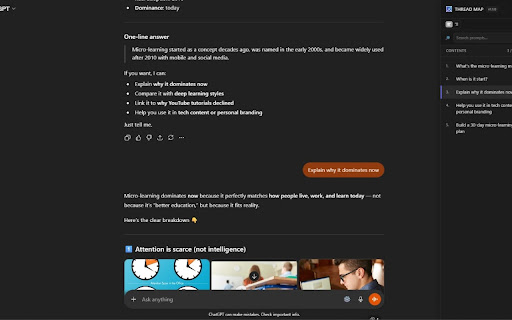
Thread Map transforms long AI chats into a structured, easy-to-navigate conversation map. Instantly jump between your prompts, find key questions, and keep track of complex discussions with an automatic Table of Contents built directly from your messages.

Whether you're researching, coding, studying, or brainstorming, Thread Map helps you stay oriented in lengthy AI conversations.
Supported Platforms

Thread Map works seamlessly across the most popular AI chat platforms:

ChatGPT

Claude

Gemini

The extension automatically adapts to each platform using a smart multi-platform architecture.

Key Features
Automatic Conversation Map

Thread Map scans your prompts and generates a numbered Table of Contents from the first line of each message, making it easy to see the structure of your entire conversation at a glance.

Jump Instantly Between Prompts

Click any item in the list to smoothly scroll directly to the corresponding message. A visual highlight helps you quickly locate the section you selected.

Live Updates

The table of contents updates automatically as you continue chatting — no refresh required.

Search Your Prompts

Quickly filter the conversation map using the built-in search field to find questions, topics, or ideas instantly.

Active Prompt Highlighting

As you scroll through a conversation, Thread Map automatically highlights the prompt you are currently viewing so you always know where you are in the discussion.

Scroll Progress Indicator

See your position within the conversation with a live indicator showing the current prompt number relative to the total prompts.

Example:

12 / 37 prompts
Keyboard Shortcut

Toggle the panel instantly with:

Alt + T
Smart Floating Panel

Thread Map adds a clean floating panel to the page that can be opened or hidden anytime.

Features include:

Slide-in navigation panel

Draggable floating toggle button

Adjustable panel width

Left or right panel docking

Smooth UI animations

The interface is fully isolated using Shadow DOM so it never interferes with the host website.

Designed for Long Conversations

Thread Map is especially useful when conversations become long and complex, such as:

coding discussions

research sessions

debugging conversations

study notes

brainstorming sessions

Instead of scrolling endlessly, you can jump directly to the prompt you need.

Intelligent Language Support

Thread Map automatically detects reading direction and supports both:

Left-to-Right (LTR)

Right-to-Left (RTL)

You can also manually switch direction when needed.

Customizable Settings

Customize how Thread Map behaves:

Enable or disable the extension

Toggle scroll highlight animation

Set maximum label length

Choose light, dark, or automatic theme

Enable automatic panel opening

Adjust panel width

Dock panel to the left or right

Privacy First

Thread Map was built with privacy in mind.

No data collection

No analytics or tracking

No external servers

All processing happens locally in your browser

Your conversations never leave your device.

Built for Reliability

Thread Map uses a modular architecture and unit-tested core components to remain stable across different AI platforms and evolving website layouts.

FEATURES

Perfect For

Thread Map is ideal for:

developers

researchers

students

prompt engineers

anyone working with long AI conversations

If you frequently use AI assistants and find yourself scrolling endlessly through chats, Thread Map will dramatically improve your workflow.

Version

Current version: 1.0.0
Technical
- Version
- 1.0.0
- Manifest
- V3
- Size
- 13.37MiB
- Min Chrome
- 88
- Languages
- 1
- Featured
- No
Metadata
- ID
- mphdagogccfkkjmjmepaipodckefbaem
- Developer ID
- u662c4b3ed1253a0b4da259cac1597960
- Developer Email
- [email protected]
- Created
- Mar 18, 2026
- Last Updated (Store)
- Mar 18, 2026
- Last Scraped
- Jun 8, 2026
- Website
- —
- Support URL
- —
Similar extensions
Alternatives to Thread Map, ranked by description similarity.

ChatMap: Timeline Navigator
Adds a sidebar to navigate AI chats easily. Supports ChatGPT. Soon: Claude, Gemini & Grok. Browse your chat history faster.
3

MapHack
MapHack: The Pathfinder
8
★ 5.0

GPTBuddy
Adds a sidebar with quick links to all questions in a GPT conversation thread. Works with ChatGPT, Claude, Gemini and Perplexity
27
★ 5.0

SideThreadAI
Adds threaded conversations to ChatGPT and Gemini chats.
7

ChatGPT Message Navigator
Lists user's prompts in a ChatGPT chat thread for easy access and discovery.
8
★ 5.0

AI Chat TOC
Adds a Table of Contents to ChatGPT, Gemini, Perplexity, Claude, and Grok
104
★ 5.0

AI Chat Sidebar
View and navigate through all your chat prompts in a beautiful sidebar - works with Gemini and ChatGPT
25
★ 5.0

Conversation Titles for ChatGPT
Always see and copy your ChatGPT conversation title. Configurable click shortcuts for different copy formats.
3
Data sourced from the Chrome Web Store · last verified Jun 8, 2026.