
Text Tools
Handy text tools a click away
As of May 2026, Text Tools has 3,000 users and a 4.03/5 rating from 30 reviews in the Productivity category.
Usersno change0%
3.0K
3,000
Ratingno change0%
4.03
30 reviews
Reviewsno change0%
30
Version
1.0.27
Manifest V3
History
1 snapshotsTracking since Apr 30, 2026.
View as table
| Date | Users | Rating | Reviews | Version |
|---|---|---|---|---|
| Apr 30, 2026 | 3.0K | 4.03 | 30 | 1.0.27 |
| Now | 3.0K | 4.03 | 30 | 1.0.27 |
Permissions & access
- Permissions
- None declared
- Host access
- None declared
Screenshots
About
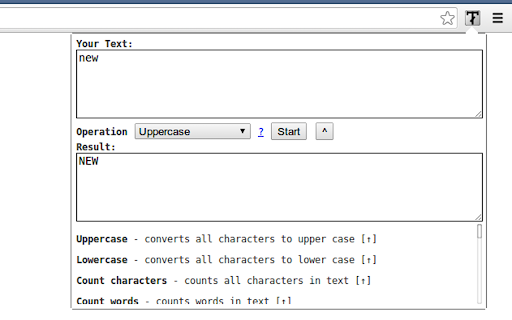
Handy text tools including:

- Uppercase - converts all characters to upper case
- Title Case - capitalizes every first character of word
- Lowercase - converts all characters to lower case
- Count characters - counts all characters in text
- Count words - counts words in text
- Count lines - counts new lines in text
- Rotate 13 - Moves each character with 13 positions forward in the ASCII table
- Sort lines alpha (case insensitive) - Sorts text lines alphabetically ignoring character case
- Sort lines alpha - Sorts text lines alphabetically
- Word frequency - How many times each word is used
- Character frequency - How many times each character is used
- Column from table - Allows you to get text column from HTML table. Copy and paste the table content in the text field and type the column number you want to extract then press Start
- Trim lines start - Removes whitespace from beginning of lines
- Trim lines end - Removes whitespace from end of lines
- Trim lines - Removes whitespace from beginning and end of lines
- Replace text with new line - Replaces string with new line
- Replace text - Replaces one string with another
- Format JSON - Pretty format JSON string
- URLEncode - Encode string as URL safe string
- URLDecode - Decode URL safe string as regular string
- base64encode - Encode text as base64
- base64decode - Decode base64 sting
- Add line numbers - Add line number before every line of text
- Split text - Splits text by separator
- Reverse text - Reverses text
- Generate numbers - Generates numbers withing the provided range
- Unix to date - Converts UNIX timestamp to Datetime string
- Identify Hash - Try to identify hash string
- Prefix/Suffix lines - Adds prefix and/or suffix to each line of the text
- Format Numbers - Format numbers according to the current browser locale
- Underscore - adds underscore to the text
- Strikeout - strikes out the text
- Shuffle - Shuffle the lines of the text
- Remove duplicate lines - Removes duplicate lines from the text
- Expand placeholders template

===== CHANGELOG =====

Added replace regexp; Added expand template

1.0.27 - Added function to format US phone numbers
1.0.26 - Added function to strip non-alphanumeric characters
1.0.25 - Migrated to manifest v3
1.0.24 - Removed automatic clipboard support
1.0.23 - Removed GoogleAnalytics
1.0.22 - Added slugify function
1.0.21 - Added Indent lines with spaces; Result is auto-selected after the operation
1.0.20 - Added replace regexp; Added expand template
1.0.19 - Added Remove empty lines
1.0.18 - Removed dependency on jQuery;
1.0.17 - Added trim lines start and end as separate commands to trim white-space from the beginning or the end of each line
1.0.16 - Added Remove duplicate lines
1.0.15 - Added case insensitive line sort
1.0.13 - Added shuffle function
1.0.12 - Added underscore and strikeout functions
1.0.11 - Save/Restore last used tool;
1.0.10 - Added auto number formatting;
1.0.9 - Added prefix/suffix to each line function;
1.0.8 - Fixed replace; Added replace with new line;
1.0.7 - Strip (most of) punctuation from word frequency;
1.0.6 - Frequency lists are now sorted
1.0.5 - Added Title Case convert. Your text is populated from the clipboard;
1.0.4 - Added Unix timestamp to date converter;
1.0.3 - Cleaner icon. Removed links from descriptions;
1.0.2 - Small interface improvements;
1.0.1 - Working Trim lines;
Technical
- Version
- 1.0.27
- Manifest
- V3
- Size
- 13.13KiB
- Min Chrome
- 88
- Languages
- 1
- Featured
- Yes
Metadata
- ID
- mpcpnbklkemjinipimjcbgjijefholkd
- Developer ID
- u49d48312eafd6bc55ed7f6588dfc5d49
- Developer Email
- [email protected]
- Created
- Jan 5, 2014
- Last Updated (Store)
- Dec 11, 2023
- Last Scraped
- May 29, 2026
- Support URL
- —
- Privacy Policy
- —
Similar extensions
Alternatives to Text Tools, ranked by description similarity.

Text Utils
Various text utilities to help with daily tasks and improve your productivity.
71

Text Toolkit Pro - All Text Operations (Fast & Easy)
All text operations: case conversion, encoding, hashing, JSON, analysis, time conversion & more. Fast & easy toolkit.
81
★ 5.0

Text Utility Tool
Advanced text toolbox for analysts, devs, and researchers
1

Quick Text Case Converter
Convert text to lowercase, UPPERCASE, Title Case, Sentence case, bold, strikethrough and more directly from the context menu.
117
★ 5.0

Right Click Text Format
Speed up text formatting with quick case changes, whitespace management, and more.
1.0K
★ 4.3

Clippy
Automatically saves your clipboard history. Access, search, and manage everything you've copied.
9

Text Manipulator
Save text snippets from any page. Clean duplicates, sort lines, extract columns, regex find-replace. Built-in text library.
45
★ 5.0

Mark It Down — Markdown Editor & Web Clipper
Clip pages, AI chats, and RSS articles to Markdown. Edit in New Tab & Side Panel. Export PDF, DOCX, PNG. Local-first.
99
Data sourced from the Chrome Web Store · last verified May 29, 2026.