
ZonovAI Investigation Agent
Injects report panel into hospital portals (any domain) to generate and save lab/radiology PDFs, with voice and camera support.
As of June 2026, ZonovAI Investigation Agent has 2 users in the Developer Tools category.
Usersno change0%
2
2
Ratingno change0%
—
— reviews
Reviewsno change0%
—
Version
1.1.0
Manifest V3
90-day change · In the last 90 days this extension 1 version update, changed permissions.
History
3 snapshotsTracking since May 29, 2026.
Not enough history yet for this metric — the chart fills in as we collect more snapshots.
View as table
| Date | Users | Rating | Reviews | Version |
|---|---|---|---|---|
| May 29, 2026 | — | — | — | 1.0.0 |
| Jun 4, 2026 | — | — | — | 1.0.0 |
| Jun 10, 2026 | — | — | — | 1.1.0 |
| Now | 2 | — | — | 1.1.0 |
Changelog
- Jun 4, 2026description
ZonovAI Investigation Agent helps healthcare professionals generate formatted lab and radiology investigation reports directly from their browser — on any hospital or clinic website.

──────────────────────────────────────
WHAT IT DOES
──────────────────────────────────────

The extension adds a floating panel to your existing hospital or clinic web portal. From this panel you can:

▸ AUTO-FILL PATIENT DETAILS
Reads the patient information already visible on your current web page (name, age, UHID) — no retyping needed.

▸ SELECT TEST TYPE
Search and choose from a built-in library of common tests: CBC, KFT, LFT, TSH, Blood Sugar, Urine Routine, Electrolytes, and more.

▸ VOICE ENTRY
Click the microphone button and speak your patient details or test values. Your speech is transcribed and fills the form automatically.

▸ CAPTURE LAB MACHINE SCREENS
Take a photo using your webcam or upload an image of your lab analyser display. The extension extracts test values from the image and fills the report fields for you.

▸ GENERATE & DOWNLOAD PDF REPORTS
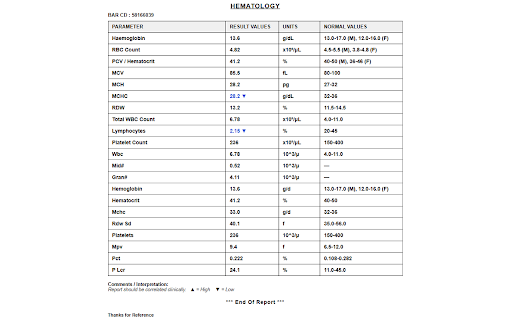
One click produces a professionally formatted A4 PDF report — with your hospital's logo, name, address, patient details, test results table, normal value ranges, and high/low flags.

──────────────────────────────────────
WHY INSTALL IT
──────────────────────────────────────

Lab and radiology staff spend significant time manually re-entering test values from analysers into report formats. This extension eliminates that effort — capture values directly from the machine screen or fill them by voice, then instantly download a report that matches your hospital's branding.

Works on any hospital management system or clinic web portal. No setup or IT changes required on the hospital side.

──────────────────────────────────────
KEY FEATURES
──────────────────────────────────────
Works on any website — compatible with all hospital and clinic portals
Auto-reads patient info (name, UHID, age, gender) from the current page
Built-in templates: CBC, KFT, LFT, TSH, RFT, Urine Routine, and more
Voice input for hands-free data entry
 Webcam capture and image upload to read values from lab machine displays
One-click A4 PDF download with your hospital's logo and branding
High / Low value flags with colour indicators in the report
Patient details: Name, UHID, Age/Gender, Doctor, Ward/Bed No, Specimen Type
Secure — all data transmitted over HTTPS, not stored after report is generated
License-key based — each hospital gets its own branded configuration

──────────────────────────────────────
DESIGNED FOR
──────────────────────────────────────

Pathologists, lab technicians, radiologists, and front-desk staff at hospitals, clinics, and diagnostic centres.

──────────────────────────────────────
DATA & PRIVACY
──────────────────────────────────────

Patient data is read from the current tab only when you open the panel. It is sent over HTTPS to generate your requested report and is not retained after delivery. Voice transcription uses Deepgram (only when you use the microphone feature). Full privacy policy:

https://zonovai.vercel.app/privacy-policy-2
ZonovAI Investigation Agent helps healthcare professionals generate formatted lab and radiology investigation reports directly from their browser on any hospital or clinic website.

──────────────────────────────────────
WHAT IT DOES
──────────────────────────────────────

The extension adds a floating panel to your existing hospital or clinic web portal. From this panel you can:

▸ AUTO-FILL PATIENT DETAILS
Reads the patient information already visible on your current web page (name, age, UHID) — no retyping needed.

▸ SELECT TEST TYPE
Search and choose from a built-in library of common tests: CBC, KFT, LFT, TSH, Blood Sugar, Urine Routine, Electrolytes, and more.

▸ VOICE ENTRY
Click the microphone button and speak your patient details or test values. Your speech is transcribed and fills the form automatically.

▸ CAPTURE LAB MACHINE SCREENS
Take a photo using your webcam or upload an image of your lab analyser display. The extension extracts test values from the image and fills the report fields for you.

▸ GENERATE & DOWNLOAD PDF REPORTS
One click produces a professionally formatted A4 PDF report — with your hospital's logo, name, address, patient details, test results table, normal value ranges, and high/low flags.

──────────────────────────────────────
WHY INSTALL IT
──────────────────────────────────────

Lab and radiology staff spend significant time manually re-entering test values from analysers into report formats. This extension eliminates that effort — capture values directly from the machine screen or fill them by voice, then instantly download a report that matches your hospital's branding.

Works on any hospital management system or clinic web portal. No setup or IT changes required on the hospital side.

──────────────────────────────────────
KEY FEATURES
──────────────────────────────────────

Works on any website — compatible with all hospital and clinic portals
Auto-reads patient info (name, UHID, age, gender) from the current page
Built-in templates: CBC, KFT, LFT, TSH, RFT, Urine Routine, and more
 Voice input for hands-free data entry
Webcam capture and image upload to read values from lab machine displays
One-click A4 PDF download with your hospital's logo and branding
High / Low value flags with colour indicators in the report
Patient details: Name, UHID, Age/Gender, Doctor, Ward/Bed No, Specimen Type
 Secure — all data transmitted over HTTPS, not stored after report is generated
License-key based — each hospital gets its own branded configuration

──────────────────────────────────────
DESIGNED FOR
──────────────────────────────────────

Pathologists, lab technicians, radiologists, and front-desk staff at hospitals, clinics, and diagnostic centres.

──────────────────────────────────────
DATA & PRIVACY
──────────────────────────────────────

Patient data is read from the current tab only when you open the panel. It is sent over HTTPS to generate your requested report and is not retained after delivery. Voice transcription uses Deepgram (only when you use the microphone feature). Full privacy policy: https://zonovai.vercel.app/privacy-policy-2
- Jun 4, 2026permissions
activeTab, storage, downloads
activeTab, scripting, storage, downloads
Permissions & access
- Permissions
- activeTabscriptingstoragedownloads
- Host access
- https://zonov.ai/*, https://*.zonov.ai/*, https://ext-inves.zonov.ai/*, http://*/*, https://*/*
Screenshots


About
ZonovAI Investigation Agent helps healthcare professionals generate formatted lab and radiology investigation reports directly from their browser on any hospital or clinic website.

──────────────────────────────────────
WHAT IT DOES
──────────────────────────────────────

The extension adds a floating panel to your existing hospital or clinic web portal. From this panel you can:

▸ AUTO-FILL PATIENT DETAILS
Reads the patient information already visible on your current web page (name, age, UHID) — no retyping needed.

▸ SELECT TEST TYPE
Search and choose from a built-in library of common tests: CBC, KFT, LFT, TSH, Blood Sugar, Urine Routine, Electrolytes, and more.

▸ VOICE ENTRY
Click the microphone button and speak your patient details or test values. Your speech is transcribed and fills the form automatically.

▸ CAPTURE LAB MACHINE SCREENS
Take a photo using your webcam or upload an image of your lab analyser display. The extension extracts test values from the image and fills the report fields for you.

▸ GENERATE & DOWNLOAD PDF REPORTS
One click produces a professionally formatted A4 PDF report — with your hospital's logo, name, address, patient details, test results table, normal value ranges, and high/low flags.

──────────────────────────────────────
WHY INSTALL IT
──────────────────────────────────────

Lab and radiology staff spend significant time manually re-entering test values from analysers into report formats. This extension eliminates that effort — capture values directly from the machine screen or fill them by voice, then instantly download a report that matches your hospital's branding.

Works on any hospital management system or clinic web portal. No setup or IT changes required on the hospital side.

──────────────────────────────────────
KEY FEATURES
──────────────────────────────────────

Works on any website — compatible with all hospital and clinic portals
Auto-reads patient info (name, UHID, age, gender) from the current page
Built-in templates: CBC, KFT, LFT, TSH, RFT, Urine Routine, and more
 Voice input for hands-free data entry
Webcam capture and image upload to read values from lab machine displays
One-click A4 PDF download with your hospital's logo and branding
High / Low value flags with colour indicators in the report
Patient details: Name, UHID, Age/Gender, Doctor, Ward/Bed No, Specimen Type
 Secure — all data transmitted over HTTPS, not stored after report is generated
License-key based — each hospital gets its own branded configuration

──────────────────────────────────────
DESIGNED FOR
──────────────────────────────────────

Pathologists, lab technicians, radiologists, and front-desk staff at hospitals, clinics, and diagnostic centres.

──────────────────────────────────────
DATA & PRIVACY
──────────────────────────────────────

Patient data is read from the current tab only when you open the panel. It is sent over HTTPS to generate your requested report and is not retained after delivery. Voice transcription uses Deepgram (only when you use the microphone feature). Full privacy policy: https://zonovai.vercel.app/privacy-policy-2
Technical
- Version
- 1.1.0
- Manifest
- V3
- Size
- 111KiB
- Min Chrome
- 88
- Languages
- 1
- Featured
- No
Metadata
- ID
- mpbolpllojffpcnkgdochblgcaclhcco
- Developer ID
- u78d9feb53b6ef4170df8f34f4db88ff1
- Developer Email
- [email protected]
- Created
- May 28, 2026
- Last Updated (Store)
- Jun 1, 2026
- Last Scraped
- Jun 10, 2026
- Website
- —
- Support URL
- —
- Privacy Policy
- https://zonovai.vercel.app/privacy-policy-2
Data sourced from the Chrome Web Store · last verified Jun 10, 2026.