
editGPT
Easily proofread, edit, and track changes to your content in ChatGPT.
As of June 2026, editGPT has 40,000 users and a 4.16/5 rating from 49 reviews in the Workflow & Planning category.
Usersno change0%
40.0K
40,000
Ratingno change0%
4.16
49 reviews
Reviewsno change0%
49
Version
1.0.31
Manifest V3
History
1 snapshotsTracking since Apr 18, 2026.
View as table
| Date | Users | Rating | Reviews | Version |
|---|---|---|---|---|
| Apr 18, 2026 | 40.0K | 4.16 | 49 | 1.0.31 |
| Now | 40.0K | 4.16 | 49 | 1.0.31 |
Permissions & access
- Permissions
- None declared
- Host access
- https://chatgpt.com/*
Screenshots


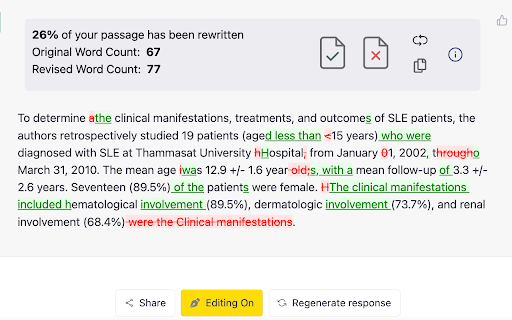
About
Easily proofread, edit, and track changes to your content in ChatGPT with editGPT's web app and chrome extension.

IMPORTANT: For the most powerful AI proofreader experience, use the full web app at www.editgpt.app

If you want to edit with editGPT in ChatGPT, download the chrome extension.

editGPT Chrome Extension Instructions
1. Install the extension
2. Go to the chatGPT website. The editGPT extension only works on https://chat.openai.com/.
Note: For the most powerful AI proofreader experience, go to www.editgpt.app
3. Type in a prompt that includes the text you want to edit, for example: "Proofread this: [insert your text here]."
3. Wait for the response! The  'editGPT' button only appears after the response is complete.
5. Click on the button to turn on editing mode.

With the chrome extension, the  'editGPT' button will appear in the top corner of ChatGPT after a message is sent.


Track Changes

Select (highlight) the text and press Accept or Reject button to accept or reject changes in the highlighted portion.
Reset button will reset to original.
Markup button will show/hide markup.
Clipboard button will copy your text including any changes you've made to clipboard (without markup).

Example Prompts

These four prompts typically increase how intrusive chatGPT's editing is.
1. Proofread this but only fix grammar:
2. Proofread this:
3. Proofread this, lightly improving clarity and flow:
5. Proofread this, improving clarity and flow:

Other prompts:
Proofread this, significantly improving clarity and flow:
Rewrite this, improving prose:
Proofread these bullet points from my CV, keep it in CV language:
Proofread these bullet points:

Note: Everything after 'Proofread' or 'Rewrite' and before the first colon (:) will be considered a prompt and removed from the text comparison
Technical
- Version
- 1.0.31
- Manifest
- V3
- Size
- 54.36KiB
- Min Chrome
- 88
- Languages
- 1
- Featured
- Yes
Metadata
- ID
- mognjodfeldknhobgbnkoomipkmlnnhk
- Developer ID
- uca336197c1a1c14439a922cf52b121c3
- Developer Email
- [email protected]
- Created
- Feb 9, 2023
- Last Updated (Store)
- Nov 7, 2025
- Last Scraped
- Jun 3, 2026
- Website
- editgpt.app
- Support URL
- —
- Privacy Policy
- https://sites.google.com/view/editgpt-app/privacy-policy
Similar extensions
Alternatives to editGPT, ranked by description similarity.
ChatGPT Rewriter
Use ChatGPT to rewrite your texts
957
★ 2.0
FixThePrompt
Real-time feedback to write better AI prompts. Like Grammarly, but for prompts.
4

ChatGPT to Help
Get Instant Help Anywhere and Anytime with ChatGPT AI Assistant on Chrome
506
★ 4.6

Promptris - Prompt Builder & Manager for ChatGPT & Claude
Build prompts with blocks. Save them. Use them anywhere.
941
★ 4.6

PromptGPT
Easily save and load templates into ChatGPT. Copy pasting is outdated
40

GPT Based - A Powerful ChatGPT Prompt Generator
GPTBased is used to generate effective prompts for ChatGPT in a few simple steps
152
★ 4.2

StealthGPT
Undetectable AI writer and answer assistant, powered by StealthGPT
6.0K
★ 4.4

ChatGPT-Pro
A Chrome extension to display the token count for OpenAI chat messages.
171
★ 5.0
Data sourced from the Chrome Web Store · last verified Jun 3, 2026.