
IEability - Open in IE
Runs Internet Explorer (IE) in Chrome with IE Tab mode, supporting legacy websites, Java, ActiveX, Flash and enterprise systems.
As of June 2026, IEability - Open in IE has 200,000 users and a 4.23/5 rating from 140 reviews in the Productivity category.
Usersno change0%
200.0K
200,000
Ratingup 0.7 percent+0.7%
4.23
140 reviews
Reviewsup 13.8 percent+13.8%
140
Version
2.26.17.0
Manifest V3
90-day change · In the last 90 days this extension 2 version updates.
History
11 snapshotsTracking since Apr 16, 2026.
View as table
| Date | Users | Rating | Reviews | Version |
|---|---|---|---|---|
| Apr 16, 2026 | 200.0K | 4.20 | 123 | 2.26.14.0 |
| Apr 22, 2026 | 200.0K | 4.20 | 123 | 2.26.14.0 |
| Apr 25, 2026 | 200.0K | 4.17 | 124 | 2.26.15.0 |
| Apr 28, 2026 | 200.0K | 4.20 | 129 | 2.26.15.0 |
| May 7, 2026 | 200.0K | 4.21 | 130 | 2.26.15.0 |
| May 13, 2026 | 200.0K | 4.22 | 132 | 2.26.15.0 |
| May 18, 2026 | 200.0K | 4.23 | 134 | 2.26.15.0 |
| Jun 1, 2026 | 200.0K | 4.21 | 135 | 2.26.15.0 |
| Jun 6, 2026 | 200.0K | 4.22 | 136 | 2.26.15.0 |
| Jun 10, 2026 | 200.0K | 4.23 | 138 | 2.26.15.0 |
| Jun 20, 2026 | 200.0K | 4.24 | 139 | 2.26.15.0 |
| Now | 200.0K | 4.23 | 140 | 2.26.17.0 |
Permissions & access
- Permissions
- offscreentabscookiesstoragecontextMenusnativeMessagingdownloadsdownloads.opendeclarativeNetRequestWithHostAccess
- Host access
- <all_urls>
Screenshots

About
IEability integrates the Internet Explorer (IE) rendering engine directly into Chrome, allowing users to open web pages in IE Tab mode seamlessly, just like using a regular Chrome tab.

Access legacy websites, Silverlight, ActiveX, SharePoint, Flash and Java applications seamlessly in Chrome with IE Tab mode!

The ultimate Internet Explorer integration extension, enabling you to browse all websites in a single browser environment.

Ideal for: Enterprise users, developers, and anyone requiring IE compatibility without switching browsers.

### Key Features:

1. Advanced IE Tab Mode:
   - Instantly access legacy websites with the native IETab rendering engine.
   - Full support for IE versions (IE7 - IE11).
   - Perfect for banking, enterprise portals, and outdated web applications.

2. Smart Automation:
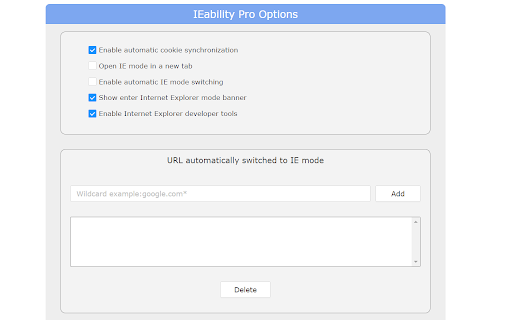
   - Automatically switch to IE Tab mode based on custom URL rules.
   - Seamless cookie synchronization between Chrome and IE.
   - Single sign-on support—no repeated logins required.

3. Enterprise-Grade Compatibility:
   - Complete support for ActiveX controls.
   - Full compatibility with Flash, Java, SharePoint, and Silverlight.
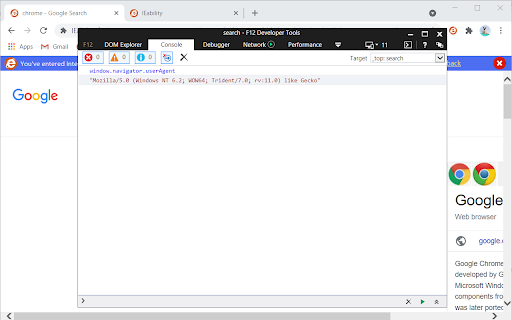
   - Includes built-in IE Developer Tools for efficient debugging.

4. Effortless User Experience:
   - Operates just like a standard Chrome tab.
   - Quick and smooth switching between Chrome and IE modes.
   - Clean and familiar interface for ease of use.

### Important Notes:

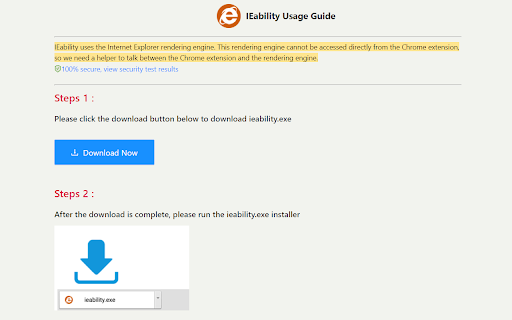
- A Windows-compatible helper application (ieability.exe) is required.
- Installation path: `C:\Users\[Username]\AppData\Local\ieability\ieability.exe`

### FAQ:

1. Why is ieability.exe necessary?
   It enables integration of the IE engine within Chrome, especially after NPAPI support was discontinued.

2. Is it safe?
   Yes, it is fully security-certified and virus-scanned. You can verify its safety at: (https://www.virustotal.com/gui/file/123437a7f07d96d245681620b4103af2e05b2dab3a7e22a6d987e734e975bcaf).

### License Information:

- Basic Version: Free forever.
- Premium Version: Unlocks advanced features for enhanced functionality.

For more details, view our Privacy Policy: (https://ieability.com/privacy.html)
Technical
- Version
- 2.26.17.0
- Manifest
- V3
- Size
- 1.14MiB
- Min Chrome
- 109
- Languages
- 3
- Featured
- Yes
Metadata
- ID
- moffahdcgnjnglbepimcggkjacdmpojc
- Developer ID
- u85c0054d3fbd2f32dc553170bf50a566
- Developer Email
- [email protected]
- Created
- May 6, 2021
- Last Updated (Store)
- Jun 20, 2026
- Last Scraped
- Jun 20, 2026
- Website
- ieability.com
- Support URL
- https://ieability.com
- Privacy Policy
- https://ieability.com/privacy.html
Similar extensions
Alternatives to IEability - Open in IE, ranked by description similarity.
IE Tab
Display web pages using IE within Chrome. Use Java, Silverlight, ActiveX, Sharepoint, and more.
4.0M
★ 4.3

Open in IE™
Open links in IE (Internet Explorer)
10.0K
★ 2.8

Easy Browse
Your Ultimate Web Browsing Companion
34
★ 5.0

Open New Tab
Automatically opens links in new tabs with whitelist support. Choose all websites or whitelist-only mode.
61
★ 5.0

Smart Tab Closer
Close all tabs with one click, with whitelist support
6
★ 5.0

SEO Extension
A simple SEO audit tool extension.
1

Absolute Enable Right Click & Copy Mv3
Unlock your browser's full power. Restore Right Click, Copy, Paste, and Text Selection on any website.
10.0K
★ 5.0

AccessPlus+
An AI powered browser extension for contextual web navigation and accessibility.
12
★ 5.0
Data sourced from the Chrome Web Store · last verified Jun 20, 2026.