PDF Wizardry Toolkit
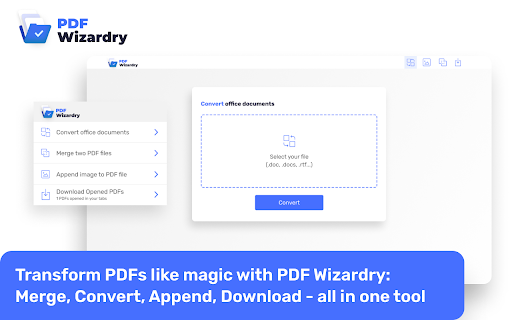
Transform PDFs like magic: Merge, Convert, Append, Download - all in one tool!
As of May 2026, PDF Wizardry Toolkit has 20,000 users and a 4.82/5 rating from 22 reviews in the Workflow & Planning category.
Usersup 100.0 percent+100.0%
20.0K
20,000
Ratingno change0%
4.82
22 reviews
Reviewsno change0%
22
Version
1.0.6
Manifest V3
90-day change · In the last 90 days this extension gained 10.0K users.
History
1 snapshotsTracking since May 17, 2026.
View as table
| Date | Users | Rating | Reviews | Version |
|---|---|---|---|---|
| May 17, 2026 | 10.0K | 4.82 | 22 | 1.0.6 |
| Now | 20.0K | 4.82 | 22 | 1.0.6 |
Permissions & access
- Permissions
- alarmsscriptingdownloadsstorage
- Host access
- <all_urls>
Screenshots
About
🔮📚 Introducing PDF Wizardry: The Ultimate Browser Extension for PDF Mastery! 🌟

Are you tired of struggling with PDF files, wishing for a simpler and more efficient way to handle them? Look no further! PDF Wizardry is here to revolutionize your PDF experience and empower you with a powerful set of tools. With just a click of a button, you'll unlock a world of possibilities to effortlessly transform PDFs into masterpieces.

🔑 Key Features:
✅ Convert DOCX and DOC files to PDF: Say goodbye to tedious formatting issues and let PDF Wizardry seamlessly convert your Word documents into professional-looking PDFs. Preserve fonts, layouts, and hyperlinks with ease, and effortlessly share your documents with anyone.

✅ Merge PDFs with ease: Combine multiple PDF files into a single, well-organized document. Whether you need to merge reports, contracts, or presentation slides, PDF Wizardry has got you covered. Simplify your workflow and enhance productivity like never before.

✅ Insert images into PDFs: Add a touch of visual appeal to your PDFs by effortlessly inserting images. Whether it's a company logo, product shots, or captivating illustrations, PDF Wizardry allows you to seamlessly integrate them into your documents. Impress your clients, colleagues, or readers with stunning visuals.

✅ Download opened PDFs: Sometimes, you come across a PDF that you urgently need to save, but the browser won't let you. With PDF Wizardry, you can effortlessly download any opened PDF directly to your device. No more frustration—simply click and save!

💼 Use Cases:

Students: Convert lecture notes, research papers, and assignments into PDF format, merge multiple PDFs into a single comprehensive document, and add relevant images for more engaging presentations.
Professionals: Easily transform important reports, proposals, and contracts into PDFs, merge multiple versions into one cohesive file, and enhance your documents with impactful visuals.
Small Business Owners: Streamline your document management by converting invoices, receipts, and agreements into PDFs, merging related documents, and adding your company logo or product images.
Content Creators: Convert your blog posts, articles, or e-books into PDF format, merge multiple chapters into one seamless document, and include captivating images for an enhanced reading experience.
With PDF Wizardry, the power to manipulate and enhance PDFs is at your fingertips. Say goodbye to complex software installations and embrace the simplicity of a browser extension. Boost your productivity, improve collaboration, and transform your PDFs like magic.

🌟 Get PDF Wizardry today and unlock the true potential of your PDF files! 🌟
Technical
- Version
- 1.0.6
- Manifest
- V3
- Size
- 1.0MiB
- Min Chrome
- 88.0
- Languages
- 54
- Featured
- No
Metadata
- ID
- moapkmgopcfpmljondihnidamjljhinm
- Developer ID
- uc477abbe52121ff1e33e2a90ea6b7213
- Developer Email
- [email protected]
- Created
- Jul 5, 2023
- Last Updated (Store)
- Aug 20, 2025
- Last Scraped
- May 31, 2026
- Website
- —
- Support URL
- —
Similar extensions
Alternatives to PDF Wizardry Toolkit, ranked by description similarity.
PDF SmartBox: Merge, Convert, Append
Effortlessly Manage PDFs: Merge, Convert, Append, and Download with Ease
30.0K
★ 4.9

Merge PDF
Merge PDF: The ultimate PDF merger for quick, seamless combination of files. Try it now and save time!
422

PDF Blender
Combine several PDF files together easily and for free. Merge multiple documents into single PDF while keeping your data private.
487
★ 3.0

PDF Quick Tools — Merge, Split & Rotate (Offline, Free)
Merge, split & rotate PDFs 100% offline and FREE. No uploads or watermarks. Instant downloads.
154
★ 5.0

Easy PDF Viewer
Efficiently View and Interact with PDFs: Easy Navigation, Zooming, and Annotations!
20.0K
★ 5.0

LuxPDF- Privacy-Focused PDF Processor
Comprehensive PDF processing toolkit with 15+ tools. All processing happens locally - your files never leave your device.
11

EZ PDF
Enhance your PDF experience with our all-in-one Chrome extension for converting, splitting, merging, and securing PDFs.
102

Swift PDF Merger: Merge PDFs Effortlessly
Swiftly merge PDFs with ease! Drag, drop, and arrange for seamless merging. Perfect for students, professionals, and more.
425
Data sourced from the Chrome Web Store · last verified May 31, 2026.