
Save All Images & Videos
Batch download high quality photos, videos, reels, stories from Instagram, X, Facebook, and more!
As of May 2026, Save All Images & Videos has 3,000 users and a 2.89/5 rating from 9 reviews in the Productivity category.
Usersno change0%
3.0K
3,000
Ratingno change0%
2.89
9 reviews
Reviewsno change0%
9
Version
1.0.9
Manifest V3
History
1 snapshotsTracking since Apr 30, 2026.
View as table
| Date | Users | Rating | Reviews | Version |
|---|---|---|---|---|
| Apr 30, 2026 | 3.0K | 2.89 | 9 | 1.0.9 |
| Now | 3.0K | 2.89 | 9 | 1.0.9 |
Permissions & access
- Permissions
- tabs
- Host access
- https://*.facebook.com/*, https://*.instagram.com/*, https://*.pinterest.com/*, https://*.twitter.com/*, https://twitter.com/*, https://cdn.syndication.twimg.com/*, *://*/*
Screenshots



About
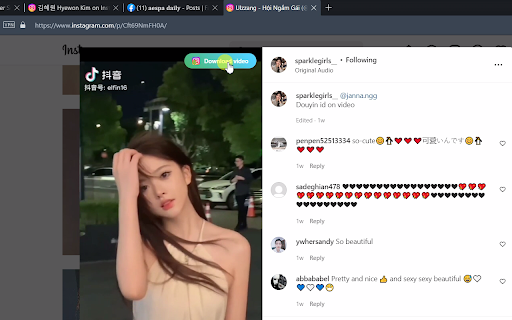
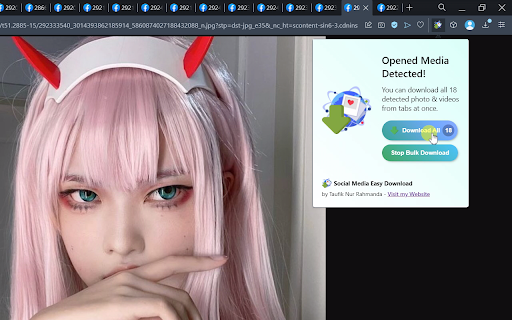
You can download all photos, videos, reels, and stories from Instagram, Facebook, Pinterest, and Twitter. This extension will detect media on opened social media pages and opened tabs, and then you can download, preview, or batch download multiple photos and videos from multiple posts of your choosing in the highest definition and higher quality.

How to Use?

1. Download HQ Photos & Videos from Facebook, Instagram, and Twitter
Open any post page containing photo or video, then you can click the button which appeared on the top right of the post, or by clicking the extension icon on the right side of the address bar. After that, the popup containing preview of detected photos & videos will appear. From there you can click "Download Selected", "Open in New Tab", or "Download All".

2. Batch Download Photos & Videos from any Instagram Page
Open any Instagram profile page, and then click on the extension icon. You'll see "Batch Download" button. After clicking that button, click on any post and the bulk download will start. To stop the operation, just click the extension icon and click "Stop Batch Download".

3. Download Facebook Story
Open a Facebook profile or page, click on the profile picture, then click View Story. After the story view opened, reload the page. After the page reloaded, you will see the download button appeared on the top right of the media, or click on the extension icon to view all detected media from the Facebook story.

Demo Video: https://youtu.be/6rmq7gcCjqU

Hope you enjoy!
Technical
- Version
- 1.0.9
- Manifest
- V3
- Size
- 252KiB
- Min Chrome
- 88
- Languages
- 1
- Featured
- Yes
Metadata
- ID
- mnpelkcmkdhikmgmhnjibkiepaakidpf
- Developer ID
- ubc8aa105075733f1a0603e3dc8f0f406
- Developer Email
- [email protected]
- Created
- Jul 20, 2022
- Last Updated (Store)
- Mar 13, 2024
- Last Scraped
- May 29, 2026
- Website
- —
- Support URL
- —
- Privacy Policy
- —
Similar extensions
Alternatives to Save All Images & Videos, ranked by description similarity.

Facebook Downloader - Photos & Videos
One-click download Facebook photos, videos, reels & stories in original quality
94

Instagram Downloader - Photos & Videos
One-click download Instagram photos, videos, reels & stories in original quality
137

CatCache Downloader
Batch download automation tool, save photos and videos quickly
125

Instagram Downloader
Download Photos and Videos from Instagram Post, Reels, TV, Stories
1.0K
★ 5.0

IG Universal Downloader
Batch downloading tool for Instagram photos and videos, efficient photo and video downloader
121
★ 1.0

Empire Internet Downloader
Empire Internet – Download Photos and Videos from Instagram Post, Reels, TV, Stories
28

Image & Video Downloader for Ins
Download Instagram photos & videos instantly. Save reels, stories, or full profiles with this fast IG media downloader.
1.0K
★ 4.0

IG Super Downloader
Quickly download Instagram photos and videos, download and save in batch
644
★ 1.0
Data sourced from the Chrome Web Store · last verified May 29, 2026.