
VisitMark - Highlight visited links with custom colors
Customize visited link colors for any site: global defaults, per-domain overrides, and sync with your Chrome profile.
As of June 2026, VisitMark - Highlight visited links with custom colors has 138 users in the Functionality & UI category.
Usersup 29.0 percent+29.0%
138
138
Ratingno change0%
—
— reviews
Reviewsno change0%
—
Version
1.0.13
Manifest V3
90-day change · In the last 90 days this extension 2 version updates, changed permissions.
History
11 snapshotsTracking since Apr 1, 2026.
View as table
| Date | Users | Rating | Reviews | Version |
|---|---|---|---|---|
| Apr 1, 2026 | 107 | — | — | 1.0.8 |
| Apr 10, 2026 | 107 | — | — | 1.0.9 |
| Apr 20, 2026 | 97 | — | — | 1.0.13 |
| Apr 25, 2026 | 110 | — | — | 1.0.13 |
| May 2, 2026 | 115 | — | — | 1.0.13 |
| May 9, 2026 | 108 | — | — | 1.0.13 |
| May 14, 2026 | 126 | — | — | 1.0.13 |
| May 20, 2026 | 130 | — | — | 1.0.13 |
| May 26, 2026 | 133 | — | — | 1.0.13 |
| Jun 2, 2026 | 129 | — | — | 1.0.13 |
| Jun 8, 2026 | 140 | — | — | 1.0.13 |
| Now | 138 | — | — | 1.0.13 |
Changelog
- Apr 10, 2026description
OVERVIEW
--------
VisitMark is a Chrome extension that makes visited links easier to see. You pick highlight colors instead of relying only on the browser’s default visited styling. On busy pages—search results, forums, docs, news—you can tell at a glance which links you already opened.


WHO IT’S FOR
------------
• Heavy readers, researchers, and shoppers who revisit the same sites often
• Students and professionals working from long pages of links and references
• Anyone who wants visited links to stand out more clearly in Google Chrome


MAIN BENEFITS
-------------
• Custom colors for visited links, with a default for the whole web
• Per-site on/off and optional color just for the current site
• Choose how “visited” is detected: browser state, browsing history, or both
• Fine-grained toggles for real-world page layouts (nav, themed classes, nested text)
• Options sync when you’re signed in to Chrome (same profile across devices)
• Simple pop-up labels so you know what each switch does


HOW TO GET STARTED
------------------
1. Install VisitMark and pin it to the toolbar if you want one-click access.
2. Open the pop-up, turn on visited link colors, and pick a default color.
3. Visit a few pages, follow links, go back—visited links should stand out.
4. If one site feels too busy, turn highlighting off for that site only or adjust link categories.


GLOBAL SETTINGS (“ALL SITES”)
-----------------------------
• Visited link colors: master switch for the whole extension
• Default color: used everywhere unless a site has its own color
• Restore defaults: resets global options when you want a clean slate


DETECTION (HOW “VISITED” IS DECIDED)
------------------------------------
• Browser visited state — respects links Chrome already treats as visited; great for normal hyperlinks.
• Browsing history — can treat URLs in your history as visited when a page’s visited signal is unreliable; optional, and works with Chrome history sync the way Chrome already does.
• You can use one mode or both, depending on what feels right for the sites you use.


THIS SITE (PER-WEBSITE)
-----------------------
• Turn styling on or off for only the site you’re on, without changing global defaults.
• Optional site-only highlight color for dark themes, busy layouts, or strong branding.
• Remove site settings in one step to fall back to your global default.


WHICH LINKS TO INCLUDE
----------------------
• Standard links — ordinary links and elements exposed as links.
• Regions and layout — links in nav, header, footer, article, and main areas.
• Themed link classes — common class-based link styling on modern sites.
• Inner formatting — bold, italic, headings, and nested text inside visited links so the highlight stays cohesive.


SYNC & STORAGE
--------------
• Global toggles and colors use Chrome sync storage when you’re signed in, so they can follow your profile across devices.
• Per-site choices are stored per hostname so exceptions travel with your setup.


PRIVACY & PERMISSIONS
---------------------
• History permission: used only when you enable history-based matching, to compare links with URLs you’ve visited.
• Broad site access: needed to apply highlight styling on the pages you browse.
• Storage: saves your settings and per-site overrides.
• VisitMark is scoped to visited-link appearance—read Chrome’s permission screen before installing, and use the pop-up toggles to match your comfort level.


TIPS
----
• Start with one default color that works on light and dark sites; add per-site colors only where needed.
• If a domain feels wrong, try switching detection modes before changing everything else.
• Prefer browser visited state first; add history matching only if a site still misbehaves.
• After a site redesign, tweak the per-site color or disable styling there for a quick fix.


WHERE IT HELPS
--------------
• Shopping — see which product pages you already opened.
• Research & docs — avoid reopening the same reference links on long guides.
• News & forums — track threads and articles you already visited.
• Search results — cut duplicate opens on dense result pages.
• Courses — quiet progress cues across multi-day study.
• Travel & booking — fewer redundant clicks on similar result cards.
• Support & internal wikis — move past links you already tried.
• Split-screen and small windows — color stands out when layout is tight.


ACCESSIBILITY & COMFORT
-----------------------
Stronger visited-link contrast helps many people scan faster. VisitMark is not a medical or assistive substitute, but calmer or higher-contrast colors can make long sessions easier. Per-site controls help when one site feels too harsh.


RELIABILITY & LIMITS
--------------------
No extension reads every page perfectly. Dynamic URLs, redirects, and heavy scripts can make visited state and history disagree with what you remember. VisitMark gives you detection modes, link categories, and per-site rules so you can tune behavior instead of a single fixed rule.


SHARING A COMPUTER
------------------
Everyone on the same Chrome profile shares the same extension settings. Use separate Chrome profiles for separate people; VisitMark’s synced options stay with each profile.


FAQ
---
Q: Does it change where links go?
A: No—only how visited links look.

Q: Will it slow Chrome down?
A: It stays lightweight and focused on styling.

Q: Can I turn it off fast?
A: Yes—globally in the pop-up or per site.

Q: Does it work on every site?
A: Most do; odd layouts may need category or detection tweaks.

Q: Can I use different colors per site?
A: Yes—enable site-specific color for the current site.

Q: What if I don’t want history used?
A: Turn off browsing-history matching and rely on browser visited state.


LAST WORD
---------
VisitMark keeps a narrow focus: visited-link colors, sensible detection, per-site overrides, and synced settings when you use Chrome while signed in—without piling on unrelated tools.
VisitMark
─────────

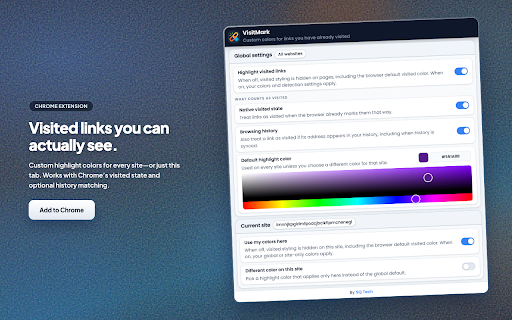
VisitMark highlights links you have already visited using colors you control. Set a default style for all sites, then override individual sites when you need a different color or want styling turned off for that page only. If you use Chrome with sync, your choices stay available across signed-in devices.

The extension can treat a link as visited when Chrome’s native visited state applies, and optionally when the URL appears in your browsing history (including synced history). Highlights update as you move between pages, including sites that change the URL without a full reload.

────────────────────────────────────────────────────────────

Key features
────────────

• Custom colors for visited links on standard HTTP and HTTPS pages.

• Global defaults plus per-site options: enable or disable highlighting for the current site, and optionally assign a color used only on that site.

• Two detection modes, usable together or separately: browser visited state, and history-based matching for cases where visited styling alone is not enough.

• A single global switch to restore the browser’s default visited appearance everywhere when you do not want VisitMark active.

────────────────────────────────────────────────────────────

Getting started
───────────────

1. Open the VisitMark popup from the Chrome toolbar.

2. Under All sites, enable Visited link colors and pick a default highlight color.

3. Under Detection, turn on Browser visited state and/or Browsing history according to how you want links qualified as visited.

4. On a site you use often, open the popup again. Under This site, choose whether highlighting applies there; use Site-specific color if you want a color that applies only to that host.

5. Use Restore defaults for global settings, or Remove site settings to clear saved options for the site you have open.

────────────────────────────────────────────────────────────

Who it helps
────────────

Anyone who scans long pages of links—search results, documentation, forums, directories—and wants consistent, easy-to-see distinction between visited and unvisited destinations without opening history or relying on faint default styling.

────────────────────────────────────────────────────────────

Privacy
───────

VisitMark applies your saved preferences locally in the browser. It uses extension APIs to read settings, observe navigation, and when you enable history-based detection, to read history as needed for that feature. It does not send your browsing data to publisher-operated servers for highlighting. See the linked privacy policy for full detail.
- Apr 10, 2026short_description
VisitMark highlights visited links in your chosen colors. Global default and site specific appearance. Settings sync with Chrome.
Customize visited link colors for any site: global defaults, per-domain overrides, and sync with your Chrome profile.
- Apr 1, 2026description
Visited Links Marker - Track Your Browsing History with Visual Markers

Never lose track of where you've been on the web! Visited Links Marker highlights visited links with customizable colors across all websites, making it easy to see what you've already explored.

Why You Need This:

- Stop accidentally revisiting the same pages
- Organize your research and browsing
- Save time by avoiding duplicate content
- Visual cues help you navigate efficiently

Key Features:

- Custom Colors - Choose any color for visited links
- Works Everywhere - Functions on all websites you visit
- Per-Site Settings - Different colors for different sites
- Instant Updates - Changes apply immediately
- Easy Setup - Just install and start browsing

Perfect For:

- Students - Track research sources and study materials
- Researchers - Organize academic papers and references
- Professionals - Monitor industry news and updates
- Content Creators - Keep track of inspiration sources
- Online Shoppers - Remember products you've already viewed
- News Readers - Avoid reading the same articles twice

How It Works:

1. Install the extension
2. Pick your favorite color
3. Browse normally - visited links get colored automatically
4. Customize colors for specific websites if needed

Privacy & Security:

- No data collection or tracking
- All settings stored on your device
- No personal information shared
- Works completely offline

Benefits:

- Save time by avoiding duplicate browsing
- Improve research efficiency
- Better organization of web content
- Visual memory aids for navigation
- Works with all major websites

Get Started Today:

Transform your browsing experience with Visited Links Marker. Install now and never lose track of where you've been on the web!
OVERVIEW
--------
VisitMark is a Chrome extension that makes visited links easier to see. You pick highlight colors instead of relying only on the browser’s default visited styling. On busy pages—search results, forums, docs, news—you can tell at a glance which links you already opened.


WHO IT’S FOR
------------
• Heavy readers, researchers, and shoppers who revisit the same sites often
• Students and professionals working from long pages of links and references
• Anyone who wants visited links to stand out more clearly in Google Chrome


MAIN BENEFITS
-------------
• Custom colors for visited links, with a default for the whole web
• Per-site on/off and optional color just for the current site
• Choose how “visited” is detected: browser state, browsing history, or both
• Fine-grained toggles for real-world page layouts (nav, themed classes, nested text)
• Options sync when you’re signed in to Chrome (same profile across devices)
• Simple pop-up labels so you know what each switch does


HOW TO GET STARTED
------------------
1. Install VisitMark and pin it to the toolbar if you want one-click access.
2. Open the pop-up, turn on visited link colors, and pick a default color.
3. Visit a few pages, follow links, go back—visited links should stand out.
4. If one site feels too busy, turn highlighting off for that site only or adjust link categories.


GLOBAL SETTINGS (“ALL SITES”)
-----------------------------
• Visited link colors: master switch for the whole extension
• Default color: used everywhere unless a site has its own color
• Restore defaults: resets global options when you want a clean slate


DETECTION (HOW “VISITED” IS DECIDED)
------------------------------------
• Browser visited state — respects links Chrome already treats as visited; great for normal hyperlinks.
• Browsing history — can treat URLs in your history as visited when a page’s visited signal is unreliable; optional, and works with Chrome history sync the way Chrome already does.
• You can use one mode or both, depending on what feels right for the sites you use.


THIS SITE (PER-WEBSITE)
-----------------------
• Turn styling on or off for only the site you’re on, without changing global defaults.
• Optional site-only highlight color for dark themes, busy layouts, or strong branding.
• Remove site settings in one step to fall back to your global default.


WHICH LINKS TO INCLUDE
----------------------
• Standard links — ordinary links and elements exposed as links.
• Regions and layout — links in nav, header, footer, article, and main areas.
• Themed link classes — common class-based link styling on modern sites.
• Inner formatting — bold, italic, headings, and nested text inside visited links so the highlight stays cohesive.


SYNC & STORAGE
--------------
• Global toggles and colors use Chrome sync storage when you’re signed in, so they can follow your profile across devices.
• Per-site choices are stored per hostname so exceptions travel with your setup.


PRIVACY & PERMISSIONS
---------------------
• History permission: used only when you enable history-based matching, to compare links with URLs you’ve visited.
• Broad site access: needed to apply highlight styling on the pages you browse.
• Storage: saves your settings and per-site overrides.
• VisitMark is scoped to visited-link appearance—read Chrome’s permission screen before installing, and use the pop-up toggles to match your comfort level.


TIPS
----
• Start with one default color that works on light and dark sites; add per-site colors only where needed.
• If a domain feels wrong, try switching detection modes before changing everything else.
• Prefer browser visited state first; add history matching only if a site still misbehaves.
• After a site redesign, tweak the per-site color or disable styling there for a quick fix.


WHERE IT HELPS
--------------
• Shopping — see which product pages you already opened.
• Research & docs — avoid reopening the same reference links on long guides.
• News & forums — track threads and articles you already visited.
• Search results — cut duplicate opens on dense result pages.
• Courses — quiet progress cues across multi-day study.
• Travel & booking — fewer redundant clicks on similar result cards.
• Support & internal wikis — move past links you already tried.
• Split-screen and small windows — color stands out when layout is tight.


ACCESSIBILITY & COMFORT
-----------------------
Stronger visited-link contrast helps many people scan faster. VisitMark is not a medical or assistive substitute, but calmer or higher-contrast colors can make long sessions easier. Per-site controls help when one site feels too harsh.


RELIABILITY & LIMITS
--------------------
No extension reads every page perfectly. Dynamic URLs, redirects, and heavy scripts can make visited state and history disagree with what you remember. VisitMark gives you detection modes, link categories, and per-site rules so you can tune behavior instead of a single fixed rule.


SHARING A COMPUTER
------------------
Everyone on the same Chrome profile shares the same extension settings. Use separate Chrome profiles for separate people; VisitMark’s synced options stay with each profile.


FAQ
---
Q: Does it change where links go?
A: No—only how visited links look.

Q: Will it slow Chrome down?
A: It stays lightweight and focused on styling.

Q: Can I turn it off fast?
A: Yes—globally in the pop-up or per site.

Q: Does it work on every site?
A: Most do; odd layouts may need category or detection tweaks.

Q: Can I use different colors per site?
A: Yes—enable site-specific color for the current site.

Q: What if I don’t want history used?
A: Turn off browsing-history matching and rely on browser visited state.


LAST WORD
---------
VisitMark keeps a narrow focus: visited-link colors, sensible detection, per-site overrides, and synced settings when you use Chrome while signed in—without piling on unrelated tools.
- Apr 1, 2026short_description
Mark visited links with customizable colors across all websites
VisitMark highlights visited links in your chosen colors. Global default and site specific appearance. Settings sync with Chrome.
- Apr 1, 2026name
Visited Links Marker
VisitMark - Highlight visited links with custom colors
- Apr 1, 2026category
productivity/tools
make_chrome_yours/functionality
- Apr 1, 2026host_permissions
<all_urls>
http://*/*, https://*/*
- Apr 1, 2026permissions
storage, scripting
history, scripting, storage, tabs, webNavigation
Permissions & access
- Permissions
- historyscriptingstoragetabswebNavigation
- Host access
- http://*/*, https://*/*
Screenshots
About
VisitMark
─────────

VisitMark highlights links you have already visited using colors you control. Set a default style for all sites, then override individual sites when you need a different color or want styling turned off for that page only. If you use Chrome with sync, your choices stay available across signed-in devices.

The extension can treat a link as visited when Chrome’s native visited state applies, and optionally when the URL appears in your browsing history (including synced history). Highlights update as you move between pages, including sites that change the URL without a full reload.

────────────────────────────────────────────────────────────

Key features
────────────

• Custom colors for visited links on standard HTTP and HTTPS pages.

• Global defaults plus per-site options: enable or disable highlighting for the current site, and optionally assign a color used only on that site.

• Two detection modes, usable together or separately: browser visited state, and history-based matching for cases where visited styling alone is not enough.

• A single global switch to restore the browser’s default visited appearance everywhere when you do not want VisitMark active.

────────────────────────────────────────────────────────────

Getting started
───────────────

1. Open the VisitMark popup from the Chrome toolbar.

2. Under All sites, enable Visited link colors and pick a default highlight color.

3. Under Detection, turn on Browser visited state and/or Browsing history according to how you want links qualified as visited.

4. On a site you use often, open the popup again. Under This site, choose whether highlighting applies there; use Site-specific color if you want a color that applies only to that host.

5. Use Restore defaults for global settings, or Remove site settings to clear saved options for the site you have open.

────────────────────────────────────────────────────────────

Who it helps
────────────

Anyone who scans long pages of links—search results, documentation, forums, directories—and wants consistent, easy-to-see distinction between visited and unvisited destinations without opening history or relying on faint default styling.

────────────────────────────────────────────────────────────

Privacy
───────

VisitMark applies your saved preferences locally in the browser. It uses extension APIs to read settings, observe navigation, and when you enable history-based detection, to read history as needed for that feature. It does not send your browsing data to publisher-operated servers for highlighting. See the linked privacy policy for full detail.
Technical
- Version
- 1.0.13
- Manifest
- V3
- Size
- 182KiB
- Min Chrome
- 88
- Languages
- 1
- Featured
- No
Metadata
- ID
- mnmjcjjobghnhfklnijgjcmodgfnceek
- Developer ID
- u575e107a2a26ce274f46d578c2d077f8
- Developer Email
- [email protected]
- Created
- Sep 23, 2025
- Last Updated (Store)
- Apr 3, 2026
- Last Scraped
- Jun 8, 2026
- Website
- sqtech.dev
- Support URL
- —
Similar extensions
Alternatives to VisitMark - Highlight visited links with custom colors, ranked by description similarity.

VisuaLinks – Visual Organizer for Chrome Bookmarks, Tabs, History & More
Visually organize links with icons,GIFs and backgrounds to boost clarity, usability and make your collection fun and easy to explore
11

Bullet History
Visual bullet journal for browsing history with Google Calendar integration
8
★ 5.0

Vertical Bookmarks Side Panel
Vertical Bookmarks Side Panel
12

Link & Co — Visual Bookmarks
A visual, container-based bookmarks manager that feels like a desktop for your links. MV3, trial, and one-time lifetime license.
6

myRoom
Transform your new tab into a beautiful, personalized dashboard with glassmorphism style and instant bookmark access.
32
★ 5.0

New Tab
A premium, highly customizable New Tab extension with a sleek design, shortcut management, and integrated search.
6
★ 5.0

Recent Bookmarks
A modern bookmark utility with search, filtering, and dark mode
26
★ 5.0

Tab Breadcrumbs: Visual Tab Manager & Recent Tabs Switcher
Find recent tabs instantly with a visual side panel guide. The smartest way to manage clutter and switch context effortlessly.
1
Data sourced from the Chrome Web Store · last verified Jun 8, 2026.