
SteelSeries Browser Cinema
Allows to subscribe to browser fullscreen event to control steelseries gears lighting
As of May 2026, SteelSeries Browser Cinema has 211 users and a 5.00/5 rating from 2 reviews in the Functionality & UI category.
Usersup 1.4 percent+1.4%
211
211
Ratingno change0%
5.00
2 reviews
Reviewsno change0%
2
Version
1.1.2
Manifest V3
History
3 snapshotsTracking since Apr 1, 2026.
View as table
| Date | Users | Rating | Reviews | Version |
|---|---|---|---|---|
| Apr 1, 2026 | 208 | 5.00 | 2 | 1.1.2 |
| Apr 30, 2026 | 212 | 5.00 | 2 | 1.1.2 |
| May 29, 2026 | 208 | 5.00 | 2 | 1.1.2 |
| Now | 211 | 5.00 | 2 | 1.1.2 |
Permissions & access
- Permissions
- storage
- Host access
- file://*/*
Screenshots
About
🎞 SteelSeries Browser Cinema Extension 🎞

⭐Have you ever wanted to automatically disable your gear lightning while you are watching movie or youtube video? Check this out ⭐

Extension for Chromium-based browsers (Chromium, Chrome, Vivaldi, Edge, Yandex.Browser) that allows to setup reactions for your SteelSeries devices on event when browser enters fullscreen mode.

⚠ Note: Currently it works only with SteelSeries GG on Windows

Why❓

Having gaming devices with fancy 💡 RGB led feels great, but it might become annoying while you are trying to watch movies or youtube video. This extension just allows to setup your device settings when browsers enters fullscreen mode. When browsers leaves fullscreen your device settings will drop to previous state before fullscreen event.

🔨 Setup

1. Make sure you have installed Steelseries GG from the offfical site https://steelseries.com/gg and configured your device inside Engine tab
2. Install `StellSeries Browser Cinema` extension from Chrome Store or from github releases page - https://github.com/meskill/steelseries-browser-cinema/releases
3. Navigate to `chrome://extensions` and click "Details" on the newly installed extension.
4. Scroll down and make sure the "Allow access to file URLs" is enabled.
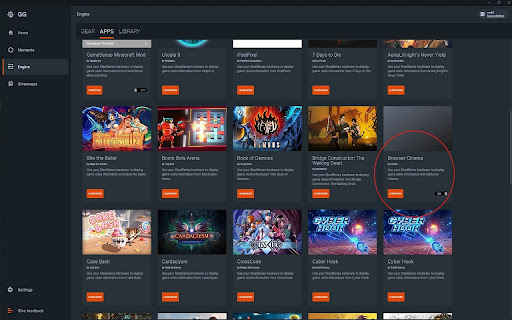
5. Inside Engine -> Apps Tab in SteelSeries GG should appear new game named `Browser Cinema`
6. Go into `Browser Cinema` game
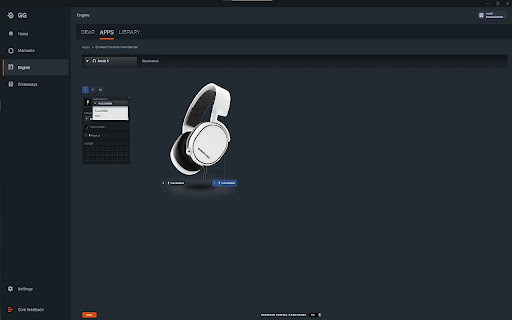
7. Choose `Event in Game -> FULLSCREEN`
8. Here you can setup your device reaction for browser fullscreen mode (I prefer to set it all to single black color that mean led will be turned off completely)
9. Repeat device set up for every of your devices

🎃 Caveats

- Currently supports only `Windows`
- Only default `SteelSeries GG` installation is supported (inside `C:/ProgramData/SteelSeries/SteelSeries Engine 3/`)
- The extension only works for web pages opened in fullscreen only for browser with enabled extension

🩺 Troubleshooting

❓ Cannot find game `Browser Cinema`

Try to reinstall extension as game is registered only on extension install

❓ Device state doesn't reflect browser mode

Make sure `SteelSeries GG` is running and extension is enabled in browser

❓ No answer on my question

Please create Issue on [GitHub](https://github.com/meskill/steelseries-browser-cinema/issues) with detailed report

🙏 Credits

🎨 Icons

Icons made by [Freepik](https://www.freepik.com) from [www.flaticon.com](https://www.flaticon.com/)
Technical
- Version
- 1.1.2
- Manifest
- V3
- Size
- 11.22KiB
- Min Chrome
- 88
- Languages
- 1
- Featured
- Yes
Metadata
- ID
- mndmnpnegjbnfakegcedmfccfiapdnhc
- Developer ID
- ud610fd631d7e5a3e040fec9f0635c264
- Developer Email
- [email protected]
- Created
- Sep 21, 2021
- Last Updated (Store)
- Aug 25, 2023
- Last Scraped
- May 29, 2026
- Website
- —
- Support URL
- —
- Privacy Policy
- —
Similar extensions
Alternatives to SteelSeries Browser Cinema, ranked by description similarity.

Mystic Light Browser Cinema
Allows to subscribe to browser fullscreen event to control mystic light gears lighting
71
★ 5.0

Cyberpunk 2077 Phantom Liberty Live Wallpaper
Turn your new tab into a futuristic chrome wallpaper with Cyberpunk 2077 Phantom Liberty Live Wallpaper.
151
★ 5.0

Rain-Soaked GT-R Live Wallpaper
Feel the raw atmosphere of night racing with Rain-Soaked GT-R Live Wallpaper - Gameograf
48

God of War Ragnarök Wallpapers
Unleash the Power of God of War Ragnarök with This Epic Chrome Extension. Games Wallpapers
1.0K
★ 4.9

Call of Duty Ghost Live Wallpaper
Transform your browser into Call of Duty Ghosts! Download now for intense live wallpapers and a game-inspired new tab.
1.0K
★ 5.0

Marvel Spider-Man Live Wallpaper
Swing into action with Marvel’s Spider-Man on this dynamic Chrome live wallpaper.
2.0K
★ 3.7

Satoru Gojo Breaking Glass Live Wallpaper
Experience the intensity of Gojo Breaking Glass with this Chrome extension, bringing a breathtaking moment from Jujutsu Kaisen!
3.0K
★ 4.6

Witcher Live Wallpaper by Gameograf
Step into the world of monster hunters with Witcher Live Wallpaper
279
★ 5.0
Data sourced from the Chrome Web Store · last verified May 29, 2026.