
Turn Off :Cinema Mode
Turn Off the Lights -Dims the webpage except for videos, creating a cinema-like experience
As of May 2026, Turn Off :Cinema Mode has 49 users and a 2.33/5 rating from 3 reviews in the Productivity category.
Usersup 6.5 percent+6.5%
49
49
Ratingdown 22.3 percent−22.3%
2.33
3 reviews
Reviewsup 50.0 percent+50.0%
3
Version
2.3
Manifest V3
History
3 snapshotsTracking since Apr 1, 2026.
View as table
| Date | Users | Rating | Reviews | Version |
|---|---|---|---|---|
| Apr 1, 2026 | 46 | 3.00 | 2 | 2.3 |
| Apr 30, 2026 | 45 | 3.00 | 2 | 2.3 |
| May 29, 2026 | 44 | 2.33 | 3 | 2.3 |
| Now | 49 | 2.33 | 3 | 2.3 |
Permissions & access
- Permissions
- activeTabscriptingtabs
- Host access
- *://*.youtube.com/*
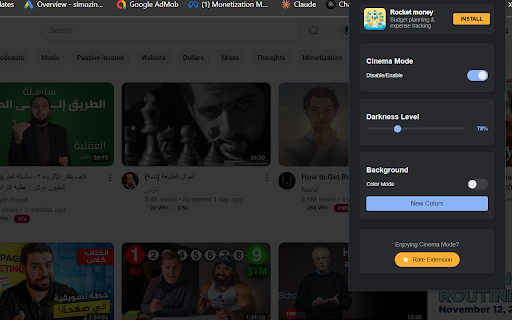
Screenshots


About
# Turn Off the Lights - Cinema Mode for YouTube

## Description
Transform your YouTube viewing experience with Turn Off the Lights - a sleek extension that creates the perfect **cinematic** atmosphere. When activated, it intelligently dims everything on the web page except for the video you are watching, simulating the cinema experience right in your browser.

## Key Features
- One-click activation: The entire page will be fading to dark while keeping the video bright
- Smart video detection: Automatically identifies and highlights YouTube videos
- Adjustable darkness: Customize the dimming level to your preference
- Dynamic color modes: Choose between solid black or gradient color backgrounds
- Smooth transitions: Elegant fade effects for a premium feel
- Video-centric design: Keeps video controls easily accessible

## How It Works
1. Install the extension
2. Navigate to any YouTube video
3. Click the toggle to activate cinema mode
4. Enjoy your video in a distraction-free environment

## Controls
- Enable/Disable toggle: Quick access to cinema mode
- Darkness slider: Fine-tune the dimming intensity
- Color mode: Switch between classic dark and gradient backgrounds
- New Colors button: Generate fresh gradient combinations

Perfect for:
- Late-night viewing
- Distraction-free watching
- Enhanced video focus
- Reduced eye strain
- Professional presentations

Experience YouTube videos the way they're meant to be watched - in a true cinematic environment.
Technical
- Version
- 2.3
- Manifest
- V3
- Size
- 25.08KiB
- Min Chrome
- 88
- Languages
- 1
- Featured
- No
Metadata
- ID
- mmppdfhhckpgceoomllmhccdhlhdcfip
- Developer ID
- uf7255b585081a7728c84c6ee0527dfc6
- Developer Email
- [email protected]
- Created
- Nov 14, 2024
- Last Updated (Store)
- Feb 11, 2025
- Last Scraped
- May 29, 2026
- Website
- —
- Support URL
- —
Similar extensions
Alternatives to Turn Off :Cinema Mode, ranked by description similarity.

Video Dimming
Darks out everything around a video player so you can focus on the video like a cinema mode.
13

Youtune
Transform YouTube videos into an immersive cinema experience with audio mode, ambient effects, and video controls.
22
★ 5.0

Cinema Mode
Immersive viewing experience
302
★ 5.0

YouTube Clean Fullscreen
Transform YouTube fullscreen into clean, distraction-free viewing experience by hiding all controls and overlays
65
★ 5.0

YouTube Focus Mode
Enhance your YouTube experience by hiding distractions.
19
★ 5.0

Focus YouTube Video
Darkens the background and highlights the YouTube video player.
12

YouTube Focus Suite - Video Brightness & Focus Mode
Enhance your YouTube viewing experience with custom video brightness controls and a distraction-free focus mode
63

VideoEnhance Plus
Enhance your video watching experience with customizable playback controls, themes, and productivity features
38
★ 5.0
Data sourced from the Chrome Web Store · last verified May 29, 2026.