
Y-Axis : Navigate through long LLM Chats
Sidebar navigation and export for Claude, ChatGPT, Gemini, and DeepSeek.
As of June 2026, Y-Axis : Navigate through long LLM Chats has 4 users and a 5.00/5 rating from 1 reviews in the Productivity category.
Usersno change0%
4
4
Ratingno change0%
5.00
1 reviews
Reviewsno change0%
1
Version
3.0
Manifest V3
History
5 snapshotsTracking since Apr 25, 2026.
View as table
| Date | Users | Rating | Reviews | Version |
|---|---|---|---|---|
| Apr 25, 2026 | — | — | — | 3.0 |
| May 2, 2026 | — | — | — | 3.0 |
| May 9, 2026 | 2 | 5.00 | 1 | 3.0 |
| May 13, 2026 | 4 | 5.00 | 1 | 3.0 |
| Jun 1, 2026 | 5 | 5.00 | 1 | 3.0 |
| Now | 4 | 5.00 | 1 | 3.0 |
Permissions & access
- Permissions
- clipboardWritestorage
- Host access
- None declared
Screenshots



About
Y Axis - Navigate through long LLM conversations.

> What is Y Axis?

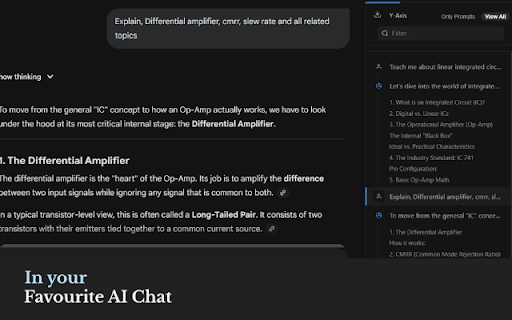
Y Axis turns long AI chats into a structured, navigable experience. Instead of endlessly scrolling through ChatGPT, Gemini, or Claude conversations, Y Axis creates a clickable outline of your prompts, so you can jump to any part of the conversation instantly. Think of it like a table of contents for your AI chats.

> The Problem

LLM chats are powerful, but they quickly become messy.
- Conversations go 100+ messages deep
- Important answers get buried
- You waste time scrolling to find something you already saw
- Context gets lost

"I know the answer is here somewhere… but where?"

> The Solution

Y Axis understands the vertical flow (Y-axis) of your conversation and turns it into a structured navigation system. With Y Axis, you can:

- View all your prompts in a clean sidebar
- Click any prompt to jump directly to that part of the chat
- Instantly find what you're looking for
- Stay in context without losing your flow

> Benefits

- Save time — no more endless scrolling
- Stay organized — see your entire conversation structure
- Think better — navigate ideas like chapters in a book
- Work faster — jump exactly where you need

Stop searching. Start jumping.

> Privacy & Data Usage

We take your privacy seriously. What we DO NOT do:

- We do NOT store your chats
- We do NOT read or send your conversation content to our servers
- We do NOT track personal or sensitive information

All chat processing happens locally in your browser.

What we Do collect (minimal & safe):

To improve the product, we collect basic usage analytics, such as:

- Number of times the sidebar is opened
- Feature interactions (e.g., clicking a prompt to navigate)
- General usage patterns (non-personal, non-content data)

This helps us understand what features are useful and how to improve the experience.

> Email (Optional)

We may ask for your email to:

- Understand who our users are
- Improve communication and product updates

Your email is:

- Optional
- Never shared or sold
- Not linked to your chat content

> Who is this for?

- Students
- Developers
- Researchers
- Writers
- Anyone who uses AI chats seriously

> Why Y Axis?

AI tools are powerful, but navigation is broken. Y Axis fixes that. Your conversations, under control.

> How it works

1. Open supported AI providers
2. Y Axis detects your prompts
3. A sidebar appears with a structured list
4. Click Jump instantly

> Get Started

Install Y Axis and navigate through your conversations. No setup. No disruption. Just clarity.
Technical
- Version
- 3.0
- Manifest
- V3
- Size
- 134KiB
- Min Chrome
- 88
- Languages
- 1
- Featured
- No
Metadata
- ID
- mmnhdknijdhpihgeflhnkaccjpcjjajo
- Developer ID
- u2c6d0984cce42fbc2a72f207417d7462
- Developer Email
- [email protected]
- Created
- Apr 24, 2026
- Last Updated (Store)
- Apr 28, 2026
- Last Scraped
- Jun 7, 2026
- Website
- —
- Support URL
- yaxis.vercel.app/help
- Privacy Policy
- https://yaxis.adnankhan93.in/privacy-policy
Data sourced from the Chrome Web Store · last verified Jun 7, 2026.