
AI Prompt Manager
Save and organize your ChatGPT, Claude AI, and Gemini prompts.
As of June 2026, AI Prompt Manager has 24 users in the Workflow & Planning category.
Usersup 20.0 percent+20.0%
24
24
Ratingno change0%
—
— reviews
Reviewsno change0%
—
Version
1.2.1
Manifest V3
History
3 snapshotsTracking since Apr 23, 2026.
View as table
| Date | Users | Rating | Reviews | Version |
|---|---|---|---|---|
| Apr 23, 2026 | 20 | — | — | 1.2.1 |
| May 13, 2026 | 16 | — | — | 1.2.1 |
| Jun 8, 2026 | 22 | — | — | 1.2.1 |
| Now | 24 | — | — | 1.2.1 |
Permissions & access
- Permissions
- storageactiveTabalarms
- Host access
- https://chat.openai.com/*, https://chatgpt.com/*, https://claude.ai/*, https://gemini.google.com/*
Screenshots


About
AI Prompt Manager Browser Extension for Chrome

Easily save, view, and export all your AI prompts for ChatGPT, Claude AI, and Gemini—automatically!

What Does AI Prompt Manager Do?

AI Prompt Manager is a powerful and simple tool designed for anyone using conversational AI tools. As soon as you type a prompt in ChatGPT, Claude AI, or Gemini, the extension automatically saves it in real-time. You can then view, manage, and export your prompts whenever needed—no extra effort required!

Key Features:

Automatic Prompt Saving: Every prompt you type is saved automatically when the extension is enabled—no need to manually track your inputs.

Cross-Platform Compatibility: Works seamlessly with ChatGPT, Claude AI, and Gemini, categorizing your prompts by the chatbot used.

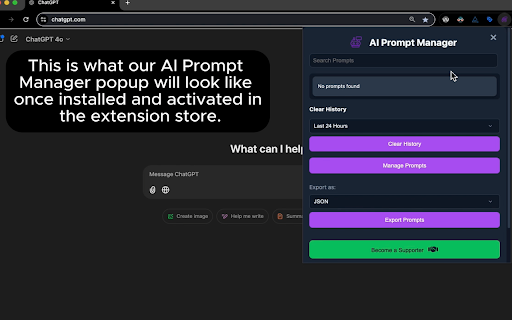
View Saved Prompts: See your saved prompts anytime in a convenient popup window.

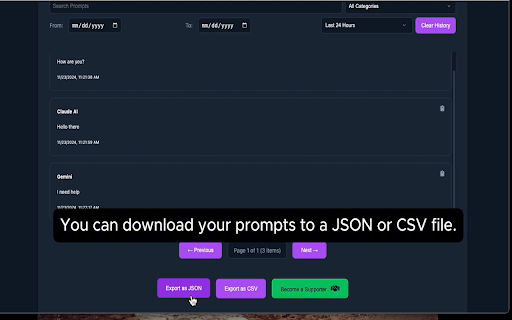
Export Options: Download your prompts as JSON or CSV files, complete with:
Category: The chatbot you used (e.g., ChatGPT, Claude AI, Gemini).
Date Stamp: When the prompt was saved.
Text Section: The content of your prompt.

Clear Saved Prompts: Clean your saved data easily with a single click if needed.

Incognito Mode Support: Want to save prompts while in incognito mode? You can enable the feature in your extension settings (requires manual activation).

Why Use AI Prompt Manager?

Save Time and Effort: Never lose a prompt or waste time copying and pasting between tools again.

Stay Organized: Automatically categorized prompts ensure you always know which chatbot was used.

Free to Use: The extension is completely free, with no hidden costs. However, donations are welcome to support development—links to donate can be found in the dropdown menu and the Manage Prompts page.

How to Get Started:

 - Install the extension.
 - Use ChatGPT, Claude AI, or Gemini as you normally would. The extension will
   automatically save every prompt.
 - Click on the extension icon to view saved prompts.
 - Export your data as JSON or CSV, or clear prompts if no longer needed.

Incognito Mode:

To enable prompt saving in incognito mode, go to the extension’s settings in Chrome, navigate to "Details," and turn on "Allow in Incognito."

Become a Supporter:
Your support helps us to maintain and improve this extension.

- One-Time Support ($9.99): https://buy.stripe.com/14kcOg0DIdZ4fvi3cc

- Subscribe to give monthly support ($2.99/month):
  https://buy.stripe.com/28o29CgCG5sy96UbIK

- Send us a tip!:
    - $5 Tip: https://buy.stripe.com/5kAdSk3PU8EK82Q5kn
    - $10 Tip: https://buy.stripe.com/eVa7tWcmq3kqbf2004
    - $20 Tip: https://buy.stripe.com/fZe7tW5Y28EKgzm5kp

Feedback and Customer Support:

We value your feedback! If you encounter bugs, have feature suggestions, or just love the extension, please let us know. Contact us: [email protected]

Don't forget to rate us and share your experience—it helps us grow and improve!
AI Prompt Manager is your free, easy-to-use solution for managing AI prompts like a pro. Download it today and take your AI workflow to the next level!
Technical
- Version
- 1.2.1
- Manifest
- V3
- Size
- 42.88KiB
- Min Chrome
- 88
- Languages
- 1
- Featured
- No
Metadata
- ID
- mmfgbhdfoffdnkehipphlhncjipbdjcd
- Developer ID
- u37ff056bf6d53bee47f0662011eecd5a
- Developer Email
- [email protected]
- Created
- Nov 27, 2024
- Last Updated (Store)
- Nov 27, 2024
- Last Scraped
- Jun 8, 2026
- Website
- —
- Support URL
- —
- Privacy Policy
- https://skysavona.github.io/ai-prompt-manager-privacy/
Similar extensions
Alternatives to AI Prompt Manager, ranked by description similarity.

Prompt Suite
Smart prompt manager for AI chats. Organize, schedule & insert prompts into ChatGPT, Claude, Gemini & Perplexity with folders.
35
★ 5.0

Prompt Helper Gemini
Intelligent prompt refinement for AI chats. Enhance Text, Code, Image, and Video prompts with one click.
458
★ 4.3

Prompt 01
Capture selected text, save prompts, and paste them into AI tools.
2

AI Prompt Helper for ChatGPT & Claude - PromptSloth
Improve prompts with one click. 2000+ expert prompt templates. Works with ChatGPT, Claude, and every AI tool.
8.0K
★ 4.8

PromptNest – Save & Reuse AI Prompts on ChatGPT, Gemini & Claude
Save, organize, and one-click insert AI prompts. Sidebar panel for ChatGPT, Gemini, and Claude with folders, tags, and search.
6
★ 5.0

AI Prompt Library
Save, organize, and search your AI prompts privately. A clean, local-storage library for ChatGPT, Claude, and more.
3

Prompt Generator Library
Extension with prompts for ChatGPT
18
★ 5.0

Prompt Holder: Store and Manage prompts effectively
Boost your AI workflow with a personal prompt library. Save, favorite, and inject prompts offline.
15
★ 5.0
Data sourced from the Chrome Web Store · last verified Jun 8, 2026.