
mdblogger
Markdown editor for blogger
As of June 2026, mdblogger has 186 users in the Social & Communication category.
Usersup 11.4 percent+11.4%
186
186
Ratingno change0%
—
— reviews
Reviewsno change0%
—
Version
0.0.8
Manifest V3
History
2 snapshotsTracking since Apr 23, 2026.
View as table
| Date | Users | Rating | Reviews | Version |
|---|---|---|---|---|
| Apr 23, 2026 | 167 | — | — | 0.0.8 |
| Jun 8, 2026 | 180 | — | — | 0.0.8 |
| Now | 186 | — | — | 0.0.8 |
Permissions & access
- Permissions
- None declared
- Host access
- None declared
Screenshots
About
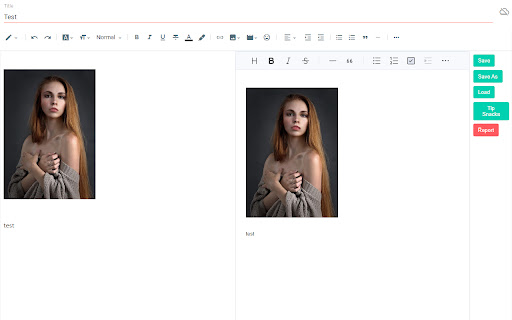
'mdblogger' is a markdown editor for google blogger. This extension insert a markdown editor to the blogger post edit page to let you use markdown editor. Nowadays a markdown editor is more preferred as a writer can focus on their writing instead of styling their writing.
With mdblogger, you can load and save markdown content as well.
## 💪 Support this extension:
- Github sponsor page: https://github.com/sponsors/opdev1004
- ko-fi: https://ko-fi.com/opdev1004
## 📢 Notice
### Releasing v0.0.8
Fixed scroll problem for editor
### Releasing v0.0.7
Found Korean and other typing not working. So this version fixes that problem. Adjusted update speed to about 59 fps.
From v0.0.6, now draft saving to the cloud is working, therefore posting your blog post would not require editing the original blogger's editor from now.
## 👨🏫 Things you must know:
1. If you have any ad block extensions/plugins, add `blogger.com` or `https://blogger.com` in the exception list from the ad block settings.
2. This may not be required anymore since draft saving is working -> After you are done writing, you must edit the blogger's editor once before finishing your post. Like `adding a space and remove it` or `change from compose view to html view`. Because the content is not going to be saved as a draft or updated or published until the blogger editor updates the post data that is hidden. It is difficult to find where the blogger editor store our post data. So until we find a way, this will be the way. Just give a small change to the blogger editor after you are done writing.
3. Pressing 'Ctrl' and 'q' will copy what is in the blogger editor(Left side) and paste to the markdown editor(Right side). Use this short cut('ctrl + q') for adding images. But you can also use the markdown editor's image uploading system. In that case the image will be stored as a data in your post. And your post can be a bit messy. For the videos, you have to use the blogger editor to add them. Markdown editor does not support videos and it will probably convert the video to a single image.
4. From all the links in the post, target and rel attributes are not going to work as markdown does not support. And it will always get removed as you write something. You can still try. I do not encourage doing it though.
5. This extension is an open source extension with MIT license. It is free for commercial and non-commercial use.
6. If you have a custom theme, it might cause some problems for some cases. Because they affect styling of the edit page.
7. In many other case, if this extension is not working, just try to refresh(F5) the edit page. This extension does not back-up your data. So make sure you back-up your unsaved data. Eg. drafting, or save markdown etc.Technical
- Version
- 0.0.8
- Manifest
- V3
- Size
- 279KiB
- Min Chrome
- 88
- Languages
- 1
- Featured
- No
Metadata
- ID
- mmdaohoahbhbjmlodlonnkdchdbhknmp
- Developer ID
- u738f0d76e45b1cce009f5e7afcc185dc
- Developer Email
- [email protected]
- Created
- Apr 20, 2023
- Last Updated (Store)
- Feb 10, 2025
- Last Scraped
- Jun 8, 2026
- Website
- —
- Privacy Policy
- —
Similar extensions
Alternatives to mdblogger, ranked by description similarity.

Github Markdown Writer
To support writing, editing and managing the github.io based Jekyll/Markdown Blog, with Markdown Previewer.
204
★ 5.0

Steemit Blog Formatter
Format and enhance your Steemit blog posts
17

LinkedIn Post Studio
Write better LinkedIn posts directly inside LinkedIn. Formatting tools, reusable templates, and live preview.
17

LinkedIn Post Preview & Format
Preview full LinkedIn posts on hover. Format text with Bold, Italic, Underline & Strikethrough using Unicode
6
★ 5.0

Link Sweep
Automatically aggregates and copies links within a Medium or Blogger blog post.
8
★ 5.0

Smart Punctuations
Replaces straight quotes ("like this") with smart quotes (“like this”) in Blogger's post editor and Gmail's compose box.
525
★ 4.2
Letterboxd Text Formatter
A simple interface for formatting Letterboxd reviews, comments, and more.
3.0K
★ 4.1

Grammarly to Markdown
Writer wants to the things right. This means using software to catch errors early on. One of the market's favourite, Grammarly,…
9.0K
★ 3.6
Data sourced from the Chrome Web Store · last verified Jun 8, 2026.