
InboxSort
Sort your Gmail inbox by date, sender, or unread status. Inline tabs, keyboard shortcuts, stats, and more.
As of June 2026, InboxSort has 30 users and a 5.00/5 rating from 3 reviews in the Workflow & Planning category.
Usersup 400.0 percent+400.0%
30
30
Ratingno change0%
5.00
3 reviews
Reviewsup 50.0 percent+50.0%
3
Version
1.0.0
Manifest V3
History
10 snapshotsTracking since Apr 1, 2026.
View as table
| Date | Users | Rating | Reviews | Version |
|---|---|---|---|---|
| Apr 1, 2026 | 6 | 5.00 | 2 | 1.0.0 |
| Apr 17, 2026 | 5 | 5.00 | 2 | 1.0.0 |
| Apr 22, 2026 | 7 | 5.00 | 2 | 1.0.0 |
| Apr 27, 2026 | 11 | 5.00 | 2 | 1.0.0 |
| May 5, 2026 | 11 | 5.00 | 2 | 1.0.0 |
| May 10, 2026 | 12 | 5.00 | 3 | 1.0.0 |
| May 16, 2026 | 11 | 5.00 | 3 | 1.0.0 |
| May 22, 2026 | 13 | 5.00 | 3 | 1.0.0 |
| May 29, 2026 | 15 | 5.00 | 3 | 1.0.0 |
| Jun 4, 2026 | 23 | 5.00 | 3 | 1.0.0 |
| Now | 30 | 5.00 | 3 | 1.0.0 |
Permissions & access
- Permissions
- activeTabstorage
- Host access
- None declared
Screenshots


About
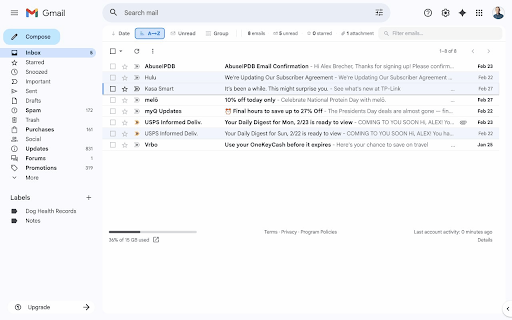
Sort your Gmail inbox your way — by date, sender, or unread status — right inside Gmail.

InboxSort adds a clean, native-feeling toolbar to your Gmail inbox with powerful sorting and organization features:

SORT MODES
• Oldest First — surface buried emails
• Newest First — restore Gmail's default
• Sender A→Z / Z→A — alphabetical by sender
• Unread First — prioritize unread messages

GROUP BY SENDER
• Cluster emails by sender alphabetically
• Works as an overlay on top of any sort mode

LIVE INBOX STATS
• See total emails, unread count, starred, and attachments at a glance

QUICK FILTERS
• Filter by starred, unread, or emails with attachments
• One-click toggle on/off

KEYBOARD SHORTCUTS
• Alt+1 through Alt+5 for sort modes
• Alt+6 to toggle grouping
• Alt+0 to clear filters
• / to focus the filter search box

CUSTOMIZATION
• 6 accent colors to match your style
• Choose which sort tabs are visible
• Auto-sort on load (remembers your preference)
• Per-label sort preferences
• Pause sorting temporarily (15m, 30m, 1h)
• Export/import settings for backup

PRIVACY FIRST
• Zero data collection — nothing leaves your browser
• No analytics, no tracking, no external requests
• Works entirely offline
• Open source: all code runs locally in your Gmail tab

Perfect for anyone who wants more control over their Gmail inbox without switching to a different email client.
Technical
- Version
- 1.0.0
- Manifest
- V3
- Size
- 44.97KiB
- Min Chrome
- 88
- Languages
- 1
- Featured
- No
Metadata
- ID
- mmbbiejiidimjaceddigelomncimdegb
- Developer ID
- ueba43426d8755f9aee61a4550a8e0b20
- Developer Email
- [email protected]
- Created
- Mar 6, 2026
- Last Updated (Store)
- Mar 6, 2026
- Last Scraped
- Jun 4, 2026
- Website
- —
- Support URL
- —
- Privacy Policy
- —
Similar extensions
Alternatives to InboxSort, ranked by description similarity.

Gmailytics — Gmail Inbox Cleanup & Unsubscribe
See who fills your inbox. Batch trash or archive by sender — in one click.
105
★ 5.0

G-Sort AI: Smart Organizer for Gmail
AI-powered email sorting and organization for Gmail. Automatically sorts your emails using Google Gemini AI.
39

inboxy: Inbox Bundles for Gmail
Adds Google Inbox bundles to Gmail
2.0K
★ 4.7

Sortd for Gmail
All-in-one Sales, Service, Help Desk & Task Manager for Gmail teams. Visual boards right in Gmail to share, assign and track emails.
40.0K
★ 4.1

ActiveInbox: Organize Gmail™ tasks
Overwhelmed by too many to-dos in your inbox? Turn Gmail into an effortless task manager to never forget anything.
10.0K
★ 4.7

Inbox Reborn theme for Gmail™
Adds features like reminders, email bundling, and Inbox's minimalistic style to Gmail™
999
★ 4.6

Gmail Mass Unsubscribe & Delete Emails - InboxPurge
Mass unsubscribe and delete unwanted emails in Gmail with one click. Trusted by thousands to clean inboxes fast!
20.0K
★ 4.7

Gmail Notifications
Gmail Notifications: Simple notifier for gmail. Check gmail inbox and get instant alerts in any tab—no switching.
1.0K
★ 5.0
Data sourced from the Chrome Web Store · last verified Jun 4, 2026.