
MailPress - Save Email as PDF for Gmail
One-click export of Gmail emails to clean, searchable PDFs. Threads, batch export, filename templates, Google Drive. 100% local.
As of July 2026, MailPress - Save Email as PDF for Gmail has — users in the Workflow & Planning category.
Usersno change0%
—
—
Ratingno change0%
—
— reviews
Reviewsno change0%
—
Version
1.0.0
Manifest V3
History
1 snapshotsTracking since Jul 20, 2026.
Not enough history yet for this metric — the chart fills in as we collect more snapshots.
View as table
| Date | Users | Rating | Reviews | Version |
|---|---|---|---|---|
| Jul 20, 2026 | — | — | — | 1.0.0 |
| Now | — | — | — | 1.0.0 |
Permissions & access
- Permissions
- offscreendownloadsstorageidentityalarms
- Host access
- https://mail.google.com/*, https://*.supabase.co/*, https://www.googleapis.com/*
Screenshots



About
MailPress adds a "Save as PDF" button right inside Gmail. One click turns the email you're reading into a clean, searchable, archival-quality PDF on your disk - correctly formatted, sensibly named, ready to file, share, or print. No print dialog, no popup windows, no configuration.

WHAT IT DOES

Open any email in Gmail and you'll see a MailPress button next to it. Click it, and in a few seconds you have a real PDF:

• True text, not a screenshot - every word is selectable and searchable, links stay clickable, and the file prints crisply at any size.
• Clean layout - the message is re-typeset for paper. No Gmail sidebars, toolbars, ads, or clipped margins in your document.
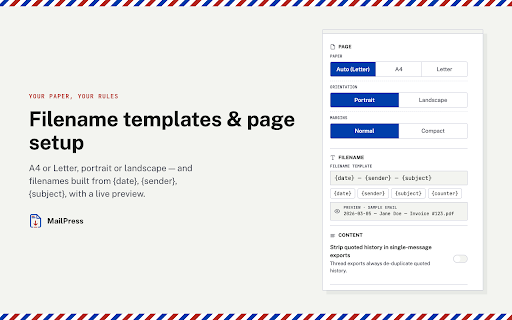
• A filename that makes sense - "2026-07-18 - Jane Doe - Invoice #123.pdf" by default. Fully customizable with {date}, {sender}, {subject}, and {counter} tokens, with a live preview as you type.
• Saved where you want - download locally, upload to your own Google Drive (any folder you choose), or both.

Need more than one email?

• Thread export - save an entire conversation as one chronological PDF.
• Batch export - select several emails in your inbox and export them all in one go, delivered as a tidy ZIP.

You stay in control of the output: A4 or Letter, portrait or landscape, normal or compact margins, and an option to strip quoted reply history so the PDF contains only the message that matters.

WHY INSTALL IT

Because the alternatives are bad.

Gmail's built-in Print produces a cluttered page with interface chrome baked in, and makes you fight a print dialog every single time. Screenshots are blurry, unsearchable, and useless as records. Email-to-PDF web services ask you to forward your private mail to a stranger's server.

MailPress fixes all three:

1. It's instant. One click, no dialogs, no new tabs. Progress appears right on the button - rendering, saving, done.
2. It's a real document. Searchable text and clean typesetting mean the PDF works as a record: for a legal file, an expense report, a warranty claim, or a court exhibit.
3. It's private by design. All processing happens locally in your browser. Your email content is never sent to our servers - nobody at MailPress can read your mail. The only upload that ever happens is the one you explicitly turn on, to your own Google Drive.

If you save emails regularly - receipts, contracts, confirmations, client correspondence, HR records - MailPress removes a small daily friction permanently. If you only need it occasionally, it's the difference between "clean PDF in five seconds" and "wrestling the print dialog, again".

PRIVACY

• Email content is processed entirely inside your browser and never sent to our servers.
• Sign-in exists only to track your export quota and subscription.
• Google Drive access is optional and limited strictly to files MailPress creates (drive.file scope) — we can never see the rest of your Drive.

SUPPORT

Questions or found a bug? Write to [email protected] - bug reports that lead to a fix earn a free month of Pro.

Install MailPress and turn your next email into a document worth keeping.
Technical
- Version
- 1.0.0
- Manifest
- V3
- Size
- 2.31MiB
- Min Chrome
- 88
- Languages
- 1
- Featured
- No
Metadata
- ID
- mljgojcaanfoaibcfpihbkohmklolpjk
- Developer ID
- u87618aae034d9532c9495d8ca38f8f64
- Developer Email
- [email protected]
- Created
- Jul 19, 2026
- Last Updated (Store)
- Jul 19, 2026
- Last Scraped
- Jul 20, 2026
- Website
- —
- Support URL
- —
- Privacy Policy
- https://mailpress.pixture.dev/privacy
Data sourced from the Chrome Web Store · last verified Jul 20, 2026.