
IT Glue Chrome Extension
Quickly and securely access all of your IT Glue passwords, create passwords, and preview your assets right from within Chrome.
As of June 2026, IT Glue Chrome Extension has 50,000 users and a 2.62/5 rating from 74 reviews in the Workflow & Planning category.
Usersno change0%
50.0K
50,000
Ratingdown 0.4 percent−0.4%
2.62
74 reviews
Reviewsup 4.2 percent+4.2%
74
Version
2.7.2
Manifest V3
90-day change · In the last 90 days this extension 1 version update.
History
4 snapshotsTracking since May 14, 2026.
View as table
| Date | Users | Rating | Reviews | Version |
|---|---|---|---|---|
| May 14, 2026 | 50.0K | 2.63 | 71 | 2.6.1 |
| May 23, 2026 | 50.0K | 2.67 | 72 | 2.6.1 |
| Jun 1, 2026 | 50.0K | 2.67 | 72 | 2.7.2 |
| Jun 24, 2026 | 50.0K | 2.64 | 73 | 2.7.2 |
| Now | 50.0K | 2.62 | 74 | 2.7.2 |
Permissions & access
- Permissions
- webRequestactiveTabstorageunlimitedStorageclipboardWritecontextMenuscookiessidePanel
- Host access
- <all_urls>
Screenshots


About
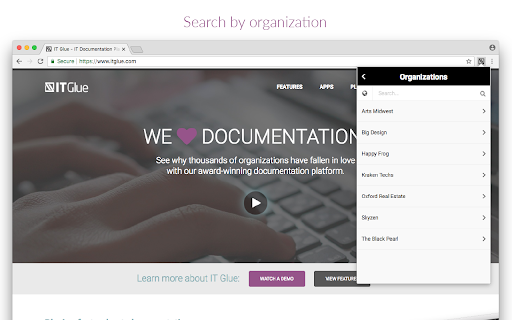
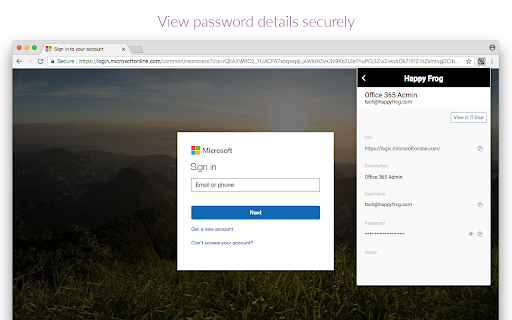
With the IT Glue Chrome extension, you’ll have instant access to IT Glue information whenever you need it. You can quickly and securely access all of your IT Glue passwords, create passwords, and preview assets right from within the browser extension. This means no more switching pages and no more copy/paste of usernames and passwords to sign in to websites and services. The extension also supports Single Sign-On (SSO), should your organization have it enabled. Now you can also experience the AI-powered efficiency of IT documentation with the Smart SOP Generator.

Smart SOP Generator
Open your IT Glue Chrome extension, click Smart SOP Generator in the menu and hit 'Start Recording'!

Our feature seamlessly captures your screen, keystrokes, and clicks, making documentation effortless. Plus, you can preview your capture in real-time on the panel to your right, ensuring everything looks just right as you go!

Need to remove a screenshot? Just click the trash icon to delete it instantly. You can also expand or shrink the preview panel whenever you need more workspace. If you close the panel your capture is stored locally on the browser should you wish to resume.

When you're ready to save your SOP, simply hit ‘Finish,’ give it a title, and choose an Organization. That’s it! Your document is automatically saved in a special folder called SOP Generator and opens right away for easy access. You can edit, publish and move your SOP at any time.

Passwords:
- Create, access and view passwords within the extension - all passwords that are saved in IT Glue will be available
- Password creation: ability to create business personal and team based passwords in the extension
- Password autofill: usernames and passwords stored in IT Glue are automatically populated in login fields
- Password auto-creation: When creating a new password (team-based or business personal password), users will be auto-promoted to add their passwords to IT Glue

Search:
- Quick search: access any item in IT Glue via the Search feature, not just passwords on any webpages by pressing "Q"
- Globally search for any passwords your account has permission to access

Security:
- The extension also supports Single Sign-On (SSO), should your organization have it enabled.
- At-rest and in-transit encryption of passwords keeps your data safe
- Sign in once and go: Share a sign-in session between the IT Glue web app and IT Glue Chrome extension for maximum time savings
Technical
- Version
- 2.7.2
- Manifest
- V3
- Size
- 2.72MiB
- Min Chrome
- 88
- Languages
- 1
- Featured
- No
Metadata
- ID
- mlhdnjepakdfdaabohjgegnomlgeejep
- Developer ID
- ud6c0f8294a63e3c4764f296ec25cae59
- Developer Email
- [email protected]
- Created
- Aug 17, 2017
- Last Updated (Store)
- May 21, 2026
- Last Scraped
- Jun 24, 2026
- Website
- —
- Support URL
- https://www.itglue.com/company/support/
- Privacy Policy
- https://www.itglue.com/privacy-policy/
Similar extensions
Alternatives to IT Glue Chrome Extension, ranked by description similarity.

MyGlue Chrome Extension
With MyGlue Chrome Extension, you can now quickly and securely access all of your MyGlue passwords right from within Chrome.
50.0K
★ 2.9

IT Glue SOP Generator Trial
Experience the AI-powered efficiency of IT documentation with the Smart SOP Generator trial.
707

IT Glue Offline Mode
IT Glue offline mode
1.0K
★ 1.0

TeamPassword
Password sharing for collaborative teams.
7.0K
★ 4.6

Passwordstate
Passwordstate for Chrome is a form filler extension that obtains credentials from Passwordstate.
100.0K
★ 3.2

Glyde - Create Step by Step Guides & SOPs
AI-powered screen recorder that turns workflows into step-by-step guides and SOPs.
42
★ 5.0

Guru
Find trusted, AI-powered answers from your company’s apps and tools directly in Chrome without switching tabs.
100.0K
★ 4.2

Scribe: AI Documentation, SOPs & Process Intelligence
Turn any workflow into documentation your teams and AI agents can follow. Save each team member 35 hours/month.
1.0M
★ 4.8
Data sourced from the Chrome Web Store · last verified Jun 24, 2026.