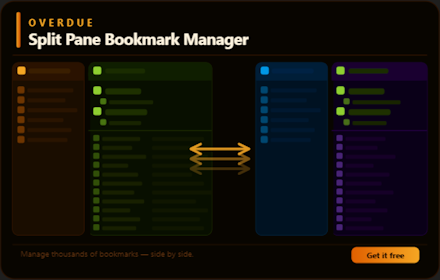
Overdue - Split Pane Bookmark Manager
The split pane bookmark manager that was long overdue.
As of June 2026, Overdue - Split Pane Bookmark Manager has 3 users in the Functionality & UI category.
Usersno change0%
3
3
Ratingno change0%
—
— reviews
Reviewsno change0%
—
Version
1.4
Manifest V3
90-day change · In the last 90 days this extension 2 version updates.
History
3 snapshotsTracking since May 28, 2026.
View as table
| Date | Users | Rating | Reviews | Version |
|---|---|---|---|---|
| May 28, 2026 | — | — | — | 1.0 |
| Jun 4, 2026 | — | — | — | 1.0 |
| Jun 9, 2026 | 3 | — | — | 1.3 |
| Now | 3 | — | — | 1.4 |
Changelog
- Jun 9, 2026name
Overdue Bookmarks
Overdue - Split Pane Bookmark Manager
- Jun 4, 2026description
Manage your bookmarks the way you manage files.
Overdue Bookmarks gives you two independent panels side by side — each with its own folder tree and bookmark list. Browse different folders simultaneously, drag items between panels or move them with a single keypress or click.

KEY FEATURES
· Split pane layout with resizable panels and folder trees
· Live search for both folder and bookmarks with highlighted matches as you type
· Drag and drop within and between panels
· Full keyboard navigation with visible focus indicators
· Cut / Paste and one-click move between panels
· Undo / Redo
· Sortable and resizable columns (Name, Path, URL, Date)
· Smooth performance with large bookmark collections
· Right-click context menu for quick actions
· Light and dark mode, follows system preference

PERMISSIONS
bookmarks — to read, create, move, rename, and delete bookmarks
tabs — to open bookmarks in new tabs

No data is collected or transmitted. Everything runs locally in your browser.
Manage your bookmarks the way you manage files. Overdue Bookmarks gives you two independent panels side by side — each with its own folder tree and bookmark list. Browse different folders simultaneously, drag items between panels or move them with a single keypress or click.

KEY FEATURES
· Split pane layout with resizable panels and folder trees
· Live search for both folder and bookmarks with highlighted matches as you type
· Drag and drop within and between panels
· Full keyboard navigation with visible focus indicators
· Cut / Paste and one-click move between panels
· Undo / Redo
· Sortable and resizable columns (Name, Path, URL, Date)
· Smooth performance with large bookmark collections
· Right-click context menu for quick actions
· Light and dark mode, follows system preference

PERMISSIONS
bookmarks — to read, create, move, rename, and delete bookmarks
tabs — to open bookmarks in new tabs

No data is collected or transmitted. Everything runs locally in your browser.
- Jun 4, 2026short_description
Split pane bookmark manager
The split pane bookmark manager that was long overdue.
Permissions & access
- Permissions
- bookmarkstabs
- Host access
- None declared
Screenshots


About
Manage your bookmarks the way you manage files. Overdue Bookmarks gives you two independent panels side by side — each with its own folder tree and bookmark list. Browse different folders simultaneously, drag items between panels or move them with a single keypress or click.

KEY FEATURES
· Split pane layout with resizable panels and folder trees
· Live search for both folder and bookmarks with highlighted matches as you type
· Drag and drop within and between panels
· Full keyboard navigation with visible focus indicators
· Cut / Paste and one-click move between panels
· Undo / Redo
· Sortable and resizable columns (Name, Path, URL, Date)
· Smooth performance with large bookmark collections
· Right-click context menu for quick actions
· Light and dark mode, follows system preference

PERMISSIONS
bookmarks — to read, create, move, rename, and delete bookmarks
tabs — to open bookmarks in new tabs

No data is collected or transmitted. Everything runs locally in your browser.
Technical
- Version
- 1.4
- Manifest
- V3
- Size
- 84.97KiB
- Min Chrome
- 88
- Languages
- 1
- Featured
- No
Metadata
- ID
- mlgkmoagnoofdpejecgbcnhaajlkgbdp
- Developer ID
- u1028bbc5b62aa351ae3fce66360e44fb
- Developer Email
- [email protected]
- Created
- May 27, 2026
- Last Updated (Store)
- Jun 4, 2026
- Last Scraped
- Jun 9, 2026
- Website
- —
- Support URL
- —
- Privacy Policy
- —
Data sourced from the Chrome Web Store · last verified Jun 9, 2026.