MATTRN Cleaner
Clear current-site or global Chrome data with quick controls, advanced cleanup targets, and optional tab reload.
As of June 2026, MATTRN Cleaner has 1 users in the Productivity category.
Usersno change0%
1
1
Ratingno change0%
—
— reviews
Reviewsno change0%
—
Version
1.3
Manifest V3
History
2 snapshotsTracking since May 26, 2026.
Not enough history yet for this metric — the chart fills in as we collect more snapshots.
View as table
| Date | Users | Rating | Reviews | Version |
|---|---|---|---|---|
| May 26, 2026 | — | — | — | 1.3 |
| Jun 8, 2026 | — | — | — | 1.3 |
| Now | 1 | — | — | 1.3 |
Permissions & access
- Permissions
- browsingDatastoragehistorytabs
- Host access
- <all_urls>
Screenshots


About
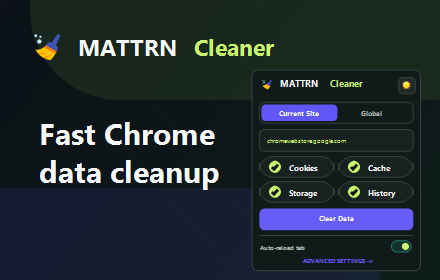
MATTRN Cleaner is a fast cleanup tool for Chrome users who need a simple way to reset site sessions, clear cached data, or remove selected browsing data without digging through Chrome settings.

Use the popup to clear data for the current website, or switch to global cleanup when you want to remove selected data across Chrome for a chosen timeframe. Quick controls cover common targets like cookies, cache, storage, and history, while Advanced Settings gives you more granular cleanup options.

Key features:

- Clear cookies, cache, site storage, and history from the popup
- Choose between Current Site and Global cleanup modes
- Select a timeframe: past hour, past 24 hours, past week, last 4 weeks, or all time
- Advanced cleanup targets including local storage, IndexedDB, WebSQL, file system data, form data, downloads list, plugin data, passwords, and more
- Save cleanup preferences locally
- Optional auto-reload after clearing current-site data
- Light and dark themes
- Keyboard shortcut for current-site cleanup: Ctrl+Shift+X

MATTRN Cleaner is built for direct control. It only runs when you open the popup, use the options page, or trigger the shortcut. Cleanup actions are permanent, so the extension shows caution labels for sensitive targets such as form data, plugin data, and passwords.
Technical
- Version
- 1.3
- Manifest
- V3
- Size
- 53.37KiB
- Min Chrome
- 88
- Languages
- 1
- Featured
- No
Metadata
- ID
- mklahlkodibfegjbjjbhlalgdgkiedbf
- Developer ID
- u8e92073b0aec17e3a22e171fc92b604b
- Developer Email
- [email protected]
- Created
- May 25, 2026
- Last Updated (Store)
- May 25, 2026
- Last Scraped
- Jun 8, 2026
- Website
- —
- Support URL
- —
- Privacy Policy
- https://sites.google.com/view/mattrn-cleaner/home
Data sourced from the Chrome Web Store · last verified Jun 8, 2026.