
Apex Log Insights
Free offline toolkit for Apex debug logs — execution timeline, governor limits, SOQL analysis, and guided triage.
As of June 2026, Apex Log Insights has 1 users in the Developer Tools category.
Usersno change0%
1
1
Ratingno change0%
—
— reviews
Reviewsno change0%
—
Version
1.1.22
Manifest V3
History
4 snapshotsTracking since Apr 24, 2026.
View as table
| Date | Users | Rating | Reviews | Version |
|---|---|---|---|---|
| Apr 24, 2026 | — | — | — | 1.1.22 |
| May 1, 2026 | — | — | — | 1.1.22 |
| May 12, 2026 | 1 | — | — | 1.1.22 |
| May 24, 2026 | — | — | — | 1.1.22 |
| Now | 1 | — | — | 1.1.22 |
Permissions & access
- Permissions
- tabsstorage
- Host access
- *://*/*.log, file:///*
Screenshots


About
Apex Log Insights is a free, offline toolkit that turns raw Apex debug logs into actionable insights. Drop in a .log file, get instant structured analysis across five views — no servers, no uploads, no accounts.

Every parse runs locally in a Web Worker. Your log data never leaves your machine.

FIVE STRUCTURED VIEWS

Triage
Get an immediate verdict — OK, Warning, or Critical — based on governor limit consumption, error count, and query patterns. See the key metrics at a glance and catch N+1 SOQL loops before you dig deeper.

Execution
Salesforce executes Apex in a 20-phase lifecycle (trigger start, validation, DML, commit, etc.). Apex Log Insights maps every event to its phase so you can see exactly which phase consumed which governor limits. Each event links back to its exact line in the raw log.

Data & Limits
All SOQL queries ranked by duration. DML operations by sObject type. HTTP callouts with status codes and response metadata. Named Credential request/response pairs. Savepoints and rollbacks. Governor limit usage at a glance.

Diagnostics
Execution context detection (synchronous trigger, queueable, future method, batch, scheduled, anonymous Apex, platform event). Debug level completeness score. Trigger cascade analysis. Managed package overhead calculation. Mixed DML and recursive trigger warnings.

Log Explorer
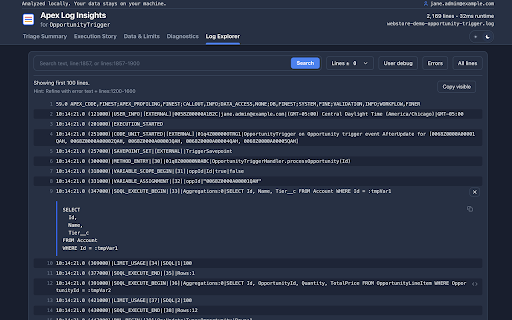
The complete raw log with full-text and regex search, context line controls, user-debug-only and errors-only filters, and one-click copy. Every item in every other view links directly to its exact line number here. Nothing is truncated.

KEY FEATURES

Evidence Linking — click any SOQL query, DML operation, callout, or warning to jump instantly to the matching line in the raw log. No manual searching.

N+1 SOQL Detection — automatically flags queries executed inside loops, the most common cause of governor limit exceptions in Apex.

Governor Limit Burn Rate — shows which execution phase consumed CPU, heap, and query limits so you can pinpoint the bottleneck.

Mixed DML Detection — warns when setup objects (User, PermissionSet, etc.) and non-setup objects are modified in the same transaction, a common cause of hard-to-debug runtime errors.

Recursive Trigger Detection — flags when the same trigger fires multiple times in a single transaction.

Debug Level Quality Scoring — tells you if your log was captured at too low a level and is missing key event types that would affect analysis accuracy.

PHI/PII Redaction — before copying log content, optionally mask email addresses, Salesforce IDs, phone numbers, and custom person names so sensitive data stays out of bug reports and tickets.

Auto-Detection — browse to any .log URL in Chrome (including Salesforce's own debug log download links) and the extension intercepts and analyzes it automatically.

COMPLETELY OFFLINE

No server. No account. No API calls. No telemetry. The extension requires only two permissions: "tabs" (to detect when you open a .log file) and "storage" (to remember your preferences). Host permissions are scoped to *.log URLs and local files only.

HOW TO GET AN APEX DEBUG LOG

In Salesforce: Setup > Debug Logs > add a Trace Flag for your user > reproduce the operation > download the log file.

For best results, use these debug levels:
Apex Code: FINEST
Apex Profiling: FINE
Database: FINEST
Callout: FINE
System: FINE
Validation: FINE
Workflow: FINE

WHO IS IT FOR

Salesforce developers and release engineers who need to understand what a transaction actually did — how many queries ran, which governor limits were hit, what the trigger lifecycle looked like, and exactly which line of code caused a problem. Works on any Apex debug log regardless of org edition.

AI INTEGRATION (OPTIONAL)

Apex Log Insights also ships as an MCP server for Claude, Cursor, and other AI tools. The MCP server parses logs locally using the same engine as this extension, then passes the structured results to your AI client. If you use cloud-based AI, every MCP tool supports an opt-in redact mode that masks Salesforce IDs, emails, and other sensitive values before they leave your machine. See the project README for setup instructions.


OPEN SOURCE

Apex Log Insights is open source. Contributions, bug reports, and feature requests are welcome.

GitHub: https://github.com/gkolan/apex-log-insights
Technical
- Version
- 1.1.22
- Manifest
- V3
- Size
- 174KiB
- Min Chrome
- 88
- Languages
- 1
- Featured
- No
Metadata
- ID
- mkgfpohljhagepglolcabmnhhiipicdp
- Developer ID
- u6b4fa8269b1d8d7c576c5dea2a94b6a3
- Developer Email
- [email protected]
- Created
- Apr 23, 2026
- Last Updated (Store)
- May 8, 2026
- Last Scraped
- Jun 6, 2026
- Website
- —
Data sourced from the Chrome Web Store · last verified Jun 6, 2026.