
Twitch Flow Chat
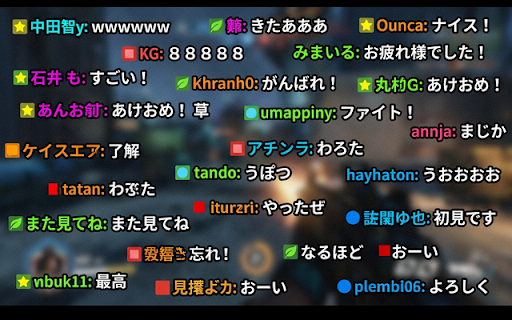
Twitchのチャットを配信画面上にニコニコ動画風にスクロールさせます。
As of June 2026, Twitch Flow Chat has 30 users in the Productivity category.
Usersup 233.3 percent+233.3%
30
30
Ratingno change0%
—
— reviews
Reviewsno change0%
—
Version
1.6.2
Manifest V3
90-day change · In the last 90 days this extension 1 version update.
History
8 snapshotsTracking since Apr 17, 2026.
View as table
| Date | Users | Rating | Reviews | Version |
|---|---|---|---|---|
| Apr 17, 2026 | 9 | — | — | 1.6.0 |
| Apr 24, 2026 | 15 | — | — | 1.6.0 |
| May 1, 2026 | 14 | — | — | 1.6.0 |
| May 8, 2026 | 16 | — | — | 1.6.2 |
| May 12, 2026 | 26 | — | — | 1.6.2 |
| May 18, 2026 | 28 | — | — | 1.6.2 |
| May 24, 2026 | 33 | — | — | 1.6.2 |
| Jun 6, 2026 | 31 | — | — | 1.6.2 |
| Now | 30 | — | — | 1.6.2 |
Changelog
- May 1, 2026description
【概要】
Twitch のチャットを、ニコニコ動画のように配信画面上に右から左へスクロールさせる Chrome 拡張機能です。
※スクリーンショットはAI生成によるイメージ図です。

【主な機能と特徴】
・ニコニコ動画風スクロール: チャットメッセージが画面上を流れます。
・バッジ・スタンプ対応: Twitch 特有のバッジやスタンプも、文字と一緒に流れます。
・豊富なカスタマイズ: ポップアップメニューから、以下の項目を自分好みに調整できます。
 - コメントの文字色・縁取り色・フォントサイズ
 - 不透明度
 - スクロール速度(秒数指定)
 - 同時に表示する最大行数
 - ユーザー名の表示/非表示(色付けも対応)
 - バッジの表示/非表示
・ワンタッチ ON/OFF: プレイヤー画面内のボタン、またはショートカットキー(Cキー)で、即座に表示/非表示を切り替えられます。
・オーバーフロー対応: コメントが多すぎる場合、一時的にストックして隙間ができてから流す「キュー機能」を搭載。

【プライバシーについて】
本拡張機能は、各種データを外部サーバーに送信することはありません。
すべての処理はブラウザ内で完結し、設定内容は Google Chrome の同期機能(またはローカルストレージ)にのみ保存されます。

------ English ------
【Overview】
This Chrome extension scrolls Twitch chat from right to left across the video player, recreating the iconic "Nico Nico Douga" style experience.
*Note: Screenshots are AI-generated conceptual mockups.

【Key Features】
- Nico Nico Style Scrolling: Chat messages flow seamlessly across the screen.
- Badge & Emote Support: Twitch-specific badges and emotes are displayed alongside text.
- Rich Customization: Adjust the following settings to your preference via the popup menu:
    - Text color, outline color, and font size
    - Opacity
    - Scroll speed (duration in seconds)
    - Maximum number of lines displayed simultaneously
    - Show/hide usernames (includes support for user colors)
    - Show/hide badges
- One-Touch Toggle: Instantly toggle visibility using the button in the video player or the shortcut key ("C" key).
- Overflow Handling: Features a "Queue" function that temporarily stores comments during high-traffic periods, releasing them when space becomes available.

【Privacy Policy】
This extension does not send any data to external servers. All processing occurs locally within your browser, and settings are saved only using Google Chrome's sync feature (or local storage).
【概要】 Twitch のチャットを、ニコニコ動画のように配信画面上に右から左へスクロールさせる Chrome 拡張機能です。 ※スクリーンショットはAI生成によるイメージ図です。 【主な機能と特徴】 ・ニコニコ動画風スクロール: チャットメッセージが画面上を流れます。 ・バッジ・スタンプ対応: Twitch 特有のバッジやスタンプも、文字と一緒に流れます。 ・コメント読み上げ: 端末の音声読み上げ機能を用いてコメントを読み上げます。 ・豊富なカスタマイズ: ポップアップメニューから、以下の項目を自分好みに調整できます。 - コメントの文字色・縁取り色・フォントサイズ - 不透明度 - スクロール速度(秒数指定) - 同時に表示する最大行数 - ユーザー名の表示/非表示(色付けも対応) - バッジの表示/非表示 ・ワンタッチ ON/OFF: プレイヤー画面内のボタン、またはショートカットキー(Cキー)で、即座に表示/非表示を切り替えられます。 ・オーバーフロー対応: コメントが多すぎる場合、一時的にストックして隙間ができてから流す「キュー機能」を搭載。 【プライバシーについて】 本拡張機能は、各種データを外部サーバーに送信することはありません。 すべての処理はブラウザ内で完結し、設定内容は Google Chrome の同期機能(またはローカルストレージ)にのみ保存されます。 ------ English ------ 【Overview】 This Chrome extension scrolls Twitch chat from right to left across the video player, recreating the iconic "Nico Nico Douga" style experience. *Note: Screenshots are AI-generated conceptual mockups. 【Key Features】 - Nico Nico Style Scrolling: Chat messages flow seamlessly across the screen. - Badge & Emote Support: Twitch-specific badges and emotes are displayed alongside text. - Comment Text-to-Speech: Uses the device's voice synthesis to read comments aloud. - Rich Customization: Adjust the following settings to your preference via the popup menu: - Text color, outline color, and font size - Opacity - Scroll speed (duration in seconds) - Maximum number of lines displayed simultaneously - Show/hide usernames (includes support for user colors) - Show/hide badges - One-Touch Toggle: Instantly toggle visibility using the button in the video player or the shortcut key ("C" key). - Overflow Handling: Features a "Queue" function that temporarily stores comments during high-traffic periods, releasing them when space becomes available. 【Privacy Policy】 This extension does not send any data to external servers. All processing occurs locally within your browser, and settings are saved only using Google Chrome's sync feature (or local storage).
Permissions & access
- Permissions
- storage
- Host access
- None declared
Screenshots

About
【概要】
Twitch のチャットを、ニコニコ動画のように配信画面上に右から左へスクロールさせる Chrome 拡張機能です。
※スクリーンショットはAI生成によるイメージ図です。

【主な機能と特徴】
・ニコニコ動画風スクロール: チャットメッセージが画面上を流れます。
・バッジ・スタンプ対応: Twitch 特有のバッジやスタンプも、文字と一緒に流れます。
・コメント読み上げ: 端末の音声読み上げ機能を用いてコメントを読み上げます。
・豊富なカスタマイズ: ポップアップメニューから、以下の項目を自分好みに調整できます。
 - コメントの文字色・縁取り色・フォントサイズ
 - 不透明度
 - スクロール速度(秒数指定)
 - 同時に表示する最大行数
 - ユーザー名の表示/非表示(色付けも対応)
 - バッジの表示/非表示
・ワンタッチ ON/OFF: プレイヤー画面内のボタン、またはショートカットキー(Cキー)で、即座に表示/非表示を切り替えられます。
・オーバーフロー対応: コメントが多すぎる場合、一時的にストックして隙間ができてから流す「キュー機能」を搭載。

【プライバシーについて】
本拡張機能は、各種データを外部サーバーに送信することはありません。
すべての処理はブラウザ内で完結し、設定内容は Google Chrome の同期機能(またはローカルストレージ)にのみ保存されます。

------ English ------
【Overview】
This Chrome extension scrolls Twitch chat from right to left across the video player, recreating the iconic "Nico Nico Douga" style experience.
*Note: Screenshots are AI-generated conceptual mockups.

【Key Features】
- Nico Nico Style Scrolling: Chat messages flow seamlessly across the screen.
- Badge & Emote Support: Twitch-specific badges and emotes are displayed alongside text.
- Comment Text-to-Speech: Uses the device's voice synthesis to read comments aloud.
- Rich Customization: Adjust the following settings to your preference via the popup menu:
    - Text color, outline color, and font size
    - Opacity
    - Scroll speed (duration in seconds)
    - Maximum number of lines displayed simultaneously
    - Show/hide usernames (includes support for user colors)
    - Show/hide badges
- One-Touch Toggle: Instantly toggle visibility using the button in the video player or the shortcut key ("C" key).
- Overflow Handling: Features a "Queue" function that temporarily stores comments during high-traffic periods, releasing them when space becomes available.

【Privacy Policy】
This extension does not send any data to external servers. All processing occurs locally within your browser, and settings are saved only using Google Chrome's sync feature (or local storage).Technical
- Version
- 1.6.2
- Manifest
- V3
- Size
- 264KiB
- Min Chrome
- 88
- Languages
- 1
- Featured
- No
Metadata
- ID
- mkffadcoaamccjdiookgcpolhclapfam
- Developer ID
- u3c8293ecdd97beeada4ba8503450b5a9
- Developer Email
- [email protected]
- Created
- Feb 28, 2026
- Last Updated (Store)
- Apr 26, 2026
- Last Scraped
- Jun 6, 2026
- Website
- —
- Support URL
- —
- Privacy Policy
- —
Similar extensions
Alternatives to Twitch Flow Chat, ranked by description similarity.

Youtube Livechat Danmaku Helper
Turn YouTube live chat messages into scrolling danmaku (barrage) on the video player.
12

ニコショ
ニコニコ動画のスクリーンショットを簡単に撮るChrome拡張
290

StreamSync
TwitchのVOD視聴中に、同時刻の別配信者VODへジャンプできる拡張です。
1

チャットを翻訳して読み上げるちゃん😀 Chat Translate and Read Aloud Chan😀
ライブ配信のチャットを翻訳して読み上げます。読み上げたい配信のチャットをポップアウト画面で開くと、新着コメントを翻訳して読み上げます。対応サービス(YouTube™ / Twitch)
26
★ 5.0

TTV Tools
Adds extra features to Twitch
2.0K
★ 3.4

ちえちゃんと秋ちゃん
ニコ生コメント読み上げ拡張(あなたもツールの虜なのバージョン9:累積バグの修正対応版)
17
★ 3.0

Danmaku Overlay for Youtube
Shows YouTube Live chat messages as flying bullet comments over the video player.
54

Twitch 定型チャット - Twitch Chat Templates
Twitchでのチャットをもっと便利に!定型文を登録しておき,Twitchチャット欄に簡単入力。入力の手間を省き,快適なチャットをサポートします。
3
Data sourced from the Chrome Web Store · last verified Jun 6, 2026.