
Scan CSS
A script to inspect, scan and copy CSS properties of any element on the web page
As of June 2026, Scan CSS has 821 users and a 2.38/5 rating from 8 reviews in the Workflow & Planning category.
Usersdown 5.0 percent−5.0%
821
821
Ratingno change0%
2.38
8 reviews
Reviewsno change0%
8
Version
1.0.2
Manifest V3
History
3 snapshotsTracking since Apr 23, 2026.
View as table
| Date | Users | Rating | Reviews | Version |
|---|---|---|---|---|
| Apr 23, 2026 | 864 | 2.38 | 8 | 1.0.2 |
| May 13, 2026 | 878 | 2.38 | 8 | 1.0.2 |
| Jun 8, 2026 | 838 | 2.38 | 8 | 1.0.2 |
| Now | 821 | 2.38 | 8 | 1.0.2 |
Permissions & access
- Permissions
- None declared
- Host access
- None declared
Screenshots
About
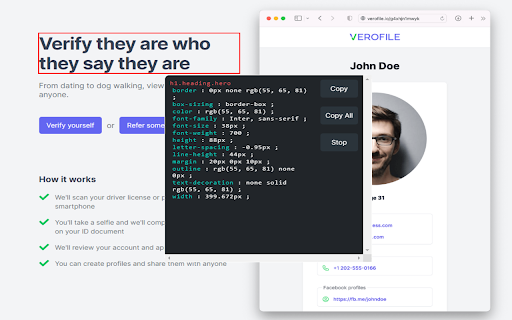
A free tool to inspect and edit CSS right in the browser without a need to open developer tools.

Press 'alt + s' to start the inspection.

Click on "Copy" to copy the CSS properties of the element.

Click on "Copy All" to copy the CSS properties of the element as well of its children.
Technical
- Version
- 1.0.2
- Manifest
- V3
- Size
- 115KiB
- Min Chrome
- 88
- Languages
- 1
- Featured
- Yes
Metadata
- ID
- mkdaolldfcljbalhclcakgjjiklajdof
- Developer ID
- u0b57130a766b8a28e782beb88a252618
- Developer Email
- [email protected]
- Created
- Nov 26, 2022
- Last Updated (Store)
- Nov 29, 2022
- Last Scraped
- Jun 8, 2026
- Website
- —
- Support URL
- —
- Privacy Policy
- —
Similar extensions
Alternatives to Scan CSS, ranked by description similarity.

Aquarius CSS Helper
Edit your HTML & CSS style and copy your code
51
★ 5.0

CSS Selector
Quick, Easy, powerful CSS Selector generation.
10.0K
★ 1.8

CSS Selector
A chrome extension to help you find the css selector of an element.
59
Copy Text from HTML Extension
Copy text content of an HTML element with Shift + Alt + C
222
★ 1.0

Pretty HTML | CSS | XML
A simple way to format your HTML, CSS, or XML code for easier reading!
4.0K
★ 3.0

Edit Any Page
Edit text of any webpage
99

Copy Dropdown Contents
Copy contents of a dropdown list easily with a right-click.
3.0K
★ 3.4

WebClip Element
Take a screenshot of highligthed element (or visible page)
93
★ 5.0
Data sourced from the Chrome Web Store · last verified Jun 8, 2026.