
Image Compressor
Compress an image once per session. Redirect to the website for further use.
As of June 2026, Image Compressor has 20 users in the Productivity category.
Usersup 33.3 percent+33.3%
20
20
Ratingno change0%
—
— reviews
Reviewsno change0%
—
Version
1.0
Manifest V3
History
3 snapshotsTracking since Apr 23, 2026.
View as table
| Date | Users | Rating | Reviews | Version |
|---|---|---|---|---|
| Apr 23, 2026 | 15 | — | — | 1.0 |
| May 13, 2026 | 19 | — | — | 1.0 |
| Jun 8, 2026 | 15 | — | — | 1.0 |
| Now | 20 | — | — | 1.0 |
Permissions & access
- Permissions
- storage
- Host access
- None declared
Screenshots
About
Effortlessly compress your images with our simple and powerful Image Compressor Chrome Extension! This tool is designed for fast and high-quality image compression directly within your browser, making it easier than ever to reduce file sizes without sacrificing image quality. Perfect for bloggers, web developers, photographers, and anyone who needs to quickly optimize images for websites, social media, or email.

Key Features:

One-Click Image Compression: Easily compress any image in just a single click. Adjust the compression quality to suit your needs, from high quality to smaller file size.
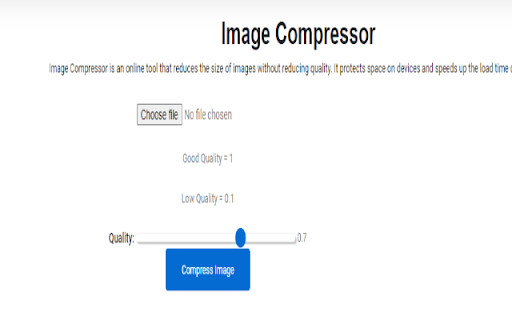
Simple User Interface: Upload, adjust quality, and compress images directly from the extension’s popup. No complex settings – designed for ease of use.
Quality Control: Use the slider to select the desired image quality, giving you control over the balance between image quality and file size.
One Compression Per Session: To keep things simple, the extension allows one compression per session. After the first use, you’ll be redirected to our website for further compressions.
Instant Download: Download the compressed image instantly after compression. Optimize your images for web use, email attachments, or social media sharing.
Secure: Your images are processed locally within your browser – no uploads to external servers, ensuring your privacy and data security.
How to Use:

Click the extension icon to open the Image Compressor.
Upload the image you want to compress.
Adjust the quality using the slider (from high quality to maximum compression).
Click "Compress Image" to reduce the file size.
Download the compressed image instantly.
Need to compress more? Visit our website for unlimited compressions.
Why Use This Extension?

Optimize Website Speed: Reduce image sizes to improve website load times and enhance SEO.
Save Storage Space: Compress images to save valuable storage on your devices.
Improve Upload Speeds: Smaller files mean faster uploads for websites, emails, and cloud storage.
Simplify your image compression tasks with this user-friendly Chrome extension. Optimize images and enhance your online experience today!
Technical
- Version
- 1.0
- Manifest
- V3
- Size
- 54.72KiB
- Min Chrome
- 88
- Languages
- 1
- Featured
- No
Metadata
- ID
- mkbdnogghcplhapahicdofefdbajblda
- Developer ID
- u33a3cb6c1e86dcbf1a0d7e4e8302063b
- Developer Email
- [email protected]
- Created
- Sep 18, 2024
- Last Updated (Store)
- Sep 18, 2024
- Last Scraped
- Jun 8, 2026
- Website
- —
- Support URL
- https://popitopi.com/report-a-bug/
- Privacy Policy
- https://popitopi.com/privacy-policy/
Similar extensions
Alternatives to Image Compressor, ranked by description similarity.

Image Compressor
Compress images (JPG, PNG, WebP), reduce image size
31

Picture Compressor
Introducing Picture Compressor, a simple image compressor that reduces picture size and creates compressed images.
887
★ 5.0

Image Compressor
Compress JPG and PNG images instantly in your browser.
58

Bulk image compressor
Bulk image compressor allows you to compress images in batches
1.0K
★ 3.8

Compress Image to 500kb » Convert JPG to 500kb
Resize + Compress JPG PNG WebP Photo to 500KB
28
★ 5.0

Compress JPG
Instantly compress JPG files! JPG compress tool—a simple image compressor to reduce image size anonymously without losing quality!
491
★ 5.0

Image Size Converter
Use image size converter as an image compressor and image resizer tool. It allows to create tiny png, jpg, webp files.
524
★ 5.0

Multi-Image Compressor (No Metadata, Full Quality)
Compress images with ZIP download. Removes metadata and preserves full visual quality.
27
★ 4.0
Data sourced from the Chrome Web Store · last verified Jun 8, 2026.