
Easy Saver for Instagram
Extension for saving media from Instagram's web version
As of June 2026, Easy Saver for Instagram has 1,000 users and a 3.84/5 rating from 25 reviews in the fun category.
Usersno change0%
1.0K
1,000
Ratingno change0%
3.84
25 reviews
Reviewsno change0%
25
Version
1.3.18
Manifest V3
History
1 snapshotsTracking since Apr 23, 2026.
View as table
| Date | Users | Rating | Reviews | Version |
|---|---|---|---|---|
| Apr 23, 2026 | 1.0K | 3.84 | 25 | 1.3.18 |
| Now | 1.0K | 3.84 | 25 | 1.3.18 |
Permissions & access
- Permissions
- downloadswebNavigationstorage
- Host access
- None declared
Screenshots


About
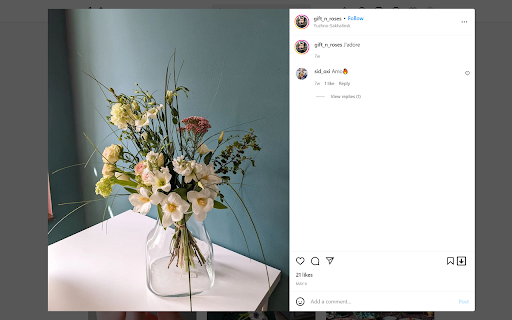
Easy Saver will help you to easily download photos, videos and live streams from your or your friend's account. It adds download button on all media of web version of Instagram.

Using this extension, you can download photos and videos from your feed, from your friend's profile, or from your own profile with one click. You can download reels, stories, and even whole carousel posts.

Easy Saver creates "easy-saver-folder" in your Download folder. All videos and photos will be saved in subfolders like this: "%Downloads_folder%\easy-saver-folder\%friends_username%\", so it will be very easy to sort photos from different accounts.

After the download is finished download button will blink green, if it was successful, or red if it wasn't. (usually because it's a private video or because you cancel the download yourself)

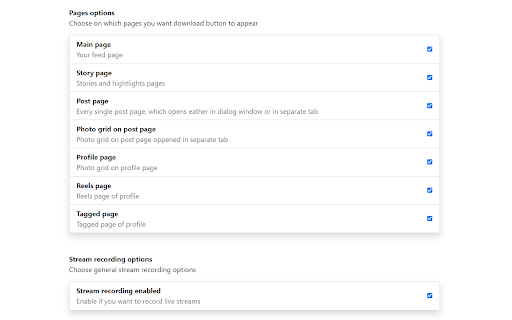
New feature🔥🔥🔥: now you can record Instagrams live stream which is currently online. Open streams page, find record panel, click "Start recording" button. That's it. The stream will be recorded and saved automatically at the end. Or you can click "Stop and save" button and currently recorded part of a live stream will be saved right away. While the stream is being recorded you can minimize the recording panel and continue to browse the Instagram. Yes, you can leave live stream page and browse your feed, stream will be recorded anyway (But don't reload Instagram page with browser reload button, it would stop the recording. Basically, if you see a recording panel then the stream is being recorded) You can record 🔥several streams simultaneously🔥 in one tab. Just open the other stream you want to record and another record panel will be added. At the end of the stream you will receive two files: one with video .m4v, one with audio .m4a. Extension can't merge these files by itself, but you can use video player (VLC for example) to open video and add an audio track. Or you can use "ffmpeg" program to merge these files into one video file (I prefer this way) Or you can find some online service to merge it, it's up to you.

Note, that if you want Chrome to automatically download photos, you need 'Ask where to save each file before downloading' option to be turned off, otherwise it will ask you where to save every single photo. It's not bad, but it's not as convenient as originally intended.

And don't forget, that all videos and photos belong to their creators. Don't download it without the owner's permission.
Technical
- Version
- 1.3.18
- Manifest
- V3
- Size
- 111KiB
- Min Chrome
- 88
- Languages
- 1
- Featured
- Yes
Metadata
- ID
- mkaclpipmcbnleaiaicbcnoojineiloi
- Developer ID
- u22cda4b8d77ee624d355e3f511271b14
- Developer Email
- [email protected]
- Created
- Jun 28, 2022
- Last Updated (Store)
- Dec 12, 2023
- Last Scraped
- Jun 8, 2026
- Website
- —
- Support URL
- —
- Privacy Policy
- —
Similar extensions
Alternatives to Easy Saver for Instagram, ranked by description similarity.

Mini Video Recorder
A tool that allows you to record a fast video using your camera and microphone, put some basic filters and download it, so you can…
1

SVD Video Downloader
Smart Video Downloader is an extension that allows you to download videos from most popular video streaming websites.
- When the…
3.0K
★ 3.0

Telegram Video Downloader - TVDownloader
Download Telegram Restricted videos/movies/images with one click. Fast, secure, and convenient.
50.0K
★ 4.7

TikPak Downloader
TikPak Downloader, helps you view and download videos from Tiktok in one click!
5.0K
★ 3.5

Twitch Replay
Record Twitch stream
1.0K
★ 2.3

Twitter To Mp4 Downloader
Downloads Twitter videos, gifs and images into your personal computer and many more with just a click of a mouse!
1.0K
★ 4.2

YouTube Screenshot
Screenshot button from youtube video online.
324
★ 4.0

TikTok Download - TTMates
TTMates sidebar:Ultimate Companion for TikTok Video Downloading
170
★ 5.0
Data sourced from the Chrome Web Store · last verified Jun 8, 2026.