
Blackboard
Draw over webpages, capture and save full page screenshots
As of June 2026, Blackboard has 2,000 users and a 3.75/5 rating from 8 reviews in the Workflow & Planning category.
Usersno change0%
2.0K
2,000
Ratingup 1.1 percent+1.1%
3.75
8 reviews
Reviewsup 14.3 percent+14.3%
8
Version
0.1.1
Manifest V3
History
2 snapshotsTracking since Apr 23, 2026.
View as table
| Date | Users | Rating | Reviews | Version |
|---|---|---|---|---|
| Apr 23, 2026 | 2.0K | 3.71 | 7 | 0.1.1 |
| May 13, 2026 | 2.0K | 3.71 | 7 | 0.1.1 |
| Now | 2.0K | 3.75 | 8 | 0.1.1 |
Permissions & access
- Permissions
- activeTabstorageunlimitedStoragescripting
- Host access
- None declared
Screenshots



About
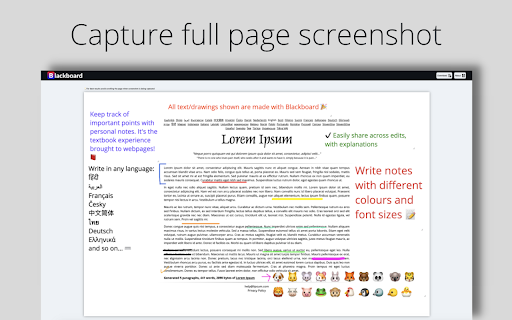
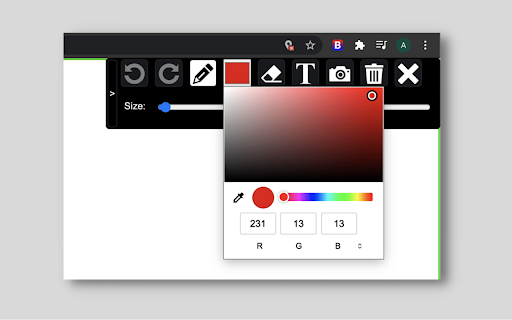
*EXTENSIONS DO NOT WORK ON CHROME WEBSTORE PAGES - NAVIGATE AWAY TO ACTUAL WEBSITES TO TEST!* Blackboard helps you live annotate web pages and take full length screenshot of your work! 🚀Features: ✏️ Pencil tool 📷 Full page screenshot ✨ Textbox 🎚️ Size adjustor for drawing/writing ✨ Eraser tool 🎨 Colour Palette 🖌️ Colour Picker 📥 Download screenshot 🗑️ Reset 💁♀️Use cases: - Communicate better with your team by creating and sharing notes written on webpages, useful for code reviews, to explain with diagrams - Save personal notes or mark important sections in webpages while studying - Download screenshots and share your views with anyone - Save bandwidth while screen-sharing, by annotating using this extension ❌ Not supported - Chrome extensions do not work in the Chrome web store - Max canvas size allowed is 8000px for optimal browser performance - Download format is .png, further support will come in future releases 🆓Free - All features are free - Unlimited full page screenshots. - Unlimited downloads - No watermark - No login/sign-up required 📌 Stay tuned for more exciting features coming through! 🎁 🐛Facing bugs or have some suggestions to improve? Help me make this tool better by logging detailed bugs or feature requests in the Support section.
Technical
- Version
- 0.1.1
- Manifest
- V3
- Size
- 1.39MiB
- Min Chrome
- 88
- Languages
- 1
- Featured
- Yes
Metadata
- ID
- mjpaeljbciakgnigdligmdihfhnpbfla
- Developer ID
- u6e81be367e875a0783b0038d5eee3466
- Developer Email
- [email protected]
- Created
- Jun 30, 2021
- Last Updated (Store)
- Jul 4, 2024
- Last Scraped
- Jun 8, 2026
- Website
- —
- Support URL
- https://forms.gle/adr6w3M3MdnJ28Sh7
- Privacy Policy
- —
Similar extensions
Alternatives to Blackboard, ranked by description similarity.

Web Paint - Page Marker & Editor
Draw shapes, paint lines, paint curves, add text on pages in real time. Take screenshot or print it. Paint Online.
400.0K
★ 4.6

Screenshotify
Lightweight Screenshot + Annotate Chrome Extension. Capture, annotate, blur, crop, and zoom screenshots - all offline and private.
11
★ 5.0

Scribble Pad - Paint On Web
Scribble Pad turns any website into your personal canvas. Draw, sketch, write notes, capture screenshots and annotate in real time.
300
★ 5.0

Page Marker Pro - Draw on Web Pages
Draw on web page, annotate, and mark up any webpage with a floating toolbar. Add text, shapes, highlights, and freehand drawings.
106

Easy Draw - Screenshot & Drawing Tool
Draw, annotate, and edit screenshots directly on any webpage. Perfect for collaboration and visual communication.
386
★ 5.0

Free Snipping Tool
Professional snipping tool with full page, selection, and scrolling capture capabilities
40.0K
★ 3.9
Paint Tool for Chrome
Paint tool to draw anything and anywhere in real-time, paint online. Take a screenshot of your drawing use screenshot tool.
70.0K
★ 4.5
Paint Tool by Painty
Paint tool to draw shapes, add text on web pages in real-time, make a screenshot, and download or share the screenshot with friends.
20.0K
★ 4.7
Data sourced from the Chrome Web Store · last verified Jun 8, 2026.