
Whatsapp Blur
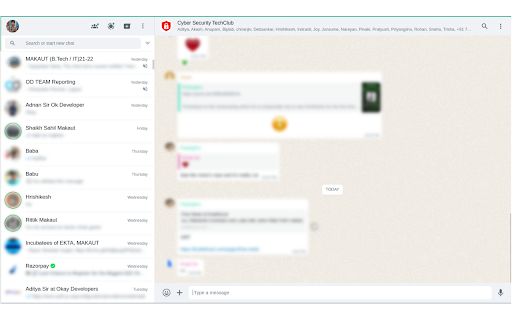
Blur details on web whatsapp.
As of June 2026, Whatsapp Blur has 9,000 users and a 2.00/5 rating from 4 reviews in the Privacy & Security category.
Usersno change0%
9.0K
9,000
Ratingup 100.0 percent+100.0%
2.00
4 reviews
Reviewsup 33.3 percent+33.3%
4
Version
1.1.0
Manifest V3
History
3 snapshotsTracking since Apr 23, 2026.
View as table
| Date | Users | Rating | Reviews | Version |
|---|---|---|---|---|
| Apr 23, 2026 | 9.0K | 1.00 | 3 | 1.1.0 |
| May 13, 2026 | 10.0K | 1.00 | 3 | 1.1.0 |
| Jun 8, 2026 | 10.0K | 2.00 | 4 | 1.1.0 |
| Now | 9.0K | 2.00 | 4 | 1.1.0 |
Permissions & access
- Permissions
- activeTabscriptingsidePanel
- Host access
- None declared
Screenshots

About
WhatsApp Blur is the ultimate privacy solution for your WhatsApp Web experience. With WhatsApp Blur, you can easily blur out sensitive and private information on the WhatsApp Web interface, ensuring that your confidential messages, contacts, and chats remain private, even when sharing your screen or working in a public place.

Key Features:

1. Privacy Protection: Protect your private chats and contacts from prying eyes by seamlessly blurring sensitive information.

2. One-Click Blur: Enable or disable the blur with just one click, making it convenient to switch between a secure and regular WhatsApp Web experience.

3. Quick and Intuitive: WhatsApp Blur is designed for ease of use. You don't need to be tech-savvy to enjoy enhanced privacy.

Advantages:

1. Enhanced Privacy: WhatsApp Blur takes your privacy seriously, ensuring that even when you share your screen or work in a crowded workspace, your sensitive information remains hidden.

2. User-Friendly: The extension is user-friendly and can be toggled on and off with ease. No complex settings or configurations are required.

3. Regular Updates: We are committed to providing you with a seamless experience, and our development team regularly updates the extension to ensure compatibility with WhatsApp updates and improved performance.

How to Use:

- Install WhatsApp Blur from the Chrome Web Store.
- Open WhatsApp Web in your Chrome browser.
- Click the WhatsApp Blur icon in your browser toolbar to enable or disable the blur.

Protect your WhatsApp conversations like never before with WhatsApp Blur. Get started today and take control of your online privacy.

Install WhatsApp Blur and enjoy a more secure WhatsApp Web experience!
Technical
- Version
- 1.1.0
- Manifest
- V3
- Size
- 249KiB
- Min Chrome
- 88
- Languages
- 1
- Featured
- No
Metadata
- ID
- mjmpppckljipbiclkfdcgagedalogfeo
- Developer ID
- u809abd31c6e3c0d1ed0d2dc891bdda8d
- Developer Email
- [email protected]
- Created
- Sep 18, 2023
- Last Updated (Store)
- Dec 10, 2024
- Last Scraped
- Jun 8, 2026
- Website
- —
- Support URL
- —
- Privacy Policy
- —
Similar extensions
Alternatives to Whatsapp Blur, ranked by description similarity.

Privacy Extension for WhatsApp Web
Protect your privacy with Cutlet's *Privacy Extension for WhatsApp Web*
697
★ 5.0

Privacy Guard for WhatsApp Web
Keep your WhatsApp Web chats private with Privacy Guard in any situation—at work, in public, or during screen sharing.
31

WhatsApp Web Privacy Helper
Protect your privacy on WhatsApp Web with customizable blur effects
36

WhatsApp Web Privacy Blur
Blur messages and sensitive info on WhatsApp Web for privacy.
10

WhatsApp Blur: Blur names and lock your screen
Blur your chats, contacts, and more. Lock your screen with a password. Keep your conversations private from others at public places.
8.0K
★ 4.9

Privacy Blur for WhatsApp Web
Privacy Blur – Blur & hide messages on WhatsApp Web, WA Web, and WhatsApp Business Web.
731
★ 5.0

WhatsApp Web Privacy Mode
Blur your WhatsApp Web chat list and messages during screen sharing for instant privacy.
57
★ 5.0

Privacy Extension for WhatsApp web
Privacy extension for WhatsApp web. Hides messages, media, profile pics until hover. Control privacy settings and protect your data.
20.0K
★ 4.7
Data sourced from the Chrome Web Store · last verified Jun 8, 2026.