
Project X Analytics
Get access to your favourite Google Analytics reports in seconds.
As of May 2026, Project X Analytics has 1 users in the Workflow & Planning category.
Usersdown 75.0 percent−75.0%
1
1
Ratingno change0%
—
— reviews
Reviewsno change0%
—
Version
1.0
Manifest V3
History
2 snapshotsTracking since Apr 24, 2026.
View as table
| Date | Users | Rating | Reviews | Version |
|---|---|---|---|---|
| Apr 24, 2026 | 4 | — | — | 1.0 |
| May 19, 2026 | 2 | — | — | 1.0 |
| Now | 1 | — | — | 1.0 |
Permissions & access
- Permissions
- identitytabs
- Host access
- <all_urls>
Screenshots

About
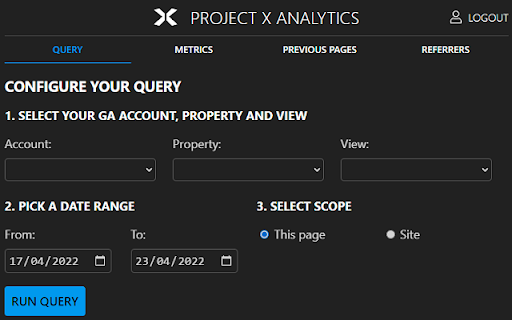
The Project X Analytics extension lifts key metrics from your Google Analytics account, and surfaces them on the page - saving you countless hours in exploration.

You are able to query by:
- All of your Accounts, Properties, Views
- Date From and To
- Scope - this page or whole site

The metrics tab shows the following, with a comparison between device type:
- Users, Sessions, Pageviews
- Average Time on Page
- Entries & Entry Rate
- Exits & Exit Rate
- Bounces & Bounce Rate

More reports will be made available based on user feedback.
Technical
- Version
- 1.0
- Manifest
- V3
- Size
- 12.28KiB
- Min Chrome
- 88
- Languages
- 1
- Featured
- No
Metadata
- ID
- mjcmjldhehomnkoliicghbanppggfkae
- Developer ID
- u6ff351d394eeda907ed6b7dbf0fef910
- Developer Email
- [email protected]
- Created
- May 15, 2022
- Last Updated (Store)
- May 20, 2022
- Last Scraped
- May 19, 2026
- Website
- —
- Support URL
- —
- Privacy Policy
- —
Similar extensions
Alternatives to Project X Analytics, ranked by description similarity.

Time Analytics
Empowers you track & analyze your website usage and helps you see exactly how much time you spend on each website on a daily basis.
50
★ 5.0

Event Tracking Google Analytics
Sample extension that uses Google Analytics to track usage.
—

Analytics Optimiser
Highlights rows and columns in Google Analytics based on traffic sources - developed by Matt Leftwich for Optimise Online
31

ViewerSense
The ViewerSense extension makes viewing your Google Analytics data easy.
—

Activity Map v3
View key site metrics in an intuitive visual format.
4.0K
★ 2.6

Realtime Content Insights Chrome Extension
The RCI Chrome Extension allows you to understand how your readers are interacting with your content, in realtime.
2.0K
★ 3.8

Crystal Ball - Automated Annotations and Insights
Automated Google Analytics Annotations directly from your ad accounts, project management platforms, newsletters and more..
2.0K
★ 5.0

Snapshot Capture
With the snapshot capture extension, you can take snapshots of pages for analysis in Tealeaf and Connect.
371
Data sourced from the Chrome Web Store · last verified May 19, 2026.