
MD Link Clip
Copy the current page's title and URL as Markdown, HTML, Scrapbox or plain text.
As of July 2026, MD Link Clip has — users in the Productivity category.
Usersno change0%
—
—
Ratingno change0%
—
— reviews
Reviewsno change0%
—
Version
1.3.0
Manifest V3
History
1 snapshotsTracking since Jul 20, 2026.
Not enough history yet for this metric — the chart fills in as we collect more snapshots.
View as table
| Date | Users | Rating | Reviews | Version |
|---|---|---|---|---|
| Jul 20, 2026 | — | — | — | 1.3.0 |
| Now | — | — | — | 1.3.0 |
Permissions & access
- Permissions
- activeTabscriptingdeclarativeContent
- Host access
- None declared
Screenshots



About
MD Link Clip copies the title and URL of the page you're on as a clean link — in one click, in Markdown, HTML, Scrapbox or plain text.

Perfect for writing docs, meeting notes, Obsidian/Notion/Scrapbox notes, or dropping reference links into issues and pull requests. Turn any open page into a tidy link in seconds.

■ Four output formats
・Markdown : [Title](URL)
・HTML : <a href="URL">Title</a>
・Scrapbox : [Title URL]
・Plain text : Title - URL

■ Four formatting options (toggle only what you need)
・Clean URL (remove tracking): strips common tracking params like utm_, gclid and fbclid. Amazon product pages are shortened to the compact /dp/ASIN form.
・Clean title (remove site name): smartly removes the trailing site name from titles like "Article Title | Site Name", keeping just the headline.
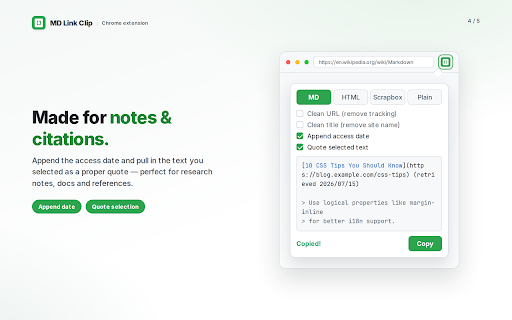
・Append access date: adds "(retrieved 2026/07/15)" — handy for citations and references.
・Quote selected text: appends any text you've selected on the page as a format-aware quote (e.g. Markdown's >) below the link.

■ How to use
1. Click the toolbar icon on the page you want to link
2. Pick a format tab and options (the preview updates instantly)
3. Hit Copy

■ Privacy & permissions
・No browsing-history permission is requested. Thanks to declarativeContent, the icon automatically greys out on non-http/https pages (e.g. chrome://).
・Only the active tab at the moment you click is used. No external servers, no tracking, no ads.
・Everything runs locally. No login or setup required.

Available in: English / 日本語 / 한국어 / 中文 (简体) / Deutsch / Español / Français
Technical
- Version
- 1.3.0
- Manifest
- V3
- Size
- 16.98KiB
- Min Chrome
- 88
- Languages
- 7
- Featured
- No
Metadata
- ID
- miodfahhdfmncmapgilinfbgjcobhfch
- Developer ID
- u0e4ee7968390ba92cb279c21a6784102
- Developer Email
- [email protected]
- Created
- Jul 19, 2026
- Last Updated (Store)
- Jul 19, 2026
- Last Scraped
- Jul 20, 2026
- Website
- —
- Support URL
- —
- Privacy Policy
- —
Data sourced from the Chrome Web Store · last verified Jul 20, 2026.