
NoContext - Enable Right Click & Select Text
Bring back the right-click! Let me select text!
As of May 2026, NoContext - Enable Right Click & Select Text has — users and a 4.50/5 rating from 8 reviews in the Accessibility category.
Usersno change0%
—
—
Ratingno change0%
4.50
8 reviews
Reviewsno change0%
8
Version
1.0.13
Manifest V3
History
2 snapshotsTracking since Apr 24, 2026.
Not enough history yet for this metric — the chart fills in as we collect more snapshots.
View as table
| Date | Users | Rating | Reviews | Version |
|---|---|---|---|---|
| Apr 24, 2026 | — | 4.50 | 8 | 1.0.13 |
| May 19, 2026 | 30.0K | 4.50 | 8 | 1.0.13 |
| Now | — | 4.50 | 8 | 1.0.13 |
Permissions & access
- Permissions
- activeTabtabsscriptingstorage
- Host access
- http://*/, https://*/, file://*/
Screenshots

About
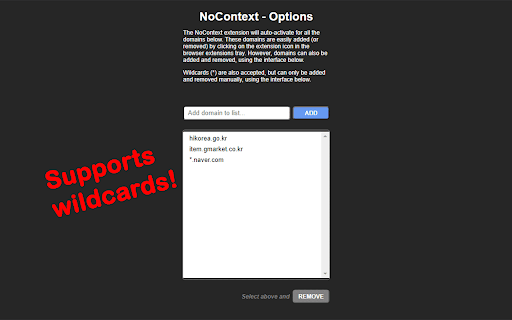
Clicking on this extension will bring back your right-click context menu and ability to select text on websites that may have mangled its true purpose. When active for the current tab's domain, you'll see a red "!" badge on the corner of the icon. It will remember the domains you've activated previously and automatically activate when returning to those domains. (Some websites use multiple domains, so you may need to activate it for each of the subdomains, or use wildcards in the Options menu!) You can always click on the icon again to deactivate when visiting the current domain.

Updates:
1.0.13 -- Better iframe handling. Settings now carry over into incognito/private tabs.
1.0.12 -- Convert past version domain lists to newer version.
1.0.11 -- Rollback due to missing back-compatible features.
1.0.10 -- Added advanced options to limit event overriding per domain.
1.0.9 -- Fixed issue with continued browsing on same tab.
1.0.8 -- Handles pages that lazy-load elements.
1.0.7 -- Domains list sorted. DOM body included in user-select restoration.
1.0.6 -- Some elements use CSS to disable user-select. This update re-enables them.
1.0.5 -- Updates to the Options page.
1.0.4 -- More functionality restored for websites using iframes.
1.0.3 -- Now works with web files from local files (URLs starting with "file://") and re-enables selection of text.
Technical
- Version
- 1.0.13
- Manifest
- V3
- Size
- 34.34KiB
- Min Chrome
- 88
- Languages
- 1
- Featured
- Yes
Metadata
- ID
- miobdnlklljmcbdjfchaiahbpjcphddb
- Developer ID
- u1822947b5e5fb4a0a64d2deaee4d8f1b
- Developer Email
- [email protected]
- Created
- Mar 23, 2022
- Last Updated (Store)
- Aug 30, 2024
- Last Scraped
- May 19, 2026
- Website
- —
- Support URL
- —
Similar extensions
Alternatives to NoContext - Enable Right Click & Select Text, ranked by description similarity.

Allow Copy
Enable copying and text selection on websites that disable these features
2

Click & Copy
Restores right-click, text selection, and copy/paste on all websites.
5

Enable right click - allow copy & select
Enable copy and right-click on protected websites
117
★ 5.0

Close Tabs by Domain
Close tabs by domain from the context menu or extension button
38

RWeb
Simple tool for customizing websites by adding your own CSS & JS.
396
★ 4.1

Enable Copy and Allow Right Click
Enable copy, right-click, and image saving on sites that blocked them. Unlock text selection and downloads.
1.0K
★ 4.3

Enable Right Click
Enable Right Click on restricted websites.
7.0K
★ 4.7

Automatic Right-Click Enabler
Enable right-click functionality on websites
5
★ 1.0
Data sourced from the Chrome Web Store · last verified May 19, 2026.