
TextCaseConverter
A simple extension to convert text case. Transform selected text - uppercase, lowercase, title case and more
As of June 2026, TextCaseConverter has 7 users and a 5.00/5 rating from 1 reviews in the Productivity category.
Usersno change0%
7
7
Ratingno change0%
5.00
1 reviews
Reviewsno change0%
1
Version
1.0.0
Manifest V3
History
8 snapshotsTracking since Apr 4, 2026.
View as table
| Date | Users | Rating | Reviews | Version |
|---|---|---|---|---|
| Apr 4, 2026 | — | — | — | 1.0.0 |
| Apr 17, 2026 | — | — | — | 1.0.0 |
| Apr 25, 2026 | 3 | — | — | 1.0.0 |
| May 2, 2026 | 5 | — | — | 1.0.0 |
| May 9, 2026 | 4 | — | — | 1.0.0 |
| May 19, 2026 | 4 | 5.00 | 1 | 1.0.0 |
| May 25, 2026 | 6 | 5.00 | 1 | 1.0.0 |
| Jun 7, 2026 | 5 | 5.00 | 1 | 1.0.0 |
| Now | 7 | 5.00 | 1 | 1.0.0 |
Permissions & access
- Permissions
- activeTabclipboardReadclipboardWritescripting
- Host access
- None declared
Screenshots



About
Transform selected text on any webpage instantly, uppercase, lowercase, title case, sentence case, and toggle case. No copy-pasting to external tools needed.

TextCaseConverter is a lightweight Chrome extension that lets you change the case of any text directly on the page you're working on.

Select text, click a button, and it's transformed in place. It works in text fields, rich text editors, Google Docs, and even on non-editable page content.

Two Modes of Operation

- Page Selection Mode
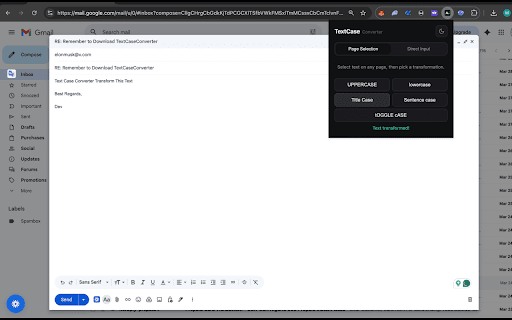
Select any text on a webpage, click the TextCaseConverter icon, and pick a transformation. The text is replaced in place — no need to copy, convert elsewhere, and paste back. If the text is non-editable, the transformed result is shown in the popup for easy copying.

- Direct Input Mode
Paste or type text directly into the extension for quick conversions without needing to interact with any webpage. Ideal for one-off transformations when drafting emails, formatting titles, or cleaning up text.

Five Case Transformations

- UPPERCASE: Converts all letters to uppercase. Great for headings, acronyms, or emphasis. Example: "sample text" to "SAMPLE TEXT"

- lowercase: Converts all letters to lowercase. Useful for cleaning up accidental caps lock or formatting code. Example: "SAMPLE TEXT" to "sample text"

- Title Case: Capitalizes the first letter of every word. Perfect for article titles, headings, and proper names. Example: "sample text" to "Sample Text"

- Sentence case: Capitalizes only the first letter of each sentence. The standard format for body text and paragraphs. Example: "SAMPLE TEXT" to "Sample text."

- tOGGLE cASE: Flips the case of every letter. Uppercase becomes lowercase and vice versa. Handy for fixing text typed with caps lock on. Example: "Sample text" to "sAMPLE TEXT"

Works Everywhere
- Text inputs and textareas: transformed in place with proper event handling so form frameworks (React, Vue, etc.) pick up the change
- Rich text editors (contenteditable): replaces selected text in editors like Gmail compose, Notion, WordPress, and more
- Google Docs: copies the transformed text to your clipboard so you can paste it back
- Non-editable page text: displays the result in the popup with a one-click copy button

Additional Features
- Dark & Light Theme: Toggle between dark and light mode with your preference saved across sessions
- One-Click Copy: Copy transformed text to your clipboard instantly
- In-Place Replacement: No round-tripping to an external converter, text is modified right where you selected it
- Auto-Inject: If the content script isn't loaded yet, the extension injects it automatically no page reload needed
- Clean, Minimal Interface: No clutter, no ads, no account required

Who is this Extension for?
- Writers formatting headlines, blog posts, and articles
- Developers cleaning up text in documentation or code comments
- Students formatting titles for papers and citations
- Social media managers formatting post copy
- Anyone who's ever typed a whole paragraph with CAPS LOCK ON

How to Use
- Select text on any webpage (or switch to Direct Input mode)
- Click the TextCaseConverter icon in your toolbar
- Click the case transformation you want
- Done! Text is replaced in place, or shown in the popup if non-editable

TextCaseConverter is fast, lightweight, and requires no sign-up.
It works entirely in your browser with ZERO external servers. Transform your text in one click, right where you need it.
Technical
- Version
- 1.0.0
- Manifest
- V3
- Size
- 17.94KiB
- Min Chrome
- 88
- Languages
- 1
- Featured
- No
Metadata
- ID
- minmleipjhnfcmpbimmdjmepfjgcmgfb
- Developer ID
- u038f26ce72c7f5de611613e9e2061c1c
- Developer Email
- [email protected]
- Created
- Apr 3, 2026
- Last Updated (Store)
- Apr 3, 2026
- Last Scraped
- Jun 7, 2026
- Website
- —
- Support URL
- —
- Privacy Policy
- —
Data sourced from the Chrome Web Store · last verified Jun 7, 2026.