Bookmark Llama - Shared Bookmarks
The best way to share your native bookmarks with anyone on any device. (Chrome, Edge and Firefox supported)
As of May 2026, Bookmark Llama - Shared Bookmarks has 4,000 users and a 4.00/5 rating from 12 reviews in the Productivity category.
Usersno change0%
4.0K
4,000
Ratingno change0%
4.00
12 reviews
Reviewsno change0%
12
Version
2.0.18
Manifest V3
History
2 snapshotsTracking since Apr 1, 2026.
View as table
| Date | Users | Rating | Reviews | Version |
|---|---|---|---|---|
| Apr 1, 2026 | 4.0K | 4.00 | 12 | 2.0.18 |
| Apr 20, 2026 | 5.0K | 4.00 | 12 | 2.0.18 |
| Now | 4.0K | 4.00 | 12 | 2.0.18 |
Permissions & access
- Permissions
- storagebookmarksalarmsnotifications
- Host access
- https://app.bookmarkllama.com/*
Screenshots



About
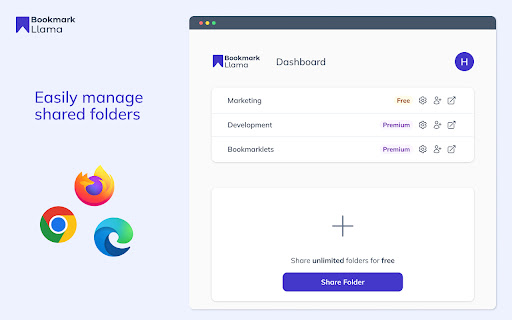
Bookmark Llama is the easiest way to create shared bookmarks, offering a seamless solution for anyone looking to simply bookmark and share with anyone. The pain caused by the lack of bookmark sharing functionality in Google Chrome is a thing of the past.

You might have tried other bookmark sharing tools, such as TeamSync bookmarks, and run into countless problems with the reliability and support. Bookmark Llama is the ultimate replacement for this. We do extensive automated testing, running thousands of tests to ensure that your Chrome share bookmark folder is always working and never out of sync.

If you are looking for a way to share bookmarks in a folder on Chrome, look no further. We have you covered with Bookmark Llama bookmarks sharing has never been easier nor more reliable. What are you waiting for? Once you install, you will finally have a way to share bookmarks in Chrome

Key Features
- Shared bookmark folders across all your own devices and browsers
- Share bookmarks with anyone else from browser to browser
- Permissions to control who can edit shared bookmarks and who can only view them
- Extensive backups of your shared bookmarks
- Share only a single bookmark folder or as many as you like


Available for Chrome, Edge, and Firefox
https://chrome.google.com/webstore/detail/bookmark-llama/mimpfplfhbocogjgjoiklgefbfkcflph

https://addons.mozilla.org/en-GB/firefox/addon/bookmark-llama/

https://microsoftedge.microsoft.com/addons/detail/bookmarkllama/ipnohflnkaljegnpiepbfefnnodmgkmp

Bookmark Llama helps users with all sorts of questions; here are just a few;
How do I share bookmarks from Chrome?
How do I share a bookmark folder in Chrome?
How do I share a bookmarks folder in Chrome?
How do I share a bookmarks folder from Chrome?
How do I share Google bookmarks?
How do I share the bookmarks folder in Chrome?
How do I share my bookmarks in Chrome?
How to share Google Chrome bookmarks?
How to send bookmarks?
Technical
- Version
- 2.0.18
- Manifest
- V3
- Size
- 1.03MiB
- Min Chrome
- 88
- Languages
- 1
- Featured
- Yes
Metadata
- ID
- mimpfplfhbocogjgjoiklgefbfkcflph
- Developer ID
- u0a748549446e2c598c9d889938d865c9
- Developer Email
- [email protected]
- Created
- Mar 22, 2022
- Last Updated (Store)
- Jun 29, 2025
- Last Scraped
- May 30, 2026
- Website
- bookmarkllama.com
- Support URL
- https://www.bookmarkllama.com
- Privacy Policy
- https://www.iubenda.com/privacy-policy/66416133
Similar extensions
Alternatives to Bookmark Llama - Shared Bookmarks, ranked by description similarity.

Copy and Share Mark
Exporta e importa marcadores fácilmente como texto o JSON para compartir y organizar tus enlaces rápidamente.
2

BridgeMark
Share selected Chrome bookmarks securely with colleagues.
—

FavURL - Bookmark Manager
A Chrome extension for bookmark management with local sync
4
★ 5.0

Flattened Bookmarks
See Everything at Once. The smart bookmarks manager with flat view, tags, and instant search.
8

Bookmarkly
Automatically organize and sort your bookmarks by name and see recent bookmarks.
7
★ 5.0

Bookmarks Hub
Organize your bookmarks with tabs, search and many themes. Free cloud sync service.
26

Bookmark Navigator
Generate navigation page from Chrome bookmarks
20
★ 5.0

Bookmark Buddy
View bookmark
7
Data sourced from the Chrome Web Store · last verified May 30, 2026.