
OneTab Vault for Browser
Save, organize, restore and protect tabs with backups, search, trash, sync and a modern German/English UI.
As of July 2026, OneTab Vault for Browser has — users in the Productivity category.
Usersno change0%
—
—
Ratingno change0%
—
— reviews
Reviewsno change0%
—
Version
1.0.0
Manifest V3
History
1 snapshotsTracking since Jul 2, 2026.
Not enough history yet for this metric — the chart fills in as we collect more snapshots.
View as table
| Date | Users | Rating | Reviews | Version |
|---|---|---|---|---|
| Jul 2, 2026 | — | — | — | 1.0.0 |
| Now | — | — | — | 1.0.0 |
Permissions & access
- Permissions
- tabstabGroupsstoragealarms
- Host access
- None declared
Screenshots



About
OneTab Vault for Browser is a modern tab saver and session organizer built to help you clean up your browser, save important pages, and restore your browsing sessions whenever you need them.

If you often work with many open tabs, this extension helps you turn messy browser windows into clean, organized tab groups. Save your current tab, the current window, or all open windows with just one click. Your saved tabs are stored as groups, so you can come back later, reopen them, rename them, copy the links, export them, or delete them when you no longer need them.

OneTab Vault for Browser is designed for people who research, work online, manage projects, compare websites, create content, study, shop, or simply want a cleaner browser experience. Instead of keeping dozens of tabs open all day, you can save them safely and open them again when needed.

Main features:

• Save the current tab
Save only the page you are using right now.

• Save the current window
Save all tabs from your active browser window as one clean group.

• Save all windows
Save tabs from all open browser windows.

• Saved tab groups
Organize saved pages into clear groups with dates, titles, and tab counts.

• Modern popup system
The extension uses a clean popup-based interface, so the main window stays compact and easy to use.

• Open saved tabs quickly
View your saved groups in a dedicated popup and open the group you need without scrolling through a long list.

• Restore saved tabs
Bring saved tabs back into your current window or restore them later when you need them again.

• Rename groups
Give your saved tab groups better names, for example Work, Research, Shopping, Videos, Google Ads, Firebase, Chrome Web Store, or Personal.

• Lock important groups
Protect important saved groups from accidental deletion.

• Copy links
Copy all links from a saved group quickly, so you can paste them into notes, documents, emails, or project files.

• Export groups
Export saved tab groups for backup or sharing.

• Import and export support
Backup and export options are prepared for JSON, HTML, TXT, and CSV formats.

• Manual backup
Create a backup whenever you want.

• Auto backup
Choose how backup behavior should work, including backup after every change.

• Trash system
Deleted groups can be moved to trash instead of being lost immediately.

• Search
Search saved tabs, URLs, titles, or group names.

• Duplicate control
Detect and manage duplicate links more easily.

• Chrome Sync option
Optional sync settings are included for users who want browser-based syncing behavior.

• Safety checks
Use safety confirmations for actions like deleting, restoring, or closing tabs.

• Keyboard shortcut hints
Quickly learn shortcuts such as saving the current window or opening the dashboard.

• Dashboard
Open a larger dashboard view when you want more space to manage your saved tabs.

• Dark, light, and system theme
Choose the look that fits your browser.

• English and German
The extension supports English and German language options.

Why use OneTab Vault for Browser?

Browsers can quickly become crowded with too many open tabs. This can make it harder to focus, harder to find important pages, and harder to keep your work organized. OneTab Vault for Browser helps you reduce clutter without losing the pages you need.

It is useful for:

• Research sessions
• Work projects
• School or university study
• Shopping comparisons
• Content creation
• Web development
• Marketing work
• Saving useful tools and resources
• Keeping temporary pages organized
• Reducing tab overload

Privacy-focused by design

OneTab Vault for Browser is built to keep your saved tabs under your control. The extension does not need an account for the main features. Your saved data is handled inside the browser storage unless you choose options that use browser sync behavior. The extension is designed to be simple, transparent, and useful without unnecessary tracking.

Clean interface

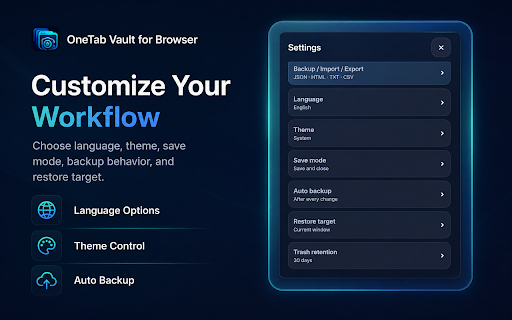
The extension uses a modern dark-blue design with compact controls, rounded cards, and popup-based menus. Settings are organized into separate popup screens, so the interface stays clean instead of becoming too crowded.

Settings included:

• Language
• Theme
• Save mode
• Auto backup
• Restore target
• Trash retention
• Chrome Sync
• Safety checks
• Duplicate handling
• Start view
• List style
• Export reminder
• Keyboard hints
• Protect pinned tabs
• Auto group naming
• Keep tab order
• Smart cleanup
• Favicons

Built for Chrome first

This version is built for Chrome first. The extension is designed with a structure that can later be adapted for other browsers, but this package is focused on Chrome.

Important note

OneTab Vault for Browser is an independent browser extension. It is not affiliated with, endorsed by, or connected to any other tab management extension, browser company, or third-party brand. All names, logos, interface design, and features are created for this extension.

Use OneTab Vault for Browser to save tabs faster, organize your sessions better, and keep your browser cleaner every day.
Technical
- Version
- 1.0.0
- Manifest
- V3
- Size
- 302KiB
- Min Chrome
- 88
- Languages
- 2
- Featured
- No
Metadata
- ID
- mihbpkopbloapjgpcpfkblilhlcapbfj
- Developer ID
- u2d4bd304e471233a10abd429c6c60b03
- Developer Email
- [email protected]
- Created
- Jul 1, 2026
- Last Updated (Store)
- Jul 1, 2026
- Last Scraped
- Jul 2, 2026
- Website
- https://www.rahmiapps.com/
- Support URL
- https://www.rahmiapps.com/
Data sourced from the Chrome Web Store · last verified Jul 2, 2026.