
NotebookLM to PDF, Word, Markdown export
Export NotebookLM to PDF, Word & Markdown — save chats, notes & reports with clean formatting in one click.
As of June 2026, NotebookLM to PDF, Word, Markdown export has 40,000 users and a 4.22/5 rating from 209 reviews in the Productivity category.
Usersup 33.3 percent+33.3%
40.0K
40,000
Ratingup 1.4 percent+1.4%
4.22
209 reviews
Reviewsup 22.2 percent+22.2%
209
Version
6.3.3
Manifest V3
90-day change · In the last 90 days this extension gained 10.0K users, 5 version updates, changed permissions.
History
16 snapshotsTracking since Apr 5, 2026.
View as table
| Date | Users | Rating | Reviews | Version |
|---|---|---|---|---|
| Apr 5, 2026 | 30.0K | 4.16 | 171 | 6.0.1 |
| Apr 8, 2026 | 30.0K | 4.19 | 176 | 6.0.1 |
| Apr 14, 2026 | 30.0K | 4.20 | 179 | 6.0.1 |
| Apr 22, 2026 | 30.0K | 4.22 | 183 | 6.0.1 |
| Apr 27, 2026 | 30.0K | 4.22 | 186 | 6.0.1 |
| May 7, 2026 | 30.0K | 4.22 | 188 | 6.0.1 |
| May 11, 2026 | 30.0K | 4.21 | 194 | 6.0.1 |
| May 15, 2026 | 30.0K | 4.22 | 196 | 6.0.1 |
| May 19, 2026 | 30.0K | 4.23 | 199 | 6.0.1 |
| May 23, 2026 | 30.0K | 4.24 | 202 | 6.0.1 |
| May 29, 2026 | 30.0K | 4.25 | 204 | 6.1.0 |
| Jun 1, 2026 | 30.0K | 4.27 | 204 | 6.2.0 |
| Jun 4, 2026 | 30.0K | 4.26 | 206 | 6.3.0 |
| Jun 6, 2026 | 40.0K | 4.26 | 206 | 6.3.0 |
| Jun 17, 2026 | 40.0K | 4.25 | 207 | 6.3.2 |
| Jun 25, 2026 | 40.0K | 4.23 | 208 | 6.3.2 |
| Now | 40.0K | 4.22 | 209 | 6.3.3 |
Changelog
- Jun 6, 2026short_description
Export your chats instantly using NotebookLM to PDF: intelligent transformation ensures flawless results.
Export NotebookLM to PDF, Word & Markdown — save chats, notes & reports with clean formatting in one click.
- Jun 6, 2026name
NotebookLM to PDF
NotebookLM to PDF, Word, Markdown export
- May 23, 2026host_permissions
https://notebooklm.google.com/*, https://svyat.site/*, https://*.usercontent.goog/*, https://*.googleusercontent.com/*, https://lh3.google.com/*
https://notebooklm.google.com/*, https://svyat.site/*, https://pay.svyat.site/*, https://store.payproglobal.com/*, https://*.usercontent.goog/*, https://*.googleusercontent.com/*, https://lh3.google.com/*
Permissions & access
- Permissions
- tabsdownloadsdebuggerstorageidentityscriptingwebNavigation
- Host access
- https://notebooklm.google.com/*, https://svyat.site/*, https://pay.svyat.site/*, https://store.payproglobal.com/*, https://*.usercontent.goog/*, https://*.googleusercontent.com/*, https://lh3.google.com/*
Screenshots


About
NotebookLM Chat to PDF Exporter: Save & Share Your AI Conversations
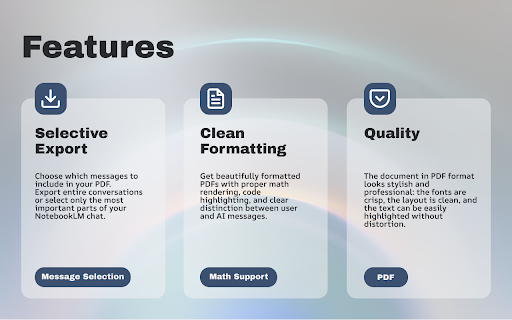
Preserve your valuable NotebookLM AI chats in a professional, portable PDF format with the "NotebookLM to PDF" Chrome extension. This essential tool is perfect for students, researchers, and professionals who need to archive research, document brainstorming sessions, or create shareable reports from their AI interactions.

Why Use the NotebookLM to PDF Exporter?
1) One-Click Export: Save entire chat histories or multiple selected notes with a single click.
2) Perfect Formatting: Retains all formatting, code blocks, and conversation flow for excellent readability.
3) Batch Processing: Export several chats to PDF at once to save time.
4) Instant Download: Get your high-quality PDF file ready for printing or sharing in seconds.
Ideal for:
5) Students & Researchers: Archive study notes, literature reviews, and methodology discussions.
6) Professionals & Teams: Document project solutions, create compliance records, and build a knowledge base.
7) Writers & Creators: Save brainstorming sessions and creative ideas for future inspiration.

Small Step-by-Step Guide: How to Export in 4 Steps
Getting your PDF is quick and easy. Just follow these steps:
1) Install the Chrome Extension: Search for "NotebookLM to PDF" in the Chrome Web Store and add it to your browser.
2) Open Your Notes: Go to your NotebookLM dashboard and open the note you want to export, or simply select multiple notes from your list.
3) Click Export to PDF: Look for the "Export to PDF" button (usually in the chat toolbar or note menu) and click it.
4) Download Your PDF: The extension will process your chat and generate a PDF file for you to download instantly.

Key Features at a Glance
Smart Parsing: Ensures conversations are structured clearly in the PDF.

Clean Layout: Automatic organization for a professional look.

Multi-Platform Ready: Works seamlessly with NotebookLM in Chrome.

Privacy-Focused: Your data is processed locally on your device for security.

Ready to save your chats? Transform your NotebookLM conversations into permanent, professional documents today. This tool is your ultimate companion for knowledge preservation.

Download the "NotebookLM to PDF" extension from the Chrome Web Store now!

Support: For questions or assistance, contact us at: [email protected]
Technical
- Version
- 6.3.3
- Manifest
- V3
- Size
- 1.58MiB
- Min Chrome
- 88
- Languages
- 55
- Featured
- Yes
Metadata
- ID
- micfpbhlllbdpgdkkgdimdpmpeefoamk
- Developer ID
- u1beafffbbeaa685b3d1510747614b5bc
- Developer Email
- [email protected]
- Created
- Sep 7, 2025
- Last Updated (Store)
- Jun 17, 2026
- Last Scraped
- Jun 25, 2026
- Website
- notebooklm-to-pdf.com
- Support URL
- —
- Privacy Policy
- https://notebooklm-to-pdf.com/privacy-policy
Similar extensions
Alternatives to NotebookLM to PDF, Word, Markdown export, ranked by description similarity.

NotebookLM to PDF
Export NotebookLM notebooks to PDF. Add bibliographies, QR codes for sources, custom branding. 100% private and local.
109

NotebookLM to PDF Exporter
Export NotebookLM conversations to PDF with selective questions and answers.
4.0K
★ 3.0

NotebookLM Export Pro
Export NotebookLM notebooks to Markdown, PDF, Notion and more
5.0K
★ 3.5

NotebookLM Exporter
Export your NotebookLM conversations, notes, and sources to PDF, Markdown, HTML, and more with authentic styling
1.0K
★ 5.0

Notebooklm Source Importer
Export your ChatGPT, Claude, Gemini, Perplexity conversations directly to Google's NotebookLM. Notebooklm Source Importer captures…
4.0K
★ 3.5

lmexporter – NotebookLM to PDF, Word, PNG
Save NotebookLM chat conversations and Studio items to multiple file formats for easy organization and archiving.
334

NotebookLM Chat History Exporter
Copy all chat history to the clipboard in Markdown format.
535
★ 4.3

Universal LLM Notebooks
Save chat threads from ChatGPT, Claude, and Gemini into organized notebooks
19
★ 1.0
Data sourced from the Chrome Web Store · last verified Jun 25, 2026.