
Advanced To-Do List
Advanced To-Do List Chrome Extension to help you focus on what matters — perfect for tasks, reminders, and office checklists.
As of June 2026, Advanced To-Do List has 10 users and a 5.00/5 rating from 1 reviews in the Workflow & Planning category.
Usersdown 37.5 percent−37.5%
10
10
Ratingno change0%
5.00
1 reviews
Reviewsno change0%
1
Version
1.1.6
Manifest V3
History
7 snapshotsTracking since Apr 17, 2026.
View as table
| Date | Users | Rating | Reviews | Version |
|---|---|---|---|---|
| Apr 17, 2026 | 16 | 5.00 | 1 | 1.1.6 |
| Apr 27, 2026 | 14 | 5.00 | 1 | 1.1.6 |
| May 7, 2026 | 12 | 5.00 | 1 | 1.1.6 |
| May 14, 2026 | 13 | 5.00 | 1 | 1.1.6 |
| May 23, 2026 | 10 | 5.00 | 1 | 1.1.6 |
| Jun 2, 2026 | 13 | 5.00 | 1 | 1.1.6 |
| Jun 10, 2026 | 12 | 5.00 | 1 | 1.1.6 |
| Now | 10 | 5.00 | 1 | 1.1.6 |
Permissions & access
- Permissions
- None declared
- Host access
- <all_urls>
Screenshots


About
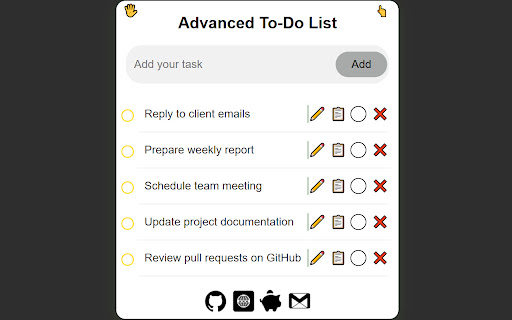
Advanced To-Do List helps you organize your workday and boost productivity with ease. The task panel is fully draggable, so you can place it anywhere on your screen for maximum convenience. Assign colors to tasks to visually separate projects, priorities, and deadlines. Easily edit, duplicate, collapse, or remove tasks to keep your workflow clean and efficient.

Designed for both office environments and personal use, this extension supports project planning, daily task tracking, and keeping important reminders always in sight. Whether you’re handling multiple responsibilities or concentrating on a single goal, Advanced To-Do List helps you stay organized, focused, and in control. Manage tasks efficiently and work smarter every day.

How to Use
1. Type a task and click Add to include it in your list
2. Use the checkbox to mark tasks as completed
3. Click the ✏️ icon to edit a task
4. Click 📋 to copy the task text to your clipboard
5. Click the ⚪ icon to change the task background color
6. Click ❌ to remove a task from the list
7. Drag and drop tasks to reorder them
Technical
- Version
- 1.1.6
- Manifest
- V3
- Size
- 4.73MiB
- Min Chrome
- 88
- Languages
- 1
- Featured
- No
Metadata
- ID
- mibfplaelemmjmeljhlfnhdmmajgdeio
- Developer ID
- udcb2066e6fe7e02ac56130fe1beeb9f7
- Developer Email
- [email protected]
- Created
- Aug 1, 2025
- Last Updated (Store)
- Jan 6, 2026
- Last Scraped
- Jun 10, 2026
- Privacy Policy
- https://browser-extensions-hub.vercel.app/privacy-policy
Similar extensions
Alternatives to Advanced To-Do List, ranked by description similarity.

Advanced To-Do List
An advanced to-do list with doodle feature
4

ToDo List
A simple and elegant todo list application with dark/light theme support
26
★ 5.0

To-Do List for Google Chrome
The BEST To-do List Extension
81
★ 3.0

ToDo List
A simple ToDo list.
5
★ 5.0

To Do List App BETA
THIS EXTENSION IS FOR BETA TESTING
10
★ 5.0

Today's Task - Organize Your Day with a To-Do List Extension
Turn Your Chrome Home Page Into a Powerful To-Do List Manager
44
★ 4.5

To Do list
To Do List app with a powerful yet simple todo list, an online daily checklist app with a clear to-do list for today and tomorrow
960
★ 5.0

Enhanced To-Do List
An improved and elegant to-do list Chrome extension with active tab highlighting.
—
Data sourced from the Chrome Web Store · last verified Jun 10, 2026.